A daily Google Ads budget check that only suggests
The ads-check job never touches your ad account. It reads a campaign CSV, suggests raise, cut or keep for each campaign by fixed rules, and lists the decisions that are yours to make.
Windows harness series, part 9 of 11 Previous A morning GA4 report job Next Planning TikTok, Reels and Shorts
A budget change spends money, so in this kit the AI does not make it. The ads-check job reads a Google Ads campaign table you exported as CSV, applies fixed rules, and writes suggestions. You decide, and you change the budget in Google Ads yourself.
It works like part 8: you drop a file in a folder, the job reads it, and a report appears.
What you will have
- Result: every day at 09:40, a report with a suggestion per campaign and a numbered list of decisions lands in
reports. - You need: a PC that finished part 7, and a Google Ads account where you can see the campaign table.
- Cost: the job adds nothing. Following a raise suggestion increases your ad spend (step 4).
Contents (8)
Step 1: Export the campaign table as CSV
The job never signs in to Google Ads; it reads only the file you give it. The labels below are from Google's English help page.
Open https://ads.google.com in your browser and go to the page with the Campaigns table.
Set the table's date range to the last 7 days. The rules work on 7-day numbers.
Click the download icon at the top right of the table.
Click Download and choose
Excel CSV. There is no option called plain "CSV".Open the
data\adsfolder. From a PowerShell window, this line opens it:explorer $HOME\harness\data\adsMove the downloaded file into this folder and put today's date at the front of its name, for example
2026-11-12-campaigns.csv.
Leave 0000-practice-sample.csv (the fictional practice file) in the folder. The job sorts names alphabetically and reads the last one, so any file whose name starts with a date wins over it.
The practice file has these seven columns. A real export may use different column names.
| Practice column | Meaning |
|---|---|
campaign | Campaign name |
daily_budget_krw | Daily budget (KRW, Korean won) |
cost_7d_krw | Cost over the last 7 days |
installs_7d | Installs over the last 7 days |
conv_value_7d_krw | Conversion value over the last 7 days |
days_running | Days the campaign has run |
end_date | End date (blank if none) |
Step 2: Switch to the English prompt and read the rules
As in part 8, the job card points to a Korean prompt by default. Open it in Notepad.
cd $HOME\harness
notepad .\jobs\ads-check.json
Change "prompt": "prompts/ads-check.md", to "prompt": "prompts/en/ads-check.md", and save. Then open the English prompt.
notepad .\prompts\en\ads-check.mdThe rules hang on ROAS (return on ad spend). The prompt computes it as 7-day conversion value / 7-day cost x 100. Conversion value is the amount assigned to the installs or purchases the ads brought in.
| Condition | Suggestion |
|---|---|
| ROAS 100% or more and 20 or more installs in 7 days | Raise the daily budget by KRW 500 to 1,000 |
| ROAS under 30% and running 7 days or more | Cut by KRW 500 to 1,000, never below KRW 1,000 |
| Already at KRW 1,000 and still meets the cut rule | "consider pausing (person decides)" |
| A raise would push one campaign over KRW 5,000 or the total over KRW 12,000 | "held back by the cap" |
| End date before today | Written first: "end date passed: ads are stopped (person to check)" |
| Anything else | "keep" |
| Change one campaign at most once every three days, by at most KRW 1,000 | A rule you keep yourself. The job does not know your past decisions, so you keep it with the log in step 4. |
The file rules match part 8. With no CSV it writes No ads file: put a CSV in data/ads and Verdict: partial failure (no file). On the practice file it starts with "This report was run on the practice file" and judges the content with no date rule. On any other file whose date is not today's, the verdict is partial failure (no file for today). The report also starts with the "columns read", and if a column the rules need is missing, it lists "Missing columns: ..." and marks the rules that need it "cannot judge".
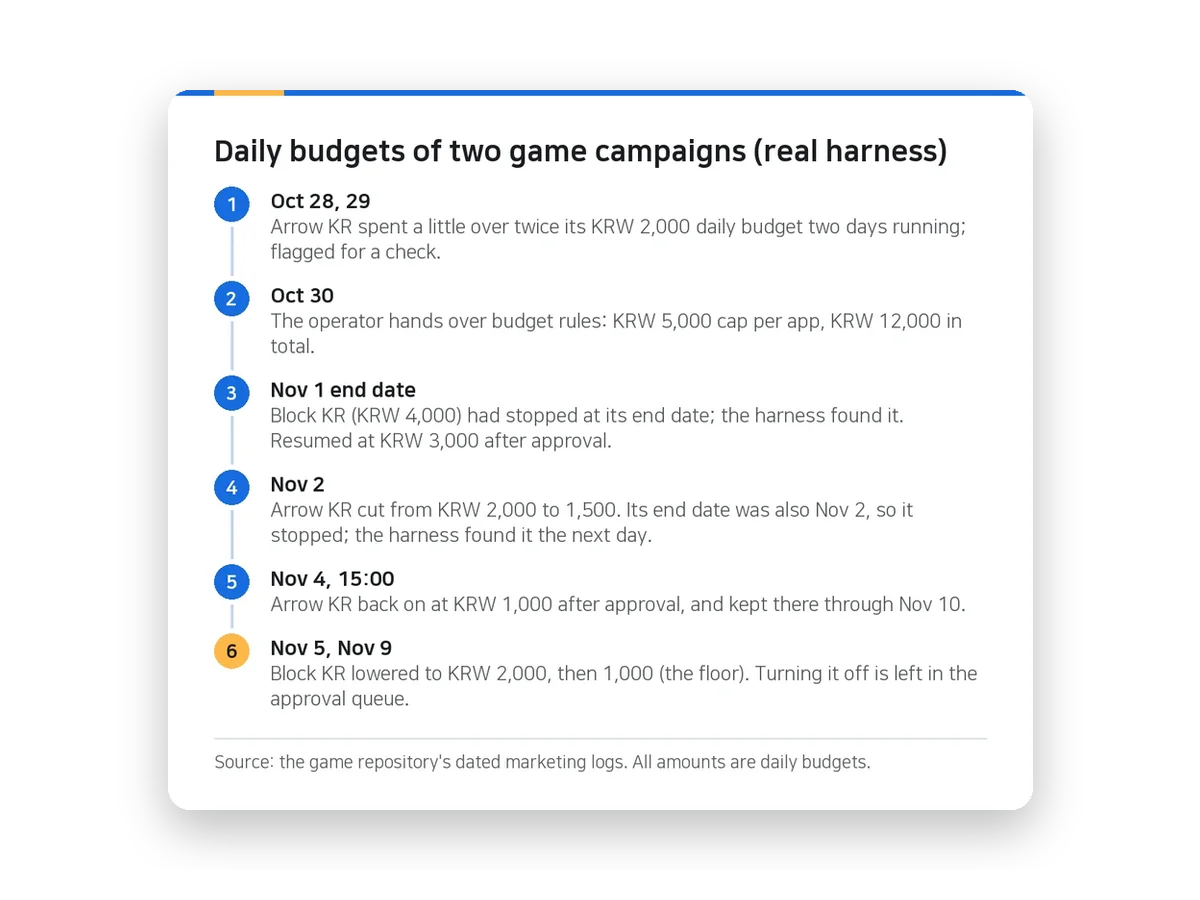
These amounts come from the budget rules the operator handed to our real harness. The real harness counts the KRW 5,000 cap per app, not per campaign, and keeps the three-day gap so that a campaign's learning is not reset.
Google's help page says a campaign past its end date shows as Ended and its ads stop running, and that you can change the end date at any time.
Fit the rules to your budget
The KRW 1,000 floor, the KRW 5,000 per-campaign cap and the KRW 12,000 total cap in the prompt are our real harness's amounts. If your ad budget is different, open the prompt, change those three amounts to yours, and save with Ctrl+S. The 1,000 KRW floor appears in two places. Ranges such as "+500 to 1,000 KRW" are step sizes.
notepad .\prompts\en\ads-check.mdStep 3: Run it and read the report
In PowerShell, enter one line at a time.
cd $HOME\harness
Set-ExecutionPolicy -Scope Process -ExecutionPolicy Bypass -Force
.\run-job.ps1 -Name ads-check
When it ends, the window prints one line starting with
끝:(Korean for "end") that showsstatus=ok exit=0andreports\latest-ads-check.md. Open that latest copy.notepad .\reports\latest-ads-check.mdRead the columns read, the table (the ROAS calculations are in it), the totals, and the decisions.
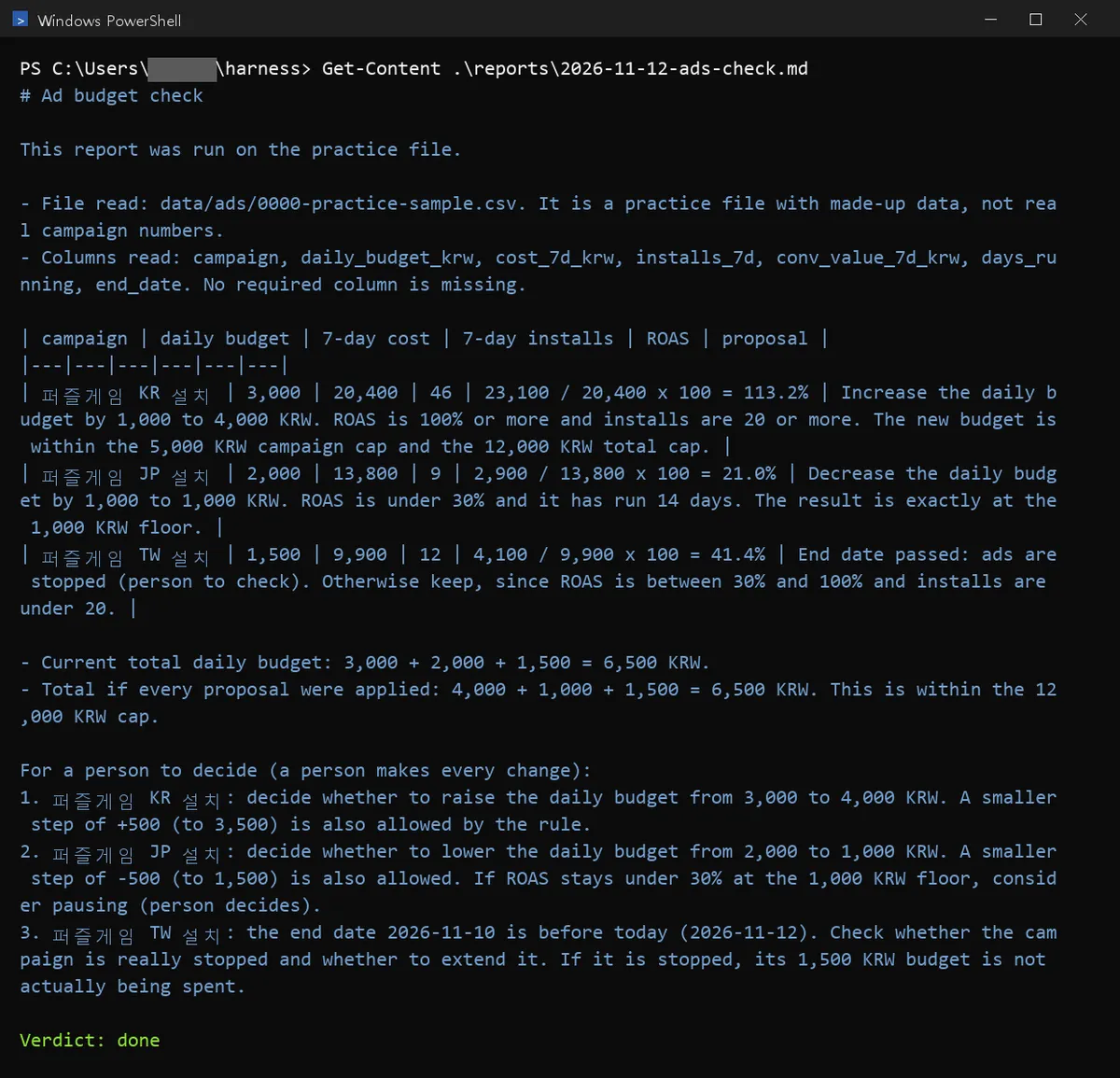
The whole report ads-check wrote with the English prompt from the fictional practice CSV (our PC, Nov 12, 2026, 14 seconds). The campaign names come from the Korean practice file; read the table, check it against the calculations, then go down to the decisions.
All three campaigns and every number in the screenshot are fictional practice data. The campaign names read "puzzle game KR installs", "JP" and "TW".
- Puzzle game KR: 23,100 / 20,400 x 100 = 113.2% with 46 installs, so the report suggests raising KRW 3,000 to 4,000.
- Puzzle game JP: 2,900 / 13,800 x 100 = 21.0% after 14 days, so it suggests cutting KRW 2,000 to the KRW 1,000 floor.
- Puzzle game TW: its end date, Nov 10, 2026, has passed, so "ads are stopped (person to check)" comes first. By the numbers alone it would be kept.
The daily total is KRW 6,500 before and after, inside the KRW 12,000 cap. The decision list adds that a +500 step for KR, or a -500 step for JP, is also within the rule. When we ran the same file with the Korean prompt, it chose exactly those smaller steps (KRW 3,500 and 1,500). Both answers are inside the rule, so how much to change is your call. We recomputed everything from the same CSV and it was all correct.
The Korean run also ended with a short summary block. That came from an instruction file in the separate settings folder our PC used for scheduled jobs; the settings folder you made (.claude-harness) has no such file, so you will not see it.
Step 4: Decide, and write it down
You change budgets in the Google Ads interface yourself. This series does not cover that screen.
Note
Google's help says a campaign can spend up to twice its average daily budget on a given day, and no more than 30.4 times the average daily budget over a month. Raise a daily budget to KRW 4,000 and some days may cost up to KRW 8,000.
After each decision, write one line with the date, the campaign and the change, in Notepad or a spreadsheet.
2026-11-12 | Puzzle game KR | 3,000 -> 4,000 KRW | report decision 1The job reads only that day's CSV and has no idea what you changed yesterday. To keep the once-every-three-days rule, you need this log.
Step 5: Schedule it every day
The order part 11 recommends is to get a week of ga4-daily reports first, then switch on the other jobs one at a time. Once part 8's schedule has run for a week, switch this one on.
In the same window, schedule it for 09:40, ten minutes after part 8's ga4-daily.
.\register-job.ps1 -Name ads-check -At 09:40Find the ads-check row in the status table (
.\status.ps1, or double-clickstatus.cmdin File Explorer).
It worked if
The ads-check row in the status table shows 09:40 as the next run.
From then on, drop in a fresh CSV before 09:40 each day.
Limits of this kit
We have not tested the kit on a file downloaded from a real Google Ads screen. Instead, after the first run, the "columns read" and "missing columns" lines at the top of the report tell you right away whether your file works. We tested a file with different column names on part 8's ga4-daily, and the ads-check prompt uses the same rule. Automation that changes your ad account is outside this series.
When you get stuck
| If you see | Why | Do this |
|---|---|---|
No ads file: put a CSV in data/ads and Verdict: partial failure (no file) | No CSV in the folder. | Redo step 1, item 6. |
| "This report was run on the practice file" at the top | No CSV whose name starts with a date. | Check that your file's name starts with the date. |
partial failure (no file for today) | The last file's date is not today. | Add today's CSV and run it again. |
| "Missing columns: ..." and "cannot judge" | Your file lacks a column the rules need (cost, conversion value, days running, end date and so on). | Export a table that has those columns. |
| The report is in Korean | The job card still points to the Korean prompt. | Redo the job card change in step 2. |
| A raise suggested for the same campaign several days in a row | The job does not know your past decisions. | Check your log and keep the three-day gap yourself. |
In the real harness
Our harness finished shadow running (reports only, no changes) and switched on real changes on Oct 27. Adjusting daily ad budgets inside rules was a separate step: the operator handed that over on Oct 30, and the rules in step 2 are the ones set then. The harness reads budgets from the screen before and after each change, and new campaigns, pausing and bid changes go to an approval queue (a Notion table); only what the operator approves is carried out.
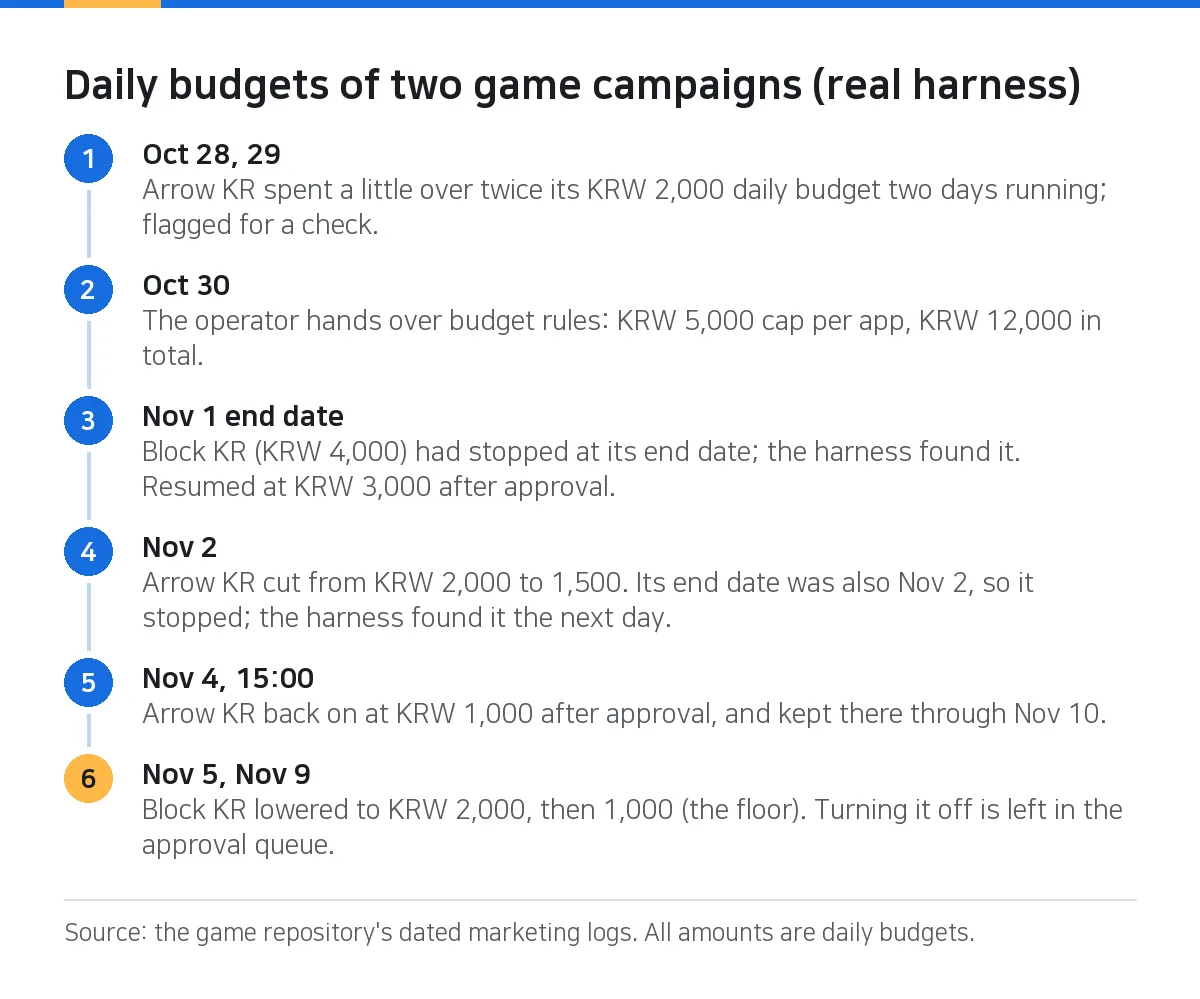
The two campaigns belong to our games: Arrow, an arrow-untangling puzzle, and Block, a block puzzle.
- Campaigns stopped by an end date: Block KR had already stopped at its Nov 1 end date, and Arrow KR's end date was Nov 2, the day its budget was cut, so its ads stopped quietly from the next day. The harness found both and sent them to the approval queue, and each came back on after the operator approved. That is why the kit's report checks the end date first.
- Spending twice the daily budget: on Oct 28 and 29, Arrow KR spent a little over twice its KRW 2,000 daily budget, two days in a row. That is past the daily maximum Google's help describes, so the harness flagged it for a check.
- Holding a raise on a day with an outlier: on Nov 8, Arrow's ROAS jumped, but an interstitial ad click-through rate of 45% or more came with it. The harness noted the ROAS might be inflated and did not raise the budget.
FAQ
Should I let an AI change my Google Ads budgets?
This kit does not. Our real harness adjusts daily budgets only inside fixed caps with read-back checks, and anything else goes through approval. Start with suggestions only and watch whether they hold up; part 11 covers the order we recommend.
A day cost more than my daily budget. Is that a bug?
Google's help says a day can cost up to twice the average daily budget, and a month no more than 30.4 times it. If days over twice the budget keep coming, it is worth a check.
As of Nov 12, 2026. Google Ads Help (download a report, average daily budget, campaign status, checked Nov 11, 2026), output of the kit run on our PC (fictional practice data), and the game repository's dated marketing logs.
This note is written from values SugarMount measured itself; an AI coding agent was used to draft it.