
SugarSpeller
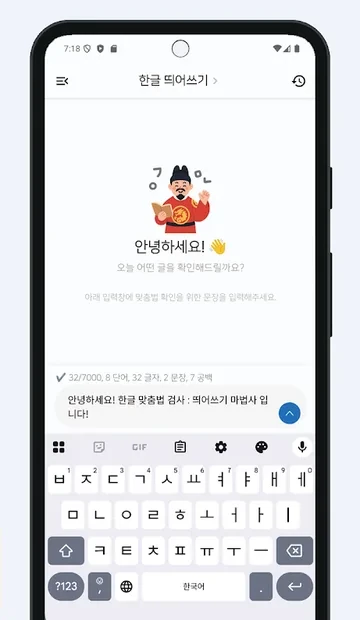
SugarSpeller is an Android app that fixes Korean spelling and word spacing in text you paste or share, using the Naver or Daum spelling checker.
Google Play Hangul Checker · Korean Spelling: Spacing Check

Use it to
- Check a long Korean text, such as a cover letter, in one pass
- Fix a message before you send it on KakaoTalk
- See why a correction was made and learn the rule
- Practise tricky spellings with a daily five-question quiz
What it does
Check by sharing
Share from KakaoTalk or a notes app and pick Hangul Checker, or select text and pick Spell check from the menu. No copy and paste needed.
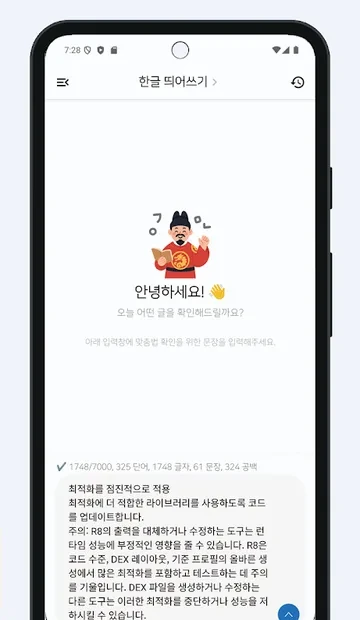
Long text in one go
Free 3,000 characters, Basic 4,000, Premium 7,000 per check.
Choose the checker
Use the Naver or Daum (Kakao) spelling checker. In the chat screen and the mini window, if one fails the app retries once with the other.
Why is it wrong?
Tap a correction to get a short AI explanation. Only when you tap, the original and corrected word, the error type and the checker used are sent; surrounding sentences are not.
History
Originals and corrections are kept on your device so you can look back.
Daily Spelling Quiz
Five tricky spelling questions a day, each with an explanation.
At a glance
| Status | Google Play |
|---|---|
| Price | Free with ads. Subscriptions: Basic (4,000 characters, banner ads) and Premium (7,000 characters, no ads) |
| Characters per check | Free 3,000 · Basic 4,000 · Premium 7,000 |
| Internet | Required. Text is sent to the Naver or Daum spelling checker to be checked. |
| Account | Not needed. |
| Language | Checks Korean text (app screens in Korean and English) |
| Package name | com.sugarmount.sugarspeller |
| Developer | simpest (SugarMount) |
Data and permissions
- Text you check is sent only to the Naver or Daum (Kakao) spelling checker. It is not sent to our servers.
- Your check history stays on your device.
- Only when you tap “Why is it wrong?”, the original and corrected word, the error type, the checker used (Naver or Daum) and your subscription status go to our server (Google Firebase). To write the explanation, the server sends only the words and the error type to Google Vertex AI (Gemini). Surrounding sentences are not sent.
- The app includes ads (Google AdMob with mediation partner Liftoff), usage statistics (Google Analytics), remote config and notifications (Firebase), and Firebase App Check (Google Play Integrity), which checks that requests come from a genuine install.
- To count daily AI explanations, the app creates an anonymous identifier (Firebase anonymous account). It is not linked to a name, email or phone number.
See SugarSpeller privacy policy for details.
What it can't do
- Each check has a length limit: 3,000 characters free, 4,000 with Basic and 7,000 with Premium.
- It needs an internet connection. Text is sent to the Naver or Daum spelling checker.
Frequently asked questions
How many characters can I check at once?
3,000 for free, 4,000 with Basic and 7,000 with Premium.
Is my text stored or uploaded?
Text is sent only to the Naver or Daum spelling checker to be checked, not to our servers. Your history stays on your device. When you tap “Why is it wrong?”, the corrected word and its explanation may be cached on our server (Google Firebase).
Can I check text from other apps?
Yes. Pick Hangul Checker from another app's share menu, or Spell check from the menu that appears when you select text.
Help articles
AX notes on this app
Recent updates
- 1.6.030 · · New mini game, Spelling Shower: type the correct form of falling misspelled words.
Related apps


Contact
If something isn't working or you have a question, email us.
Email: sugarmount21@gmail.com · Package name: com.sugarmount.sugarspeller