Android block puzzle game
Block Turn
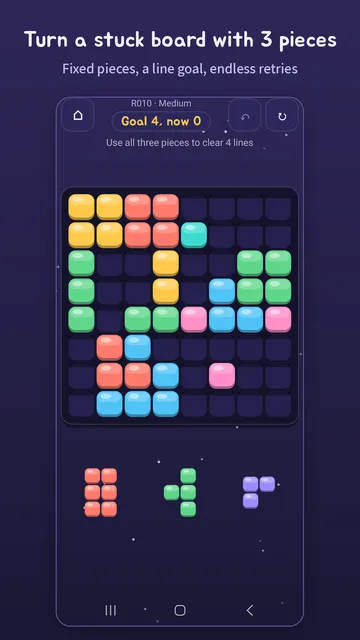
Block Turn is an Android block puzzle: place three set pieces on a stuck 8×8 board to clear a target number of lines. There are no timers, and it plays offline without signing in.
Google Play Block Turn: Daily Block Puzzle
Use it to
- Learn the rules and how to clear lines
- Find a block puzzle with no timer
- Play the same daily puzzle as everyone and share your result
How it plays
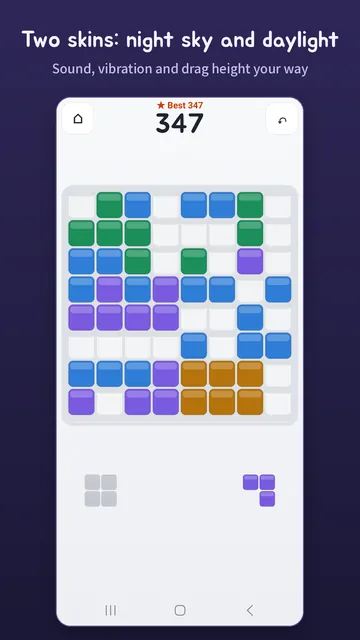
You get a half-filled board and three set pieces. Place all three and clear the target number of lines (say, 4) to win. The pieces are fixed, so it's about finding the right order and spots, not luck.
- Check the goal — the top of the screen shows the line goal and how many lines you've cleared so far.
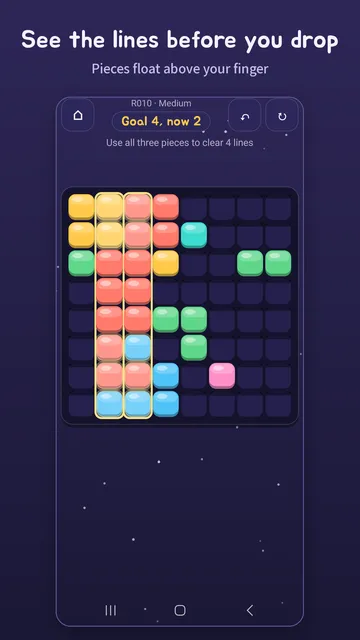
- Place the three pieces — lines that will clear light up before you drop. While you drag, a piece floats above your finger so you can see where it goes.
- Reach the goal — clear the target lines to win. Stuck? Start the puzzle over as often as you like.
300 three-move puzzles
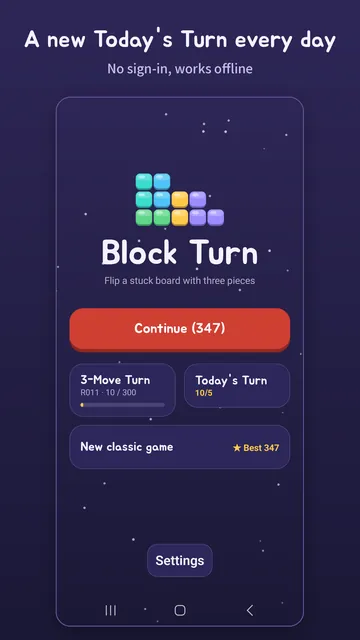
A fixed board, three pieces and a line goal. They ramp up through Guide, Easy, Medium and Hard.
Today's Turn
Everyone gets the same puzzle for each date. It is built on your device, and you can share your result.
Classic score chase
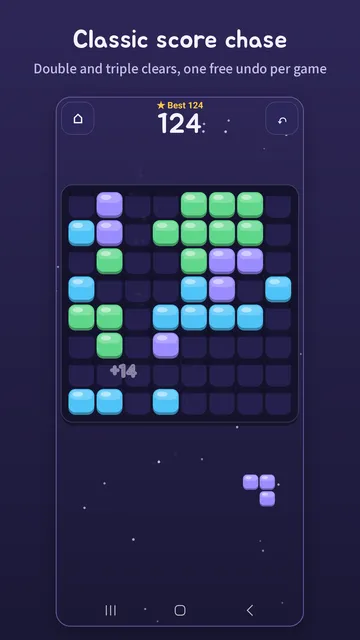
Place pieces on an 8×8 board and clear rows and columns for points. Multi-line and back-to-back clears score extra, and you get one free undo per game.
Help when you're stuck
After one failed try you can see the first move (by watching an ad; free in the first chapter, R004–R013). After three (two in the first chapter), you can step through the solution for free.
Controls your way
Set how high a piece floats while dragging (Low, Normal or High), or tap to place instead of dragging.
Four skins
Night sky and Daylight are ready to use. Candy and Arcade can be previewed for free and kept after watching three ads. Sound and vibration can each be turned off.
At a glance
| Price | Free with ads. Remove ads is a one-time purchase (₩5,500 in Korea, $4.99 in the US) |
|---|---|
| Modes | 3-Move Turns (300 puzzles), Today's Turn (one a day), Classic (8×8 score) |
| Account and internet | No sign-in. Plays without an internet connection |
| What leaves the device | Progress and settings stay on the device. Ads (Google AdMob, Liftoff) and usage statistics and crash reports (Google Firebase) go to Google and Liftoff when you are online |
| Permissions | Vibration, internet and network state, advertising ID, Google Play billing |
| Android version | Android 7.0 or later |
| Languages | English, Korean |
| Current version | 1.1.4 |
| Package name | com.sugarmount.blocks |
| Developer | simpest (SugarMount) |
Data and permissions
- No account, no sign-up. Your best score, the classic game in progress, solved puzzles and settings are saved only on your device and never sent to us. We don't run a server.
- Ads are served by Google AdMob and its partner Liftoff, which may use your advertising ID, an approximate location from your IP address and device information under their own policies.
- To tune the game and fix crashes, we receive anonymous usage statistics and crash reports through Google Firebase (Analytics, Crashlytics). Names, email addresses, contacts and photos are not sent.
- The app uses four permissions: vibration for feedback when you place pieces and clear lines; internet and network state for ads, purchase checks and statistics; the advertising ID for showing and measuring ads; and Google Play billing to buy and restore Remove ads. It does not ask for location, contacts, camera, photos or microphone.
- Where consent is required, you can change your choice anytime under Privacy options in Settings.
For details, see the Block Turn privacy policy.
Free play and removing ads
- The whole game is free. No banner and no ads between games during the guide puzzles and your first three games.
- Ads between games show only after a game ends, when you tap Next, Play again or Home on the result screen. Never while you are placing pieces.
- These ads and the return ad wait at least 2 minutes after the previous full-screen ad.
- If you leave the app for more than 4 minutes and come back, an ad may show once (up to twice a day), but not if you were in the middle of a game.
- Reward ads play only when you tap their button: to see the first move in a 3-Move Turn, to get three new pieces when Classic has no room left (up to twice per game), and to unlock the Candy and Arcade skins.
- Buying Remove ads once (₩5,500 in Korea, $4.99 in the US) removes the banner, ads between games and the return ad, and unlocks every skin. Reward ads stay available when you want them. On a new device, use Restore purchase in Settings.
What it can't do
- There are no leaderboards and no head-to-head mode.
- With no account, we can't move or recover your progress for you. Clearing the app's data or uninstalling the app deletes it.
- Once you've solved all 300 three-move puzzles, new ones arrive only with updates. Today's Turn and Classic stay available meanwhile.
Frequently asked questions
Can I play Block Turn offline?
Yes. 3-Move Turns, Today's Turn and Classic all work without an internet connection, and the daily puzzle is built on your device. Offline, ads simply don't show.
What can I do when I'm stuck on a puzzle?
Start over as often as you like; after one failed try you can see the first move, and after three you can step through the whole solution. The exact rules are under How it plays.
How do I remove the ads?
Buy Remove ads once in Settings to remove the banner, ads between games and the return ad. Reward ads stay available when you want them. See Free play and removing ads.
AX notes on this app
Recent updates
- 1.1.4 · · A smoother first chapter and new Candy and Arcade skins.
Related apps
Contact
If the game does not work as expected or you have a question, email us. Including your device model, Android version and the puzzle number (for example R010) helps us check.
Email: sugarmount21@gmail.com Send an email
Package name: com.sugarmount.blocks