Photo app
Compress Image
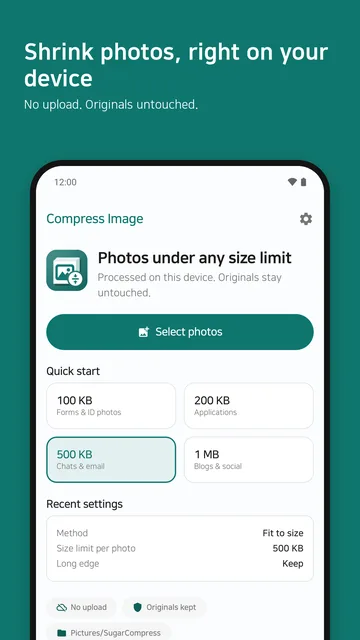
Compress Image is an Android app that shrinks photos under a size limit you set, such as 100 KB or 500 KB, so they fit form, upload and email limits.
Google Play SugarCompress
- No uploads
- Originals kept
- No sign-up
Use it to
- Get a photo under 100 KB
- Meet the file size limit for an ID or application photo
- Shrink many photos to the same size at once
- Fit photos under an email attachment limit
What it does
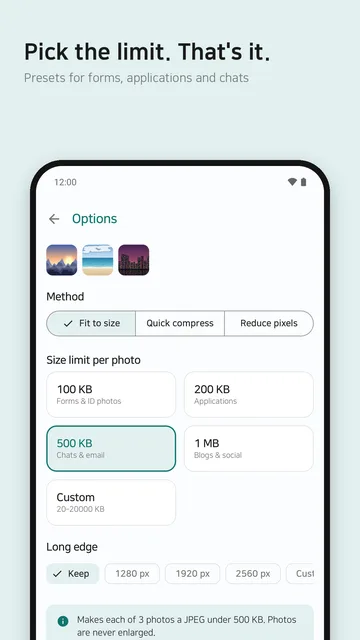
Fit to size
Set a limit each photo must stay under: 100 KB, 200 KB, 500 KB, 1 MB, or your own value in KB.
Quick compress
Pick a quality of 90, 80 or 65 and save again in one step.
Reduce pixels
Set the long edge to 1280, 1920 or 2560 pixels, or enter your own. The aspect ratio is kept.
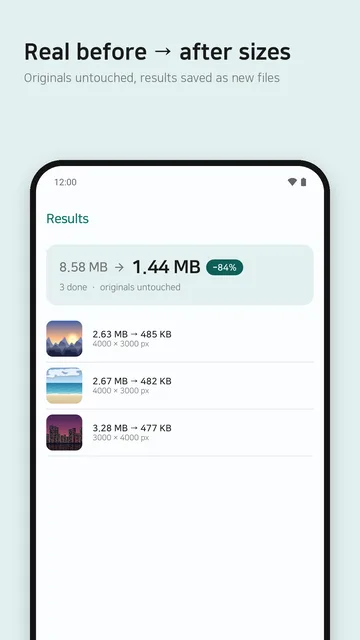
Real sizes, honest results
The numbers on the result screen are the actual file sizes. A photo that cannot reach the limit is reported, not marked as a success.
- Pick photos with the Android photo picker.
- Choose a mode, set its options and tap “Create results”.
- Save or share the results. Saved photos go to the
Pictures/SugarCompressfolder as new files.
At a glance
| Price | Free with ads. Pro is a one-time purchase that removes ads and raises the batch to 100 photos |
|---|---|
| Input formats | JPEG, PNG, WebP. HEIC when your device can decode it |
| Output format | JPEG |
| Limits | Free 20 photos per batch, Pro 100. Up to 50 MB and 50 megapixels per photo |
| Sent to a server | Photos and file names are never sent |
| Permissions | None for you to grant (no storage permission) |
| Android version | Android 10 or later |
| Languages | English, Korean |
| Package name | com.sugarmount.sugarcompress |
| Developer | simpest (SugarMount) |
Data and permissions
- The app receives only the photos you pick in the Android photo picker. It does not ask for access to all your storage.
- Compression, resizing, previews and saving all happen on your device. Photos, results and file names are never sent to a server or third party. Processing needs no internet connection.
- Originals are never modified or deleted. Results become new files when you save them.
- Anonymous usage stats (Firebase / Google Analytics) and crash reports (Firebase Crashlytics) are on by default. Turn each off in Settings under “Send anonymous usage stats” and “Send crash reports”. Neither includes photos or file names.
- The free version shows Google AdMob ads. The ads SDK may process data such as the advertising ID under Google’s policies; change your consent in Settings under “Ad privacy options”.
- Internet access is used for ads, the Pro purchase, and sending stats and crash reports. There is no account or sign-in.
Details are in the Compress Image privacy policy.
Free and Pro
Free
- All three modes
- Up to 20 photos per batch
- Shows ads
Pro
- One-time purchase, not a subscription
- No ads
- Up to 100 photos per batch
The price is shown on the Google Play purchase screen. On a new device, use “Restore purchase” in Settings to apply a purchase made with the same Google account.
What it cannot do
- Results are saved as JPEG only. Transparent areas in PNG or WebP are filled with white, and animated images are not supported.
- Photos are never enlarged. A very low limit may be out of reach; the app tells you when it is.
- PNG, WebP and HEIC photos can grow when converted to JPEG. The app then marks them “larger than the original”.
FAQ
How do I get a photo under 500 KB?
Pick the photo, choose 500 KB under “Fit to size” and tap “Create results”. The limit applies to each photo, and 1 KB is counted as 1000 bytes.
Does the app change or delete my original photos?
No. Originals stay as they are; results are saved as new files in the Pictures/SugarCompress folder.
What happens to a JPEG that is already small?
A JPEG result is never larger than the original. If the photo is already small enough, it is kept at original quality without recompressing, with only location and camera info removed.
Does it work offline?
Yes. Photos are processed on your device, so no connection is needed. Only ads and the Pro purchase need the internet.
Contact
If the app does not work as expected or you have a question, email us. Including your device model and Android version helps us look into it.
Email: sugarmount21@gmail.com · Package name: com.sugarmount.sugarcompress
Help articles
AX notes on this app
Recent updates
- 1.0.6 · · JPEG results are never larger than the original, and custom size and long edge carry over to the next job.