How we shipped four Android apps in 20 days with an AI coding agent
Working with an AI coding agent (Claude Code), a solo developer published four Android apps on Google Play in the 20 days from the first commit on September 20, 2026 to October 10.
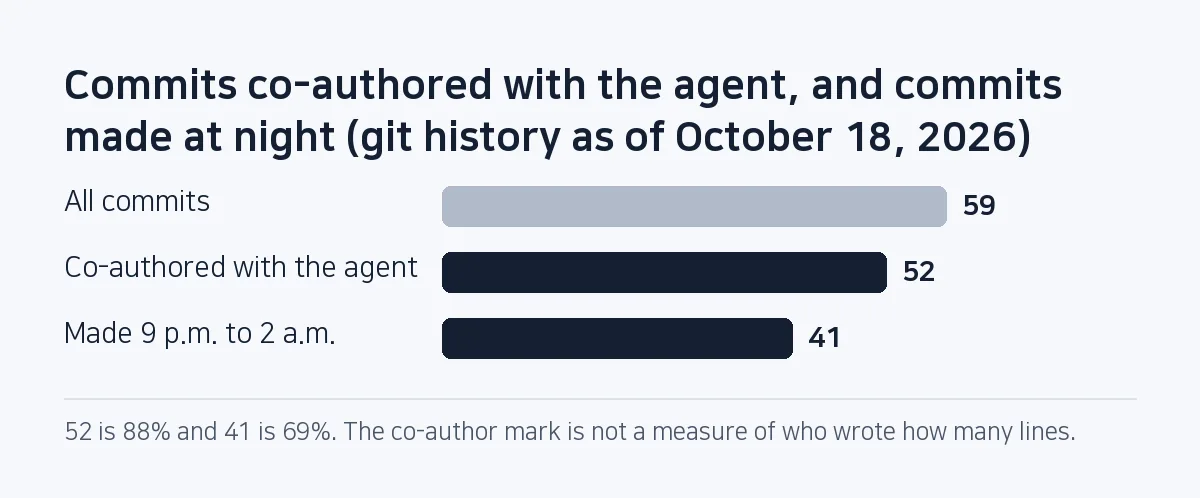
In that period 52 of 59 commits (88%) are marked as co-authored with the agent. Besides the AI writing code fast, each app was stamped out from the same template, one at a time, and pre-release checks and Play Console work were turned into scripts.
The numbers come from the git history, CHANGELOG and on-device QA reports of SugarMount's app repository (sugar-utils), as of October 18, 2026.
Contents (6)
What happened in those 20 days?
| Date | What was done |
|---|---|
| 09-20 | Repository started. The skeleton of the first app, Compress Image, and the shared file, image, ads and analytics modules written in parallel by several agents in separate git worktrees |
| 09-21 | First signed AAB (1.0.0). A script that uploads builds and store listings through the Play Developer API |
| 09-23 | An R8 problem that crashed the release build right after launch found on a real device (Galaxy S23) and fixed |
| 09-24 | The second app, Flip & Rotate Image, and the third, Convert Image, generated from the scaffolding script and uploaded to the internal test track |
| 09-25 | On-device QA of all three apps on a Galaxy S21 by four agents in turn (one per app, then one independent cross-check) |
| 10-03 | First app's store page live |
| 10-04 | Defects from end-to-end tests on a Galaxy S20 and S21 fixed; all three apps released to production |
| 10-10 | Fourth app, HWP Viewer SugarDoc, store page live |
41 of the 59 commits (69%) were made between 9 p.m. and 2 a.m.
How was the work split between the person and the AI?
AI agent
- Kotlin code and unit tests
- Build, release and QA scripts
- Store listing drafts, screenshot capture and framing
- Emulator and device tests, with written reports
Person
- Decisions such as ad placement, prices and tone of copy (recorded with a date in the instruction file)
- Work that only the Play Console can do
- Connecting real devices and the final check
- The decision to release to production
The co-author mark means the commit was made together with the agent. It is not a measure of who wrote how many lines.
Four rules that made it fast
- One app at a time, shared code in modules: File saving, image processing, job state, ads, billing and analytics live in
core/modules, not in an app. From the second app on, only the screens and the app's own feature are new. - Stamp out the next app with a script:
new_app.shcopies the first app, changes its name, colour and icon, and blanks every per-app identifier to PLACEHOLDER. Its first real run (09-23) exposed four bugs, which were fixed; the next day the third app was generated without a single change. - Let a gate stop easy mistakes: A release build is not produced while an ad test ID remains or an identifier is empty. Rules do not stop at the instruction file; tests enforce them (the AGENTS.md note).
- Console work through APIs: AAB uploads, ko and en store listings, 30 screenshots per app, in-app products, Firebase projects and GA4 properties are all created by scripts. What a person does in the console is only what the APIs do not expose.
A new app refused API requests until it had been touched in the console first (the first AAB upload, or granting the service account access), and AdMob's app-creation API is limited-access and returned 403. So AdMob apps and ad units are created in the console, and a script reads their IDs into the config file.
What went wrong?
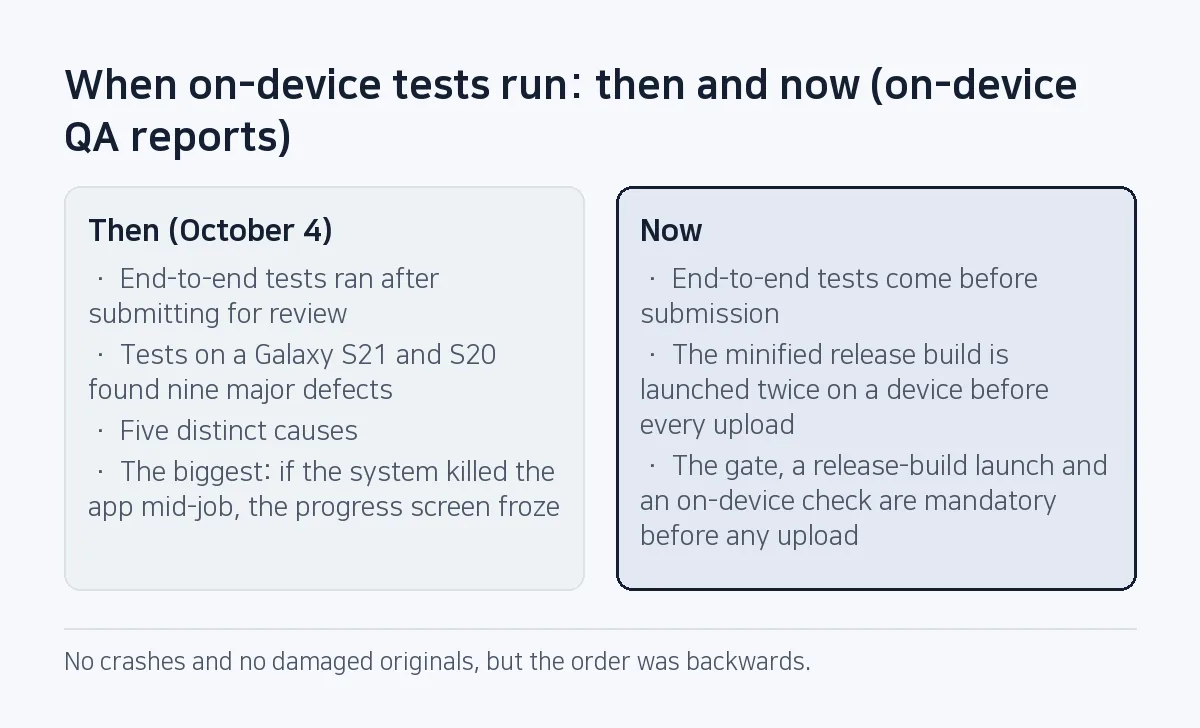
- Debug was fine, the release build crashed. The code shrinker R8 removed one constructor, and every release build crashed right at startup. Since then the minified release build is launched twice on a device before every upload (the pre-release checks note).
- On-device tests ran after submitting for review. End-to-end tests on a Galaxy S21 and S20 on October 4 found nine major defects, five distinct causes. The biggest: if the system killed the app mid-job, the progress screen froze. No crashes and no damaged originals, but the order was backwards. End-to-end tests now come before submission.
- The test scripts had bugs too. A script that waits for a screen exited with success (0) on timeout, so later checks kept running on the wrong screen. Tools the AI writes for testing need testing too.
If you want to try it
- Start with the instruction file: Write down only the rules the agent tends to get wrong, briefly. Keep history elsewhere.
- Take the first app all the way: Only after one app reaches a public store page do you see what to automate.
- Script the pre-release checks: Make the gate, a release-build launch and an on-device check mandatory before any upload.
- Record what was and wasn't verified: In the changelog, write which device checked what, and what was not checked.
Frequently asked questions
Did the AI write all the code?
By commit, 88% carry the AI co-author mark. The person made design decisions, reviewed results, checked on devices and decided on releases. The mark shows collaboration, not a share of lines.
Can one person keep quality up this way?
Largely, if checks live in scripts and tests rather than in someone's memory. Even so, on-device end-to-end tests found nine major defects.
Four apps in 20 days: are they simple apps?
Yes, deliberately: each does one thing. Shrinking photos, flipping and rotating, converting formats, viewing Korean documents. The HWP viewer, though, carries a document engine that opens HWP, HWPX and PDF on the device, and it has kept getting updates since.
Which apps are they?
Compress Image, Flip & Rotate Image, Convert Image and HWP Viewer SugarDoc. All are on Google Play.
This note is written from values SugarMount measured itself; an AI coding agent was used to draft it.
More AX notes
- Daily users rose after the redesign while organic D1 retention fell from 15.2% to 11.2%
- We built three photo apps before checking the market: this year's new apps had a median of 1,166 installs
- A year of AI coding in 701 commits: from "complete" to cause and verification
- Pre-gzipping Android assets, measured: zero APK savings, and .pack.gz became .pack with a FileNotFoundException
- A market:// link opens a store chooser on SKT-sold Samsung phones: set the Play package first
- A splash that never moved on: addOnCompleteListener(this) and onStop