A splash that never moved on: addOnCompleteListener(this) and onStop
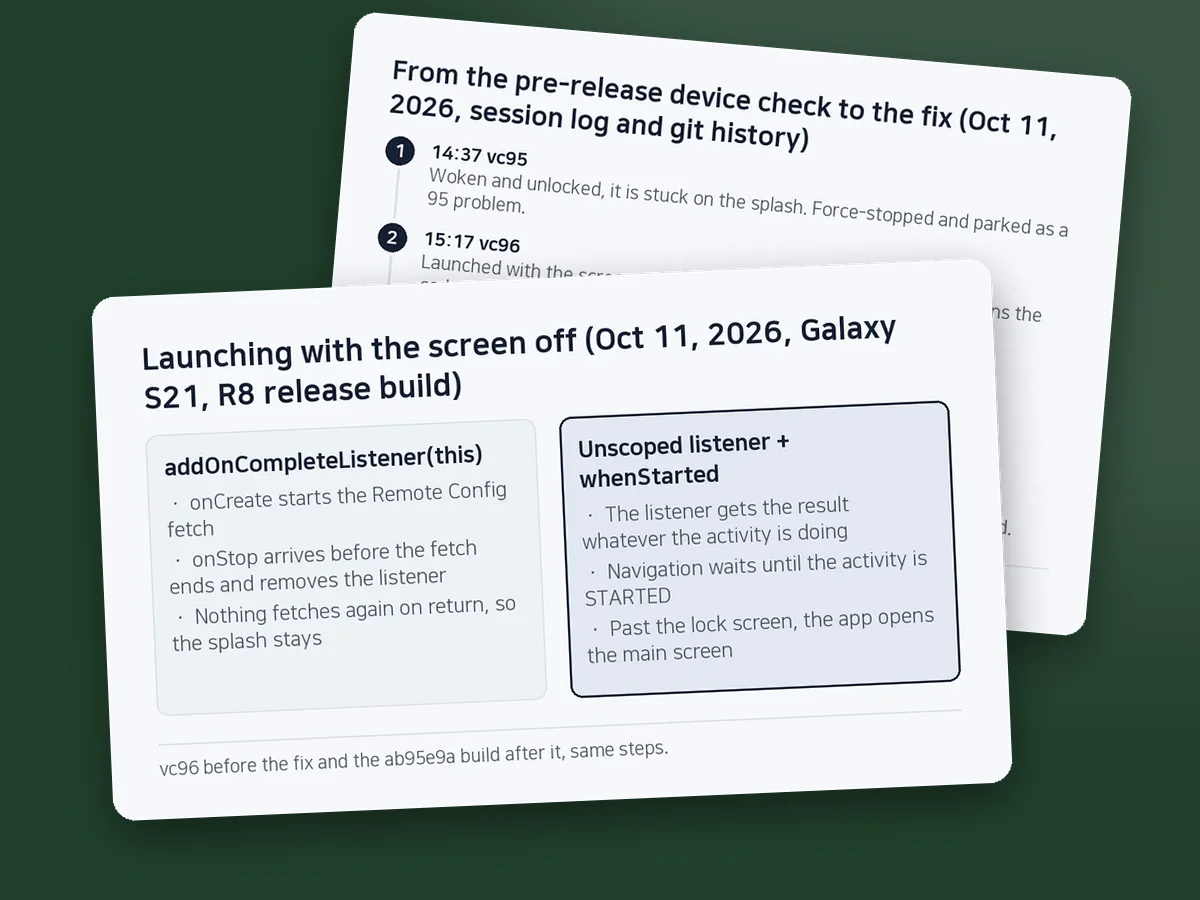
A listener added with addOnCompleteListener(this) is removed at onStop. If the screen went off during the fetch, the code that opens the next screen never ran.
Launch our Korean spelling app SugarSpeller with the phone's screen off, get past the lock screen, and it stayed on a black splash screen. On October 11, 2026, during a device check before a production release on a Galaxy S21 running the R8 release APK, we first saw it stuck on vc95, then reproduced it on vc96 by launching with the screen off. The cause, fetchAndActivate().addOnCompleteListener(this), had been in the repository since its first commit on December 16, 2020. Commit ab95e9a fixed it at 15:43 on October 11.
Sources: the app repository's git history (d5ac5e2, ab95e9a), CHANGELOG 1.6.029, the device-check notes in the release document, the agent session log from that day, the monitoring log (WATCH.md), and the Google Play services Task reference. Rechecked on 2026-10-30.
Contents (7)
- A listener removed at onStop is not called when the user comes back
- The first hang was force-stopped and set aside
- Unscope the listener, defer only the navigation
- One grep and a screen-off launch test
- How much of the 17% new-install drop-off this explains is unknown
- Still open: no test guards the five call sites
- FAQ
A listener removed at onStop is not called when the user comes back
The splash activity, ActivityEmpty, starts one Remote Config (RC) fetch in onCreate. When the fetch completes, it checks versions and calls checkMyPermission(), which moves on to the next screen. That completion listener was the only path to the next screen.
// ActivityEmpty just before ab95e9a, abridged (same line since d5ac5e2, 2020-12-16)
// [START fetch_config_with_callback]
remoteConfig.fetchAndActivate().addOnCompleteListener(this) { task ->
    ...
    checkMyPermission()   // (annotation) every branch moves on from here
}
The Task reference says of the overload that takes an Activity: "The listener will be automatically removed during onStop." If the screen turns off or the user switches apps before the fetch finishes, onStop comes first and the listener is gone. No lifecycle log from that day shows exactly when onStop arrived while the screen was off, so this step rests on the documentation and on reproducing the hang before and after the fix.
Nothing retried on return, either. The activity was still alive, so onCreate did not run again, and onStart only set system bar flags. The app stayed on the splash until the process was killed. On the test phone, the GA4 debug log showed first_open, session_start, screen_view and two app-open ad events, then nothing.
The [START fetch_config_with_callback] marker in the comment also appears in the Remote Config sample of Firebase's quickstart-android, which calls addOnCompleteListener(this) too. The marker and the line match, so the code most likely came from that sample. The other way this splash locked users out, through the RC force-update flag, is in "6.7" < "6.11" is false.
The first hang was force-stopped and set aside
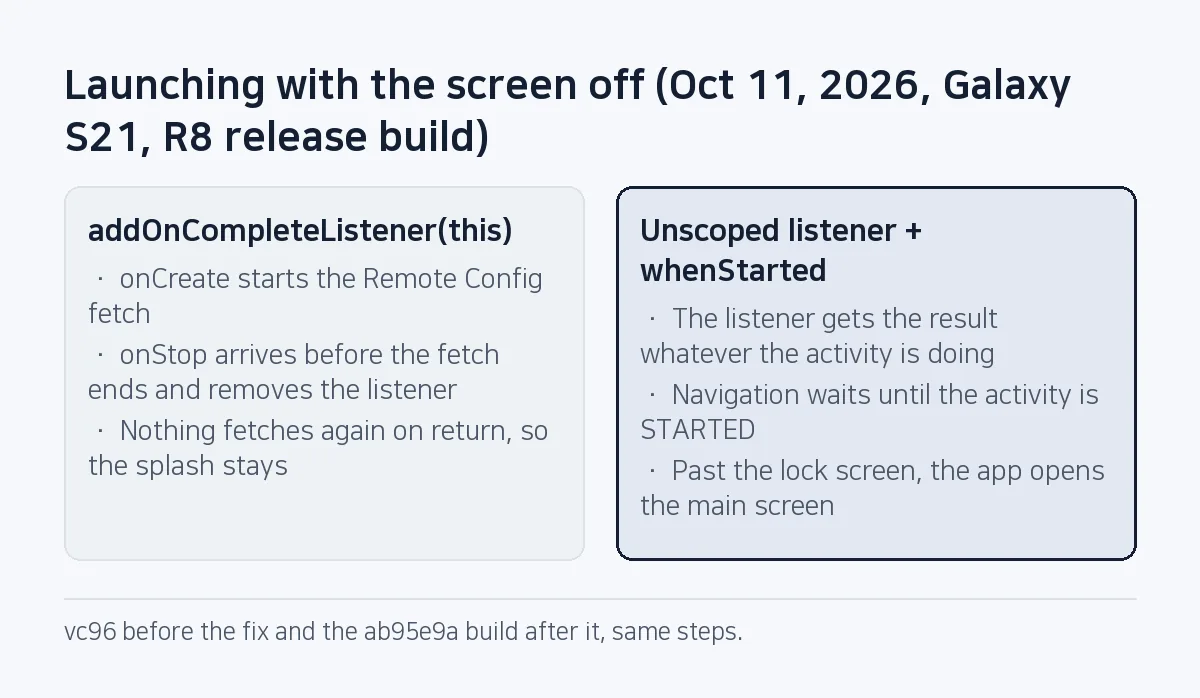
The operator asked for a deeper device check before production. A Claude Code agent ran it on the S21 with ad domains blocked by DNS: an update install, rotations, 15 round trips to the home screen, and three 5,000-event monkey runs with zero app crashes and zero app ANRs.
Around 14:37 the agent woke the S21 from sleep and found vc95, installed about ten minutes earlier, stuck on the splash after the lock screen was dismissed. The log does not show when or how the app was launched. The agent force-stopped it, relaunched, saw the main screen, and noted in its own progress notes that this was a vc95 problem to check later on vc96. A relaunch after a force stop starts again from onCreate with the screen on, so that check could not show the cause.
Forty minutes later the agent deliberately launched vc96 with the screen off. It hung again, and only then did the agent open the code. The line was the same in both versions.
Unscope the listener, defer only the navigation
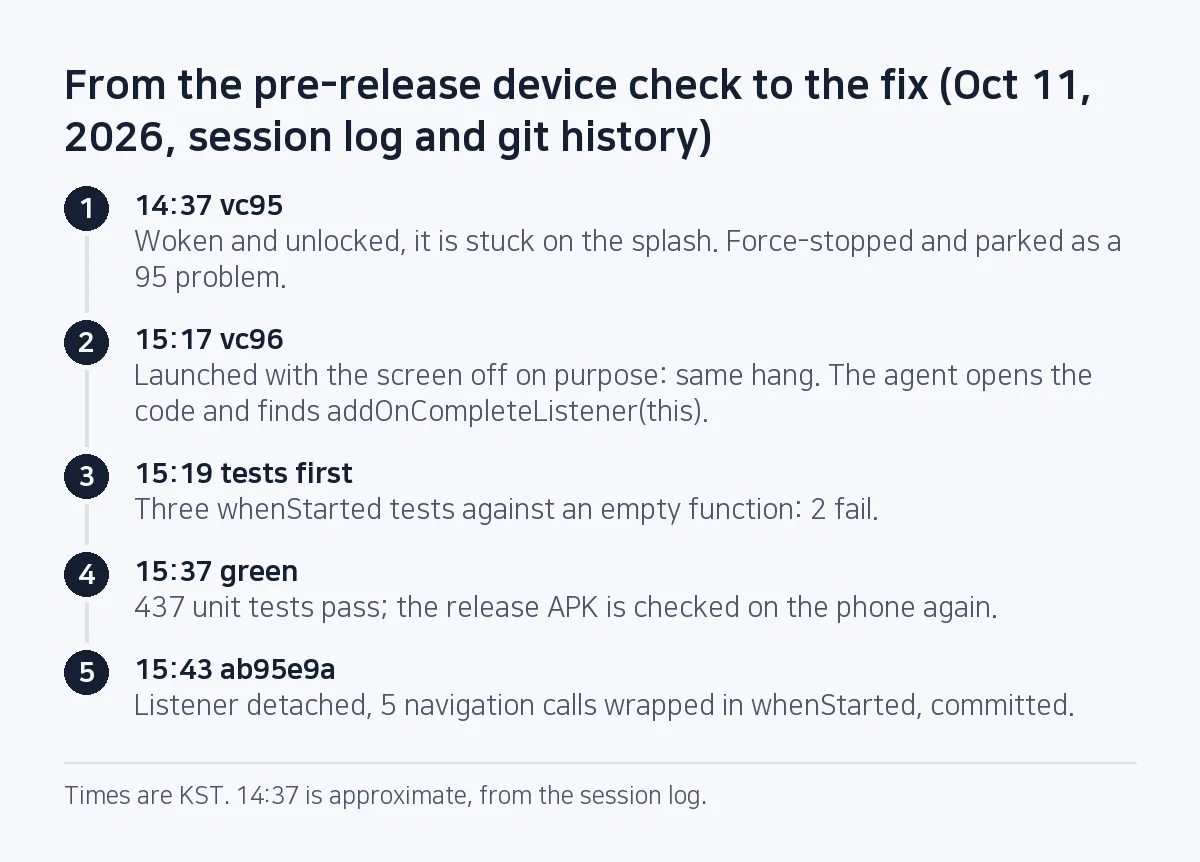
ab95e9a drops this from the listener so it no longer depends on the activity, and adds an isFinishing || isDestroyed check as its first line. Every call that opens the next screen goes through a new helper, whenStarted.
fun whenStarted(owner: LifecycleOwner, block: () -> Unit) {
    owner.lifecycleScope.launch { owner.lifecycle.withStarted(block) }
}
If the activity is visible (STARTED or later), the block runs now. If it is stopped, the block runs once when it becomes visible again. If the activity is destroyed first, it never runs. Five call sites were wrapped: three checkMyPermission() calls on the splash, the callback after the app-open ad wait, and goIntent on the logo screen (ActivityIntro). The agent wrote the three whenStarted unit tests first and ran them against an empty function, where 2 failed, before writing the body.
Removing this and nothing else was not enough. The listener would fire, but it would start the next activity from a stopped screen, and as the commit comment puts it, that startActivity is blocked or late. A user who went home during the splash might also see the app jump back over the home screen. The post-fix device check included "does not pop up over home".
Re-adding the listener in onStart would also work for the fetch: the reference says a listener added to a completed Task is scheduled immediately. It fixes only the RC Task, though. Two of the five wrapped sites, the ad-wait callback and the logo screen's Timer, are not Tasks. Using Task.await() in a coroutine would mean adding kotlinx-coroutines-play-services; the app's build.gradle has only coroutines-android and lifecycle, and the log shows no sign this path was weighed that day.
Don't hang navigation on addOnCompleteListener(this). Receive the result regardless of the activity, and defer only the screen change to the lifecycle.
whenStarted has its own limit: if the user never comes back, the next screen never opens. If the activity is destroyed in the meantime, the block is dropped, and reopening the app runs onCreate and a fresh fetch. That last part is a reading of the code, not something we tested on a device.
One grep and a screen-off launch test
Start by finding listeners scoped to an activity. The first line below is the search the agent ran that day; it found nothing else in the main sources. The second line widens it to fragments' requireActivity() and Canceled listeners; it was not used that day. The risky ones are listeners that navigate.
git grep -nE "addOn(Complete|Success|Failure)Listener\(this"
git grep -nE "addOn(Complete|Success|Failure|Canceled)Listener\((this|requireActivity\(\)|activity)"
Then test on a device with an R8 release build. Steps 1-2 were run on vc96 before the fix and on the fixed build; steps 3-4 on the fixed build.
- Turn the screen off with
adb shell input keyevent SLEEP, wait 3 seconds, and launch withadb shell monkey -p <package> -c android.intent.category.LAUNCHER 1. - Wait 20 seconds, wake the phone and dismiss the lock screen.
adb shell dumpsys window | grep mCurrentFocusshould name the main activity. Before the fix it named the splash; after, the main screen. - Launch, press Home right away, and launch again 12 seconds later. The phone should stay on the home screen in between and land on the main screen after. Repeat on the logo screen.
- Press Back during the splash and check for crashes.
The three whenStarted tests use Robolectric and LifecycleRegistry.createUnsafe to move the state from RESUMED to CREATED and back to STARTED. After the fix all 437 unit tests passed, and two monkey runs on the fixed build had zero crashes and ANRs. How the release carrying this fix, 1.6.029, went to 100% of users at once is in A 20% staged rollout went out at 100%.
How much of the 17% new-install drop-off this explains is unknown
A baseline written the day before the fix found that of 739 new users from September 12 to October 9, 611 (82.7%) reached the main screen within 24 hours. The CHANGELOG says only that this bug "may be part of" the 17% who did not.
A check on October 15 counted 107 of 120 new 1.6.029 installs (89%) reaching the main screen. That number cannot isolate the bug. The baseline used main-screen views, while 1.6.029 used the main_shown event added in 1.6.028; the same release also started an A/B test that removes the app-open ad from the first session for half of new installs; and the sample is 120 people. No event records a hang, so we cannot count how many users hit it.
The device check covered one S21 with ads blocked by DNS. We did not test live ads, other makers' lock screens, or returning after the process was killed in the background.
Still open: no test guards the five call sites
The unit tests cover whenStarted itself. The release notes say so: the wiring, whether ActivityEmpty and ActivityIntro actually call whenStarted, could not be guarded by unit tests and was checked on the device. If someone adds a new navigation call to the splash without whenStarted, today's tests still pass; only a device test that launches with the screen off or leaves the app during the splash would catch it.
FAQ
When does addOnCompleteListener(activity, …) remove the listener?
At the activity's onStop. The Task reference says so, and in this app a screen turning off during the fetch was enough to lose the result.
Doesn't an unscoped listener leak the activity?
Here the listener returns at once if isFinishing or isDestroyed, and whenStarted skips the navigation when the activity is gone. We did not measure leaks separately.
Why didn't monkey testing catch it?
That day's monkey runs kept the screen on and sent no Home key. The hang needs onStop to arrive before the fetch completes, so it only shows up in a test that turns the screen off or leaves the app during the fetch.
This note is written from values SugarMount measured itself; an AI coding agent was used to draft it.
More AX notes
- Pre-gzipping Android assets, measured: zero APK savings, and .pack.gz became .pack with a FileNotFoundException
- A market:// link opens a store chooser on SKT-sold Samsung phones: set the Play package first
- "6.7" < "6.11" is false: comparing Remote Config versions as strings froze content updates
- R8 kept 5 AdMob test IDs in our release build: one listOf().any line and a dex count
- A reverse-construction generator and the gate behind 1,100 arrow-puzzle levels
- Daily users rose after the redesign while organic D1 retention fell from 15.2% to 11.2%