
Document app
HWP Viewer SugarDoc
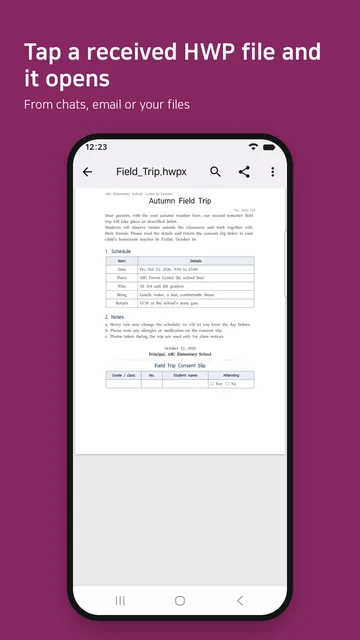
HWP Viewer SugarDoc is an Android app that opens Korean HWP and HWPX documents and PDFs straight from KakaoTalk or email. Reopen a document and it picks up on the page you were reading.
Google Play
Use it to
- Open an HWPX file that won't open on your phone
- Save a Korean HWP document as PDF on your phone
- Understand how HWP and HWPX differ
- Find a document you received on KakaoTalk
What it does
Open from the app you received it in
In KakaoTalk, email or your file manager, tap Open with or Share and pick HWP Viewer (the app’s name on your phone). Back returns you to the app you came from.
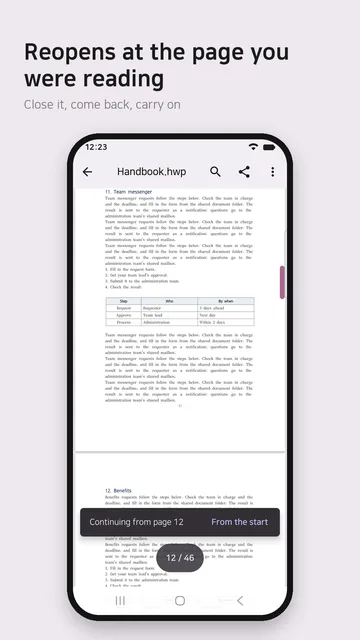
Resume where you left off
Reopen a document and it starts at the page you were reading. Use the page overview to jump to any page, fast scroll through long documents, and zoom in and out.
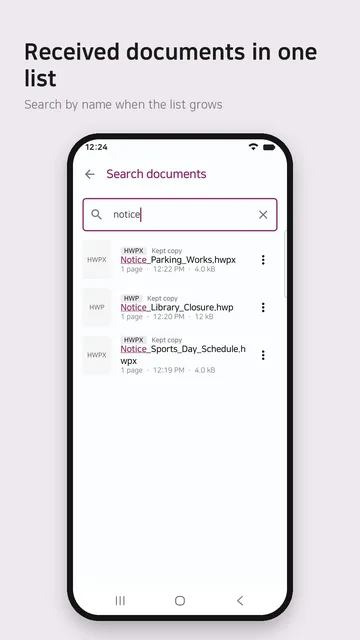
Received documents in one list
Documents you open are listed under Received documents. Search by file name, including Korean initial consonants. When the sending app is known, the list shows it (you can turn this off in Settings).
Find in document
Find text inside a document. On some devices, find is not available for PDFs.
Save as PDF and print
Save as PDF in the ⋮ menu saves an HWP or HWPX document as a new PDF in a folder you pick. Long documents save their first 15 pages (fewer on lower-end phones), and you are told before saving. Print is a separate item.
A way out when a file is slow
After 10 seconds you can keep waiting or hand the file to another app. If an HWP file has a built-in preview, you can view that first.
Password-protected files
Open password-protected HWPX and PDF files with their password. The password is never stored.
At a glance
| Price | Free, no ads. Pro (app lock, page images) is a one-time purchase (KRW 5,500 in Korea) |
|---|---|
| Formats | Korean HWP (5.x) and HWPX, older HWP 3.0, PDF |
| File size | Up to 1 GB |
| Uploads | None. Documents open on your phone only |
| Permission prompts | None after install |
| Requires | Android 10 or later |
| App languages | Korean, English |
| Latest version | 1.2.0 (on Google Play, checked October 18, 2026) |
| Package name | com.sugarmount.sugardoc |
| Developer | simpest (SugarMount) |
Data and permissions
- Documents open on your phone only. There is no upload or conversion server, and the document view does not use the internet. Your original file is never changed.
- The only things that leave your phone are anonymous usage statistics (Firebase Analytics) and crash reports (Firebase Crashlytics). Both are on by default and can be turned off in Settings; neither includes document contents or file names. Pro purchases are handled by Google Play.
- Received documents keeps copies in app-private storage. They are not backed up, and keeping them can be turned off in Settings. Copies are cleared automatically above 500 MB in total or after 90 days unopened, and files over 100 MB are not kept. Everything is deleted with the app.
- No ads, no ad SDK and no advertising ID. No sign-up.
| Permission | Used for |
|---|---|
| Internet, network state | Sending usage statistics and crash reports, Google Play billing |
| Biometric (USE_BIOMETRIC) | Showing the system unlock prompt when Pro app lock is on |
| Google Play billing | Buying and restoring Pro |
| Hide overlay windows (HIDE_OVERLAY_WINDOWS) | The Settings option that hides other apps’ floating windows over a document (Android 12 or later, off by default) |
All of these are normal permissions granted at install. The app does not use all-files access, photos and media, drawing over other apps, a battery-optimization exemption, or location, contacts, camera or microphone. See the HWP Viewer SugarDoc privacy policy for details.
Free and Pro
Free
- Open and read documents, resume reading
- Received documents, search by name
- Find in document, save as PDF, print, share
- No ads
Pro
- App lock: lock your received documents with your phone’s screen lock
- Save or share a page as an image (PNG)
- Edit: change body and table cell text in HWP documents and save it as a new file (the original stays as it is)
- Paid once through Google Play, yours to keep (no subscription)
The price in Korea is KRW 5,500; the amount charged is the one Google Play shows. On a new device, Restore purchase in Settings reapplies a purchase made with the same Google account. App lock does not lock documents opened directly from other apps, and it does not encrypt the files themselves.
What it cannot do
- Editing covers body text and table cell text in HWP (Hangul 5.x) documents only. HWPX documents and form fields cannot be edited, and it does not create documents or convert formats. Excel, Word and PowerPoint files are not supported.
- DRM-protected documents and password-protected HWP 3.0 files cannot be opened. Some devices cannot open password-protected PDFs, and distribution-only documents may not open or may show only a preview.
- Documents may look slightly different from the original. When the original font is not on your phone, a similar font is used.
Frequently asked questions
What is the difference between HWP and HWPX?
Both are formats of Hangul, the Korean word processor. .hwp is the long-standing format and .hwpx is the newer one. HWP Viewer SugarDoc opens HWP 5.x, HWPX, older HWP 3.0 and PDF.
An HWPX file from KakaoTalk will not open. What do I do?
Tap the file, choose Open with and pick HWP Viewer. If it is not in the list, save the file, open the app and pick it with Find in my files.
Can I save an HWP file as a PDF?
Yes. Open an HWP or HWPX document and tap Save as PDF in the ⋮ menu to create a new PDF in a folder you pick. Long documents save their first 15 pages, and distribution-only documents cannot be saved.
Is it free?
Yes. Opening and reading, received documents, find in document, save as PDF, print and share are free, with no ads. App lock, page images and editing are Pro (KRW 5,500 in Korea, one-time purchase).
Can I edit documents?
With Pro you can change body text and table cell text in HWP (Hangul 5.x) documents. Tap Edit in the ⋮ menu; the edited document is saved as a new file in Download > SugarDoc and the original file is not changed. HWPX documents and form fields cannot be edited yet.
Are my documents uploaded?
No. Documents open on your phone only, and there is no upload or conversion server. What does leave the phone is listed under Data and permissions.
Is there an iPhone version?
No. It runs on Android 10 or later only.
Notices
This product was developed with reference to Hancom’s public HWP document file format documentation.
HWP Viewer SugarDoc is not affiliated with or endorsed by Hancom Inc. Hancom and HWP are trademarks of Hancom Inc. Other trademarks belong to their respective owners.
Contact
If the app does not work as expected or you have a question, email us. Including your device model, Android version and the app you received the file in helps us check. You do not need to send the document itself.
Email: sugarmount21@gmail.com (write an email)
Package name: com.sugarmount.sugardoc
Help articles
AX notes on this app
Recent updates
- 1.2.0 · · New Save as PDF in the ⋮ menu: saves an HWP or HWPX document as a new PDF in the folder you pick, without the print screen.
- 1.0.0 · · First release: open received HWP, HWPX and PDF files right away and resume on the page you were reading.