How to open an HWPX or HWP file on Android
An HWPX or HWP file usually will not open on Android because the phone has no app for Korean word-processor documents. Install an HWP viewer, then choose it from Open with in KakaoTalk, email or your file manager.
This guide uses HWP Viewer SugarDoc, an Android app made by SugarMount; other HWP viewers work much the same way. Menu names vary a little by app version and phone. The screenshots are cropped from the app's Google Play screenshots of version 1.0.0.
Contents (11)
Why the file will not open
- No app can read it. Android phones usually come with something that opens PDFs, but nothing for .hwp or .hwpx. Tapping the file ends with a message that no app can open it.
- The file arrives as an unknown type. Some apps hand over .hwpx as a generic file instead of a document, so a viewer you have installed may still be missing from the list of apps.
- Another app is the default. If you once tapped Always for a different app, that app opens straight away without asking. If it cannot read HWPX you see a blank screen or an error.
HWPX is the newer of the two formats. Hancom, the maker of the Hangul word processor, says (in Korean) that its open format OWPML has been supported with the .hwpx extension since Hangul 2010:
"HWP의 개방형 문서 형식인 OWPML은 HWP 2018 버전부터 ".owpml" 확장자로 지원하고 있으며, 하위 버전은 HWP 2010 버전부터 ".hwpx" 확장자로 지원하고 있습니다."
Source: Hancom Download Center, HWP/OWPML format (Korean, checked October 18, 2026). The two formats are built differently; see HWP vs HWPX.
Without installing an app, and the catch
- Ask the sender for a PDF. Every Android phone can show a PDF, and the layout matches the original best. You have to wait for a reply.
- Open it on a computer with the Hangul word processor or another program that reads HWP. Not much help when you need the file on the go.
- Upload it to a web viewer or converter. Nothing to install, but the document goes to that site's server. Avoid it for school letters, forms or anything with names, phone numbers or addresses.
When an HWP file from KakaoTalk will not open
- Install an HWP viewer — get an app that opens HWP and HWPX from Google Play. HWP Viewer SugarDoc shows no permission prompts after installing and needs no sign-up.
- Tap the file in the chat — tap the file in the KakaoTalk chat to download it.
- Open with another app — from the file screen's menu (⋮ or the share button) choose Open with another app, then pick HWP Viewer from the list. Tap Always if you do not want to choose every time.
- Go back when you are done — Back returns you to KakaoTalk. Documents you open collect under Received documents in the app, so you can find them later by file name without scrolling back through the chat.
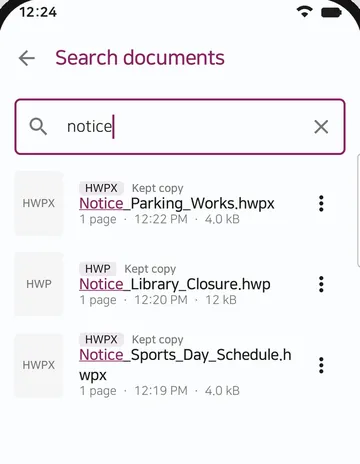
The menu names and their place differ by KakaoTalk version and phone. The app's own home screen shows the same three steps under Open documents from KakaoTalk.
Files attached to an email
Tap the attachment in your mail app and a list of apps to open it with appears. Choose the HWP viewer there. If the mail app only downloads the file and shows no list, download it first and then use the steps in the next section. Each mail app shows attachments a little differently.
When the viewer is missing from the list
- Check the file-type setting — some apps send .hwpx without saying what kind of file it is. In HWP Viewer SugarDoc, Settings > Opening files > Show for all file types lets you pick the app even then. It is on by default; if you turned it off, turn it back on and tap the file again.
- Save the file to your phone — use Save or Download in the app you received it in. It usually goes to the Download folder.
- Pick it from inside the viewer — open HWP Viewer SugarDoc, tap Find in my files and choose the file. This uses Android's own file picker, so the app does not need access to all your storage.
- Or share it — if the app you received it in has Share, choose HWP Viewer from the share list.
When a different app opens instead
If another app opens with no list to choose from, that app is set as the default. Go to Android Settings > Apps > that app > Open by default (or a similar name on your phone) and clear its defaults, then tap the file again; the list of apps comes back. Android's developer guide describes how a default gets set:
"When there is more than one app that responds to your implicit intent, the user can select which app to use and make that app the default choice for the action."
Source: Android Developers, Intents and intent filters (checked October 18, 2026).
Which way to use
| Method | Phone only | Upload | Opens HWPX | Use it when |
|---|---|---|---|---|
| HWP viewer app (such as SugarDoc) | Yes | None | Yes | You often receive HWP files on your phone |
| Ask the sender for a PDF | Yes (you wait) | None | Not needed | It is a one-off, or the layout must match exactly |
| Computer with an HWP program | No | None | Depends on the program | You need to edit the document |
| Web viewer or converter | Yes | To their server | Depends on the site | The document has no personal information |
Verdict: if HWP files reach your phone more than once in a while, install a viewer that opens both HWP and HWPX; the document stays on your phone. For a one-off file or a form you have to edit, ask for a PDF or use a computer.
If it still will not open
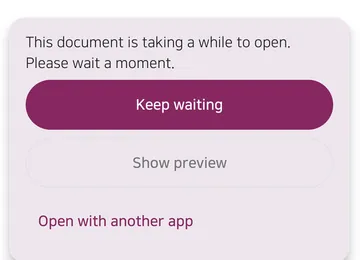
- It takes a long time — if a document has not opened after 10 seconds, HWP Viewer SugarDoc lets you keep waiting or open it with another app. When the file has a built-in preview you can view that first.
- It is password-protected — HWP, HWPX and PDF files with a password open once you enter it. Password-protected files in the old HWP 3.x format cannot be opened.
- It is locked by a company security program (DRM) — such files open only in that company's own viewer. The quickest fix is to ask the sender for an unlocked copy or a PDF.
- The download is incomplete or damaged — if the file size is zero or tiny, download it again. If the same file from someone else will not open either, the file itself may be damaged.
- It looks different from the original — when the original fonts are not on your phone a similar font is used, so line breaks and spacing can shift. Check documents where layout matters on a computer.
- You want to edit it — HWP Viewer SugarDoc Pro can change body and table cell text in HWP (Hangul 5.x) documents. It cannot edit HWPX documents yet or convert HWPX to HWP.
FAQ
Will renaming .hwpx to .hwp make it open?
No. The two formats are built differently, so changing the extension does not convert the file. Use an app that opens both.
Is my document uploaded anywhere?
No. HWP Viewer SugarDoc opens documents on your phone and does not send them to a server. See the HWP Viewer SugarDoc privacy policy.
Can I save the document as a PDF?
Yes. From version 1.2.0, tap ⋮ and then ‘Save as PDF’ to create a new PDF in a folder you choose; earlier versions save from the print screen. Long HWP documents are saved up to their first 15 pages. See converting an HWP file to PDF on Android.
Do I need to sign up or allow permissions?
No. There is no sign-up and no permission prompt after installing. Files reach the app through Open with, Share or Android's file picker.
Who do I contact if it still will not open?
Email sugarmount21@gmail.com with your phone model, Android version and the app you received the file in. You do not need to send the document itself.
Related guides
Get HWP Viewer SugarDoc
An Android app that opens Korean HWP and HWPX documents and PDFs straight from KakaoTalk or email, and reopens them on the page you were reading. No ads and no sign-up, and documents stay on your phone. With Pro you can change body and table cell text in HWP documents and save a new file. Works on Android 10 and later.
This product was developed with reference to Hancom's public HWP document file (.hwp) specification. HWP Viewer SugarDoc is not affiliated with or endorsed by Hancom Inc. Hancom and HWP are trademarks of Hancom Inc.