HWP vs HWPX: what differs and how to open both
HWP and HWPX are both Korean Hangul documents, but they are built differently, so renaming the file does not convert it. On an Android phone, open both with one viewer; converting HWPX to HWP needs the Hangul word processor on a PC.
This article uses SugarMount's Android app HWP Viewer SugarDoc (SugarDoc for short; shown as "HWP Viewer" on your phone). It cannot convert HWPX to HWP or HWP to HWPX. Editing (Pro) covers body and table cell text in HWP documents only; HWPX documents cannot be edited yet.
Contents (8)
How HWP and HWPX differ
.hwp is the long-standing format of Hancom's Hangul word processor, common in Korean schools, offices and government. It is a binary compound file, so its contents are not human-readable. .hwpx is the newer open format (OWPML): the document is written as XML files packed into one ZIP archive.
Hancom states which versions support each format:
"HWP의 개방형 문서 형식인 OWPML은 HWP 2018 버전부터 ".owpml" 확장자로 지원하고 있으며, 하위 버전은 HWP 2010 버전부터 ".hwpx" 확장자로 지원하고 있습니다."
In English: OWPML, HWP's open document format, is supported with the ".owpml" extension from HWP 2018, and with the ".hwpx" extension from HWP 2010. The same page describes the .hwp 5.x format as the one used from HWP 2002 through HWP 2018. Source: Hancom Download Center, HWP/OWPML format (Korean, checked October 18, 2026).
So the same letter can arrive in either format. An app that reads only one of them cannot open the other, and changing the extension leaves the inside unchanged.
Side by side
| Item | .hwp | .hwpx |
|---|---|---|
| Inside the file | Binary compound file | XML files in a ZIP (OWPML) |
| Hangul word processor support (per Hancom) | 5.x format from HWP 2002 | From HWP 2010 |
| Rename the extension | Does not work. The inside stays the same | |
| Open in SugarDoc | Yes, including old HWP 3.0 | Yes |
| Password-protected | Opens with the password. Password-protected HWP 3.0 files cannot be opened | Opens with the password |
| Convert between them in SugarDoc | No | |
Verdict: if you only need to read the document, the difference does not matter; one app that opens both is enough. The format only matters when you must send the file on to someone using a Hangul version older than HWP 2010. Then re-save it as .hwp on a PC, or send a PDF.
Without an app, and the limits
- Renaming the file: does not work. A .hwpx renamed to .hwp is still a ZIP-based HWPX inside, so programs that cannot read HWPX still fail.
- Re-saving in the Hangul word processor on a PC: the usual way to get .hwp. Open the file in a version that supports .hwpx, then save a copy and choose the .hwp file type. Menu names vary by version, and you need a PC with the program.
- Asking the sender for another format: the most reliable. The author can re-save as .hwp or PDF with the fewest layout changes, but you have to wait for a reply.
- Your phone's built-in apps: usually open neither. Android phones generally have a PDF viewer but no app for .hwp or .hwpx.
Open either format with SugarDoc
- Tap the file — In KakaoTalk, email or your file manager, tap the .hwp or .hwpx file and pick HWP Viewer from "Open with" or "Share". For a file already saved on the phone, use Find in my files in the app.
- Don't choose a format — There is nothing to pick. The app tells HWP, HWPX and PDF apart by reading the file's contents, not by the extension at the end of its name.
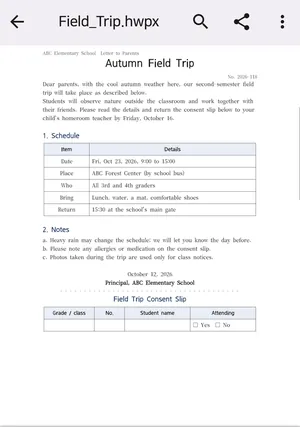
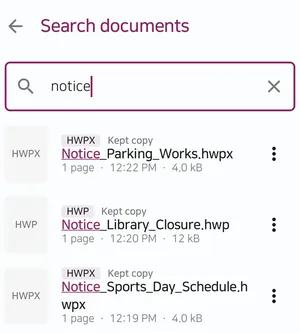
The sample document was made up for the screenshot. - Find it again later — Every document you open is listed with its format (HWP, HWPX or PDF). When the list grows, search by file name.
- Enter the password if asked — A password-protected HWP or HWPX file opens once you type its password. The password is not saved.
Screenshots are real app screens captured for SugarDoc's store listing. Menu names can differ slightly by app version and phone model.
What it cannot do
- No format conversion. SugarDoc cannot turn HWPX into HWP or the other way round, and it cannot create documents. Editing (Pro) covers body and table cell text in HWP documents only.
- You can keep a PDF. If the recipient has no Hangul word processor, or an old one, a PDF may be the easiest thing to send. See convert an HWP file to PDF on Android for the steps and page limits.
- Layout may differ slightly. When the original font is not on your phone, a similar font is used, so line breaks and spacing can shift. Old HWP 3.0 files may differ more.
- Some files will not open. DRM-protected documents, password-protected HWP 3.0 files and files over 1 GB cannot be opened. Distribution-only documents may not open, or show only a preview.
- Other office formats are not supported. Excel, Word and PowerPoint files do not open.
If a file does not open at all, the cause is usually your phone's app settings rather than the format. Start with when an HWPX file won't open on your phone.
FAQ
If I rename .hwpx to .hwp, will it open?
No. Only the name changes; the file is still HWPX inside, so programs that cannot read HWPX still fail. To get a real .hwp, re-save it as .hwp in a Hangul word processor that supports .hwpx.
Can SugarDoc convert HWPX to HWP?
No. SugarDoc has no format conversion. It opens both formats, and you can keep the document as a PDF.
Which format should I ask for?
For reading, either is fine; an app that opens both shows them the same way. If you must forward the file to someone using a Hangul version older than HWP 2010, .hwp or PDF is safer.
Do very old HWP 3.0 files open?
Yes, SugarDoc opens them, though they may look more different from the original. Password-protected HWP 3.0 files cannot be opened.
Are my documents uploaded anywhere?
No. SugarDoc opens documents on your phone without uploading them, and it never changes the original file. See the privacy policy for details.
Related articles
Get SugarDoc
An Android app that opens Korean HWP and HWPX files and PDFs straight from the app you received them in, and reopens at the page you were reading. No ads, no sign-up. Android 10 or later. Contact: sugarmount21@gmail.com
This product was developed with reference to Hancom's public HWP file format documentation. SugarDoc is not affiliated with or endorsed by Hancom Inc. Hancom and HWP are trademarks of Hancom Inc.