Resize an ID photo for Korean application uploads
Korean upload forms often cap ID photos at a file size such as 500 KB. Compress Image saves your photo as a JPEG under the limit you set. It does not crop to a ratio, so crop first if pixel sizes are fixed.
This guide uses Compress Image 1.0.6, an Android app made by SugarMount. Rules differ by site, so we don't invent numbers here; the only example is the Korean passport photo, which has an official guide.
Contents (9)
Check the site's rules first
Photo fields on Korean application, job and government sites usually set three separate conditions. Meeting one of them is not always enough.
- File size: written as "500KB 이하" (500 KB or less). This is what the app fits.
- Pixel size: for example 413 × 531 pixels. A fixed ratio means the photo must be cropped to it.
- File type: usually JPG (JPEG). The app always saves JPEG.
The rules are in the notice or next to the upload button. For any site not covered here, follow that notice.
Without an app, and the limits
- Ask the photo studio for a file: studios can often hand over a digital file sized for submission. This is the surest route, but you need to go back if the photo is already taken.
- Your gallery app's editor: most Android gallery apps can crop, which handles the ratio. Menu names and resize options vary by phone and version, so we don't list them. After saving, check the real file size and pixels in the photo's details.
- For a passport photo, the government resize tool: the Ministry of Foreign Affairs passport site has an online passport photo resize tool (Korean only). You upload a photo, zoom and move it until the face fits a red dotted guide, then save. It accepts JPG or PNG under 1 MB, and the page says the result is not for ID, half-size or visa photos.
Shrink it with Compress Image
- Select photos: tap Select photos on the first screen and pick the ID photo. The app uses the Android photo picker, so it asks for no storage permission.
- Method: Fit to size: on the Options screen, choose Fit to size under Method.
- Pick the limit: under Size limit per photo, pick 100 KB, 200 KB, 500 KB or 1 MB, equal to or below the site's limit. If none matches, tap Custom and enter 20 to 20000 KB.
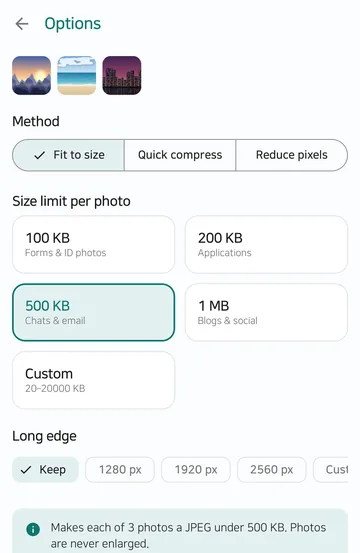
- Set the long edge if pixels are fixed: on the same screen, open Long edge, tap the custom option and enter 320 to 8000 px. The aspect ratio stays the same, so if you already cropped to the required ratio, the short edge follows. A photo cropped to 3.5 : 4.5 with a long edge of 531 comes out at 413 × 531 pixels.
- Check the result: tap Create results. Each photo shows its size before → after and its width × height in pixels. These are the real sizes of the files that will be saved.
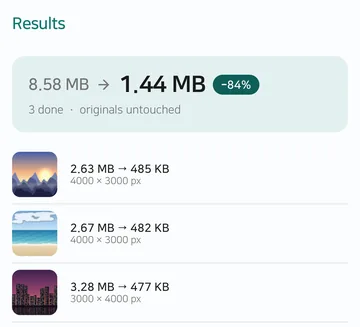
Three sample photos shrunk to a 500 KB limit. With the long edge on Keep, they stay at sizes like 4000 × 3000 pixels, which a site with pixel rules will reject. - Save or share: Save all writes new files to
Pictures/SugarCompress, and Share sends them straight to another app. Your original photos are not changed.
Screens are real app captures taken on an Android emulator in September 2026 for the Play listing, with sample pictures. Menu labels match the app's 1.0.6 source.
Korean passport photo upload rules
The passport site lists the files it accepts for online renewal (quoted in Korean, our translation below):
"파일 크기 500KB 이하, 파일 형식 JPG/JPEG"
"가로 413 픽셀(pixel), 세로 531 픽셀 사이즈 권장(가로 395~431 픽셀, 세로 507~550 픽셀 이내만 업로드 가능)"
File size 500 KB or less, JPG/JPEG. Recommended 413 pixels wide by 531 high; only 395–431 wide and 507–550 high can be uploaded. Source: Ministry of Foreign Affairs passport site, photo files for online applications, checked October 18, 2026. Rules can change, so check again before you submit.
The app can meet the size, the JPEG type and the long edge. It does not judge head size, the white background or whether the photo was taken in the last six months. The same page also advises against phone photos:
"휴대폰 등 모바일 기기로 촬영된 사진, 사진 편집 프로그램 등으로 과도한 보정을 한 사진은 여권 발급 시 사진이 실물과 다르게 표현될 수 있으므로 권장하지 않음"
Photos taken on phones or heavily retouched are not recommended, because they may look different from the person in the issued passport.
You can test the result with the site's online passport photo check. The site says this check is for reference and the real review may differ.
Methods compared
| Method | Set a size limit | Crop to a ratio | Set pixels | Where it works |
|---|---|---|---|---|
| Compress Image app | Yes (20 KB–20 MB) | No | Long edge only (320–8000 px) | Any site with a size limit |
| Gallery app editor | Varies by phone | Usually (crop) | Varies by phone | Anywhere on the phone |
| Passport photo resize tool | Not stated | Yes (face to guide) | Set by the tool | Passport online application only |
| Studio file | If you ask | Yes | If you ask | When taking a new photo |
Verdict: if the site only sets a file size, the app alone is enough. If it also fixes the ratio and pixels, as for passports, crop first (for passports, use the official tool), then use the app last for the size and long edge.
When it doesn't work, and limits
- No cropping to a ratio. The aspect ratio stays as it is. Crop in your gallery app or the passport tool first.
- No enlarging. If the original is smaller than required, a larger long edge changes nothing. Get the original file or a studio file instead.
- Pixels may shrink too. If lower quality still misses the limit, the app reduces the long edge and tries again, never below 320 px. Always check the pixel size on the result screen.
- Misses are reported. "The size limit could not be reached. Try a larger limit." means no result file was made for that photo. Raise the limit or use a different photo.
- Output is JPEG. Transparent parts of PNG and WebP become white. It won't help where PNG is required.
- No dpi setting. If a site asks for a dpi value such as 300 dpi, check whether it also gives a pixel size to aim for.
- No rule checking. Face size, background and when the photo was taken are up to you and the site's rules.
FAQ
The site counts 1 KB as 1024 bytes. Is that a problem?
No. The app counts 1 KB as 1000 bytes, so a file fitted to 500 KB is at most 500,000 bytes. That is below 500 KB counted in 1024-byte units (512,000 bytes), so it passes either way.
Does it change or delete my original photo?
No. Results are saved as new files in Pictures/SugarCompress, and the original stays as it was.
Is my photo uploaded anywhere?
No. Photos are processed on your phone and never uploaded. See the Compress Image privacy policy for details.
Does it work with HEIC photos from an iPhone?
Yes, if your phone can decode HEIC. The result is saved as JPEG. To change only the format, see Convert HEIC to JPG on a Samsung Galaxy phone.
Does it cost anything?
It is free with ads and handles 20 photos at a time. Pro, a one-time purchase, removes ads and handles 100 at a time. Each photo can be up to 50 MB and 50 megapixels.
Related articles
Get Compress Image
An Android app that shrinks photos for forms and uploads to under a size you set, such as 100 KB or 500 KB, and saves them as new files. Photos are processed on your phone and never uploaded; originals are kept.