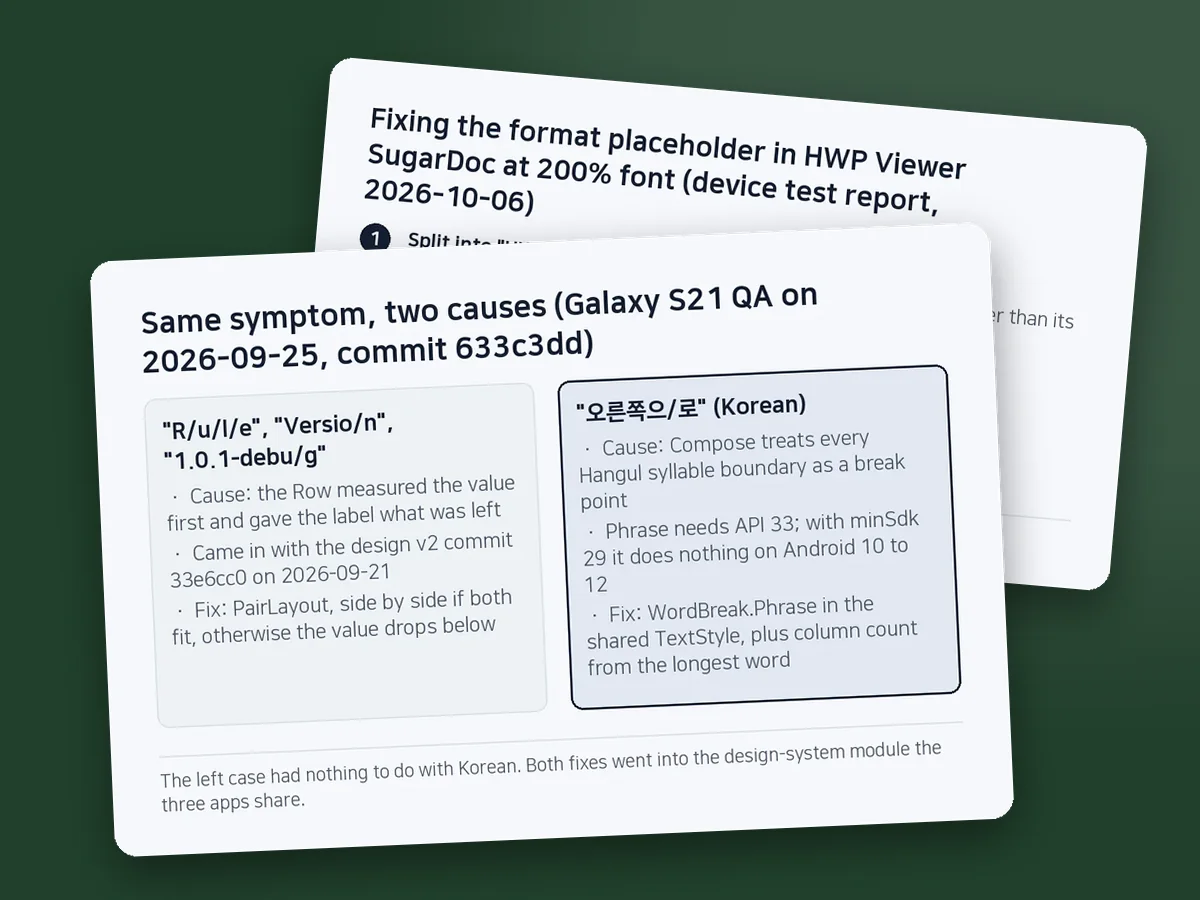
Jetpack Compose splits Korean between syllables, but the stacked 'R/u/l/e' label came from how a Row measures
The stacked "R/u/l/e" came from a Row that measured the value first; the Korean syllable splits came from Compose's break rules. Each got a separate fix in one design-system module that three apps share.
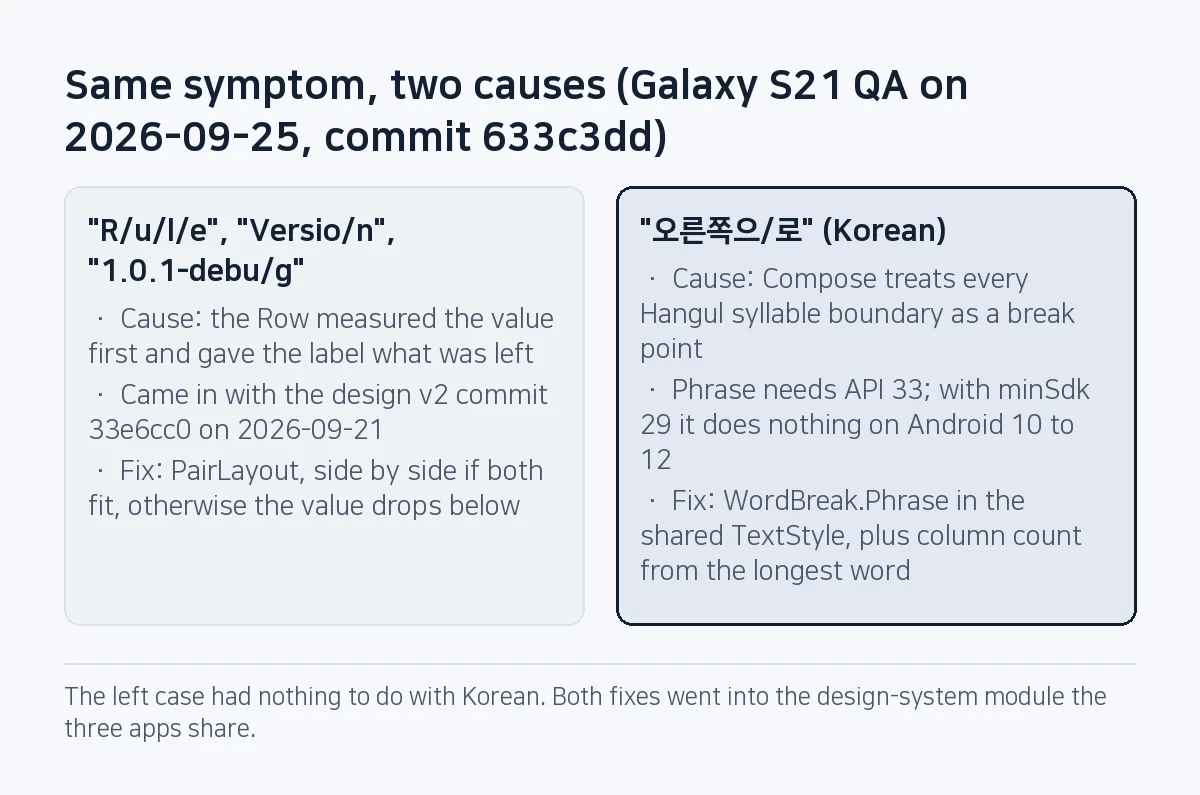
In a row that puts a label next to its value, the word "Rule" was standing on its end: R, u, l, e, one letter per line. We saw it on September 25, 2026, during a real-device pass of three photo apps on a Galaxy S21 (Android 15), and the same shape turned up in "Versio/n", "1.0.1-debu/g" and the Korean "오른쪽으/로" ("to the right", split before its last syllable). They looked alike but had two causes. The first three came from a Row that measured the value first and left the label almost no width. The Korean one came from Compose treating every Hangul syllable boundary as a break point. Both were fixed, separately, in one design-system module the three apps share (commit 633c3dd).
Sources: commit 633c3dd in SugarMount's app repository (sugar-utils), the CHANGELOG and backlog entries from the same day, the HWP Viewer SugarDoc device test report (2026-10-06) and the Android Developers reference. Checked on October 21, 2026.
Contents (8)
- Five broken spots, all inside shared components
- Compose treats Hangul syllable boundaries as break points
- WordBreak.Phrase lives in one shared TextStyle
- The longest word decides how many columns fit
- From 150% font scale, stack; for chips, use FlowRow
- A Row from four days earlier, and a button width that missed by 2 px
- Checklist
- FAQ
Five broken spots, all inside shared components
Every defect sat in a shared component. The September 25 QA was run by four AI coding agents in turn: one per app, then a fourth that reproduced every finding with its own screenshots and read the code behind each root cause. The table copies the symptoms recorded that day in the CHANGELOG and in code comments.
| Symptom | Component | Cause | Fix |
|---|---|---|---|
| "R/u/l/e", "Versio/n", "1.0.1-debu/g" | Label/value rows, settings rows | Row measured the value first and gave the label what was left | PairLayout: side by side if both fit, otherwise the value drops below |
| "오른쪽으/로", "Transparen/t PNG" | Option tile grid, action buttons | A word wider than its cell; Compose reported one Hangul syllable as the minimum width | Measure the longest word and fall back to one column |
| "Quick compress" did not fit a third of the width | Segmented control | Large font | Stacked tiles from 150% font scale |
| "Web" and "Custom" hidden off-screen | Choice chip row | Horizontal scrolling | FlowRow wrapping |
| Korean words such as "메일" (mail) could split at 200% font | Every text style | Syllable boundaries counted as break points | WordBreak.Phrase |
The three apps are Compress Image, Flip & Rotate Image and Convert Image JPG PNG WEBP, and all of them depend on the same core/designsystem module. Commit 633c3dd touched 57 files, but the line-breaking work is concentrated in a handful of files in that module.
Compose treats Hangul syllable boundaries as break points
LineBreak.WordBreak decides where Compose may split a word. The LineBreak.WordBreak reference describes Default as the locale's default word-breaking rules: Latin scripts break between words, while languages that don't use whitespace (the page's example is Japanese) can break between characters. Phrase does not insert breaks between characters of the same phrase unit and is "ideal for short text such as titles and UI labels". Both values were added in Compose 1.3.0.
Korean does put spaces between words, yet the apps still split inside them. A comment in the repository's WordWidth.kt records why: Compose's own minimum intrinsic width treats every Hangul syllable as a break point. So the grid believed "오른쪽으로" fitted in the width of a single syllable, kept two columns and cut the word in the middle.
The platform adds its own limit. Per the LineBreakConfig reference, phrase-based breaking (LINE_BREAK_WORD_STYLE_PHRASE) arrived in API level 33 (Android 13), its support depends on the locale, and it has no effect where the locale is unsupported. These apps have minSdk 29, which means Phrase does nothing on Android 10 to 12.
WordBreak.Phrase lives in one shared TextStyle
A single style() function in SugarType.kt builds every step of the type scale, so it is the only place that sets lineBreak. No screen code changed.
private val WordAwareBreak =
    LineBreak.Simple.copy(wordBreak = LineBreak.WordBreak.Phrase)

private fun style(weight: FontWeight, size: Int, line: Int, spacing: Boolean = false) = TextStyle(
    // fontFamily, fontSize, lineHeight, letterSpacing ...
    lineBreak = WordAwareBreak,
)
If your Compose app has Korean screens, set Phrase once in the shared TextStyle and do not add it to individual Text calls. Per-screen settings get forgotten the next time someone adds a screen. The same comment says a word wider than the line still breaks. (The Korean hero titles also got zero-width break points after the "·" separator.)
The longest word decides how many columns fit
The option tile grid picks its column count from the minimum intrinsic width each tile reports. For Korean that number is one syllable wide, so the module gained a function that measures whole words: split on whitespace, measure each word on one line, return the widest.
text.split(Regex("\\s+")).filter { it.isNotEmpty() }.maxOfOrNull { word ->
    measurer.measure(word, style, softWrap = false, maxLines = 1).size.width
} ?: 0
Tile titles and subtitles report that value as their minimum intrinsic width (minIntrinsicWidthAtLeast, a small LayoutModifier), and the grid compares it with the cell width.
val cols = when {
    requested == 1 -> 1
    largeFont -> 1
    measurables.any { it.minIntrinsicWidth(Constraints.Infinity) > cellWidthFor(requested) } -> 1
    else -> requested
}
In app code, Flip & Rotate Image's four action buttons use the same function. When the longest word of any label is wider than half the screen minus the button chrome, the buttons go one per row instead of two.
From 150% font scale, stack; for chips, use FlowRow
One constant defines "large font": LARGE_FONT_SCALE = 1.5f in Chips.kt. At or above it, three components switch to a vertical layout.
- Segmented control: the segments become option tiles stacked top to bottom. The check icon went too; it was taking a third of a segment's width.
- Option tile grid: one column, whatever was requested.
- Flip & Rotate Image's action buttons: one per row.
The choice chip row used to be a Row with horizontalScroll. Chips past the edge simply hid there, and nothing told the user that "Web" or "Custom" existed. With FlowRow they wrap onto the next line.
// before: Row(modifier = modifier.horizontalScroll(rememberScrollState()), ...)
FlowRow(
    modifier = modifier.fillMaxWidth(),
    horizontalArrangement = Arrangement.spacedBy(SugarSpacing.sm),
) { /* FilterChip ... */ }
A Row from four days earlier, and a button width that missed by 2 px
"R/u/l/e" had nothing to do with Korean. The label/value row came from the design v2 commit (33e6cc0, 2026-09-21), written together with an AI coding agent. It was a Row with Modifier.weight(1f, fill = false) on the label and no weight on the value. A Row measures unweighted children first, so a long value took the whole width and the label folded into the few pixels left, one letter per line.
Four days later, the cross-check agent in the device QA flagged this structure while reading the code behind the finding. The new PairLayout measures each slot's natural width (maxIntrinsicWidth) first. If the sum fits the line, they sit side by side; if not, the value moves under the label.
The second mistake was a number. The action-button chrome adds up to exactly 76 dp: 24 dp of OutlinedButton padding on each side, a 20 dp icon and an 8 dp gap. According to the code comment, at 130% font "오른쪽으로" measured 2 px under the space that exact figure left, and it still wrapped. The value was fixed at BUTTON_CHROME = 84.dp, the exact chrome plus 8 dp of slack.
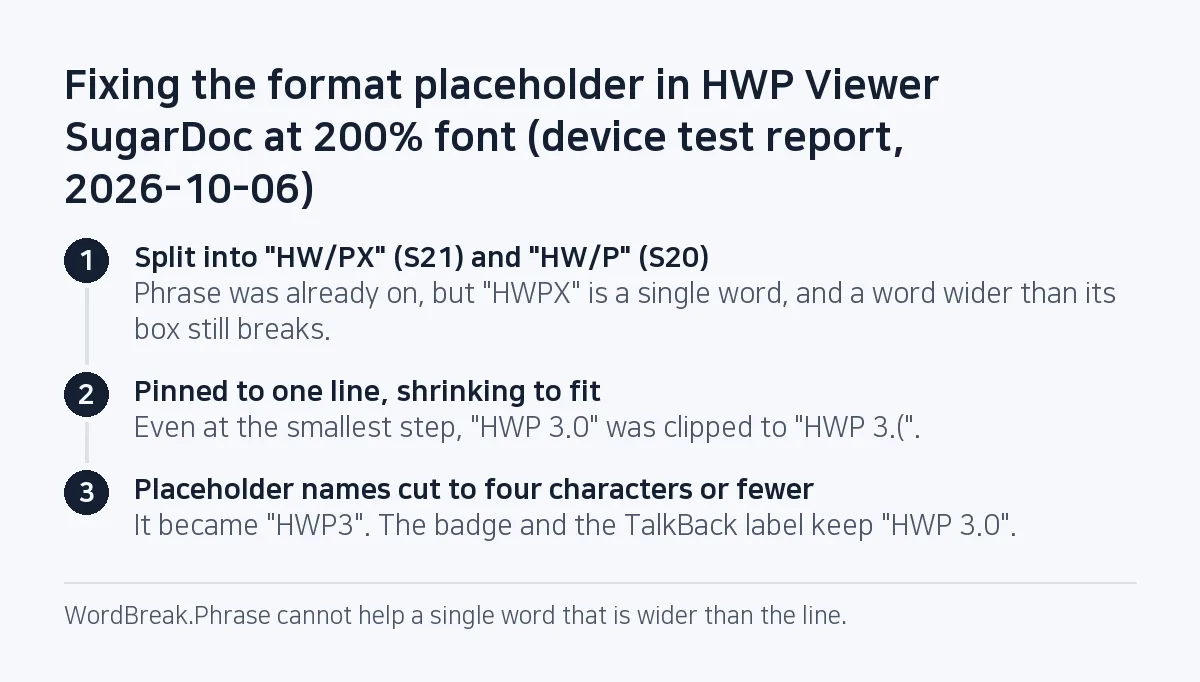
The same defect came back by another route. In the HWP Viewer SugarDoc device test on 2026-10-06, the format placeholder split into "HW/PX" (S21) and "HW/P" (S20) at 200% font. That app uses the same design-system module, so Phrase was already on, but "HWPX" is a single word and a word wider than its box still breaks. Pinning the placeholder to one line and letting it shrink to fit fixed that, but "HWP 3.0" did not fit even at the smallest step and got clipped to "HWP 3.(" instead. The final fix shortened placeholder names to four characters or fewer ("HWP3"), while the badge and the TalkBack label keep "HWP 3.0".
Checklist
After the September 25 fixes, a separate agent checked every fix on the device and a person checked again by hand, across 1.0/1.3/2.0 font scale, Korean and English, light and dark, and landscape, with no regressions. The list below is drawn from these fixes.
- The shared
TextStylesetslineBreak = LineBreak.Simple.copy(wordBreak = LineBreak.WordBreak.Phrase). Android 12 and lower ignore it, so the items below still matter. - Layouts that choose a column count look at the longest word, not Compose's minimum intrinsic width.
- At
fontScale1.5 and above, segmented controls, grids and button rows switch to a vertical layout. - No option hides behind horizontal scrolling (
FlowRow). - Label/value rows are not left to
Rowweights. - Computed padding includes the error seen on a device (8 dp this time).
- Single-word short labels, such as format names like "HWPX", fit their box at 200% font.
One item is still open: on the input screen of Convert Image JPG PNG WEBP, the size badge wraps as "JPEG · 1.3 / MB", recorded as a cosmetic leftover in the 2026-09-25 CHANGELOG entry. The full pre-release check list is in What to check before shipping an AI-built Android app.
FAQ
How do I make Jetpack Compose wrap Korean by word instead of by syllable?
Set lineBreak = LineBreak.Simple.copy(wordBreak = LineBreak.WordBreak.Phrase) in your TextStyle. Put it in the shared typography once and every Text picks it up. Android 12 and lower ignore it, so keep a layout check based on the longest word as well.
Why does a word still split in the middle with WordBreak.Phrase?
Phrase still breaks a word that is wider than its line or cell. Widen the cell, use fewer columns or shorten the text. HWP Viewer SugarDoc saw the 'HWPX' placeholder split into 'HW/PX' at 200% font, pinned it to one line with auto-shrink, and shortened 'HWP 3.0', which still did not fit, to 'HWP3'.
Which font scales should a Compose layout be tested at?
These apps were checked at 1.0, 1.3 and 2.0 font scale, combined with Korean and English, light and dark, and landscape. Their layouts switch to vertical at 1.5, so test on both sides of that switch.
This note is written from values SugarMount measured itself; an AI coding agent was used to draft it.
More AX notes
- Pre-gzipping Android assets, measured: zero APK savings, and .pack.gz became .pack with a FileNotFoundException
- A market:// link opens a store chooser on SKT-sold Samsung phones: set the Play package first
- A splash that never moved on: addOnCompleteListener(this) and onStop
- "6.7" < "6.11" is false: comparing Remote Config versions as strings froze content updates
- A reverse-construction generator and the gate behind 1,100 arrow-puzzle levels
- Daily users rose after the redesign while organic D1 retention fell from 15.2% to 11.2%