Spell-check long Korean text on Android
The common Korean web spell checkers take 300 or 1,000 characters at a time. On Android, SugarSpeller checks up to 3,000 free, or 7,000 with a subscription, in one pass.
This guide is based on the source of SugarSpeller 1.6.031, an Android app by SugarMount (its home-screen name is Hangul Checker). It is not unlimited: text over 7,000 characters still has to be split.
Contents (8)
Without an app, and the limits
Most people paste text into a portal's web spell checker. When we checked on October 18, 2026, the checker on Naver's search results showed a 0/300 counter, and Daum's spell checker page showed 0/1000. Spaces count as characters.
- Long text must be split. A 2,000-character cover letter takes 7 rounds in a 300-character checker and 2 in a 1,000-character one. Cutting mid-paragraph can change how spacing is judged.
- You stitch the results back together. Each corrected piece has to be copied back in order by hand.
- Fine on a PC, tedious on a phone. Selecting and splitting long text on a small screen is the slow part.
If you check spacing by hand, the basic rule is in the official Korean spelling standard, Chapter 1, Article 2, from the National Institute of Korean Language:
"문장의 각 단어는 띄어 씀을 원칙으로 한다."
"As a rule, each word in a sentence is written with a space." Source: National Institute of Korean Language, Korean Orthography, Chapter 1, Article 2
Check long text with SugarSpeller
- Add your text — Paste it into the input box at the bottom, or pick Hangul Checker from another app's Share menu. Shared text goes into the input box first; it is not checked until you send it.
- Watch the count — While you type, the app shows the count against your limit, like "1234/3000". Anything past the limit does not go into the box, so if the count equals the limit, your text was cut. Check the rest separately.
- Send — Tap the send button. The app splits the text into pieces of about 300 characters, at a space, period or line break, checks them, and shows the result as one text again.
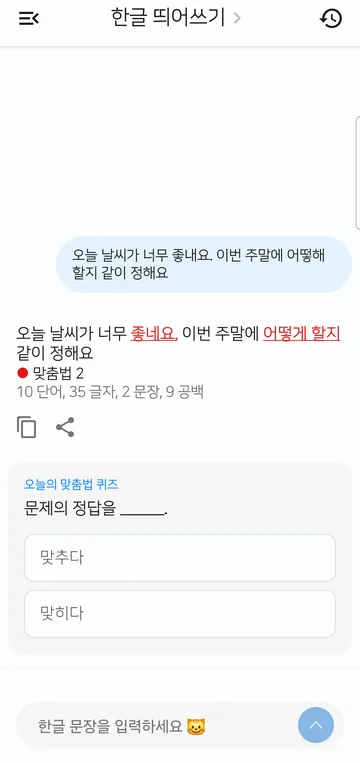
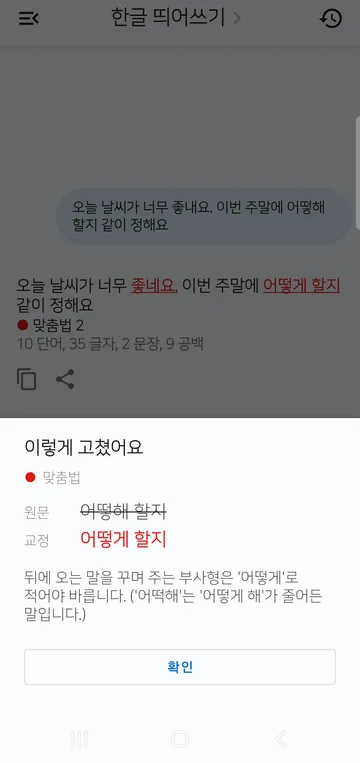
- Review corrections — Tap an underlined part to see the original and the correction side by side. Tap Why is it wrong? for a short AI explanation.
- Copy or share — Use the copy and share buttons under the result to move the corrected text where you need it.
Screens: Galaxy S21 (real device), SugarSpeller 1.6.025 with the Korean interface, captured October 1, 2026, status bar cropped. The character limits and piece size were checked in the 1.6.031 source. The layout may differ slightly between versions.
Characters per check, compared
| Method | Per check | A 2,000-character text | Cost | Use it when |
|---|---|---|---|---|
| Web checker (search results) | 300 | 7 rounds | Free | You need a sentence or two checked fast |
| Web checker (dictionary page) | 1,000 | 2 rounds | Free | You're on a PC with medium-length text |
| SugarSpeller Free | 3,000 | One pass | Free (with ads) | You want a whole essay answer checked on your phone |
| SugarSpeller Basic | 4,000 | One pass | Subscription (banner ads) | Your texts often run a little over 3,000 |
| SugarSpeller Premium | 7,000 | One pass | Subscription (no ads) | You check several answers together |
Verdict: for text up to 3,000 characters on a phone, the free app is enough. For longer text, split it by question for free, or subscribe if you do this often. For one or two sentences, a web checker is fine and needs no install.
Limits and when it fails
- It is not unlimited. Free 3,000, Basic 4,000, Premium 7,000 characters. Spaces and line breaks count.
- It needs the internet. The app does not judge spelling itself. It sends the text to the Naver or Daum (Kakao) spell checker. Which one is used is set by the app's configuration server; if one fails, the app retries once with the other.
- Slow checks fail. If not every piece comes back within 30 seconds, the app stops and asks you to try again.
- Shared text loses line breaks. Text received through Share has runs of spaces and line breaks merged into single spaces. If paragraphs matter, paste into the box instead.
- The text-selection menu is for short text. Select text in another app and pick Spell check: up to 300 characters are checked in a small sheet; longer text is passed to the main screen.
- It fixes only what the checker catches. It does not judge whether a sentence reads well or is correct. Read it aloud once before you submit.
Where your text goes
Text you check is sent to the Naver or Daum (Kakao) spell checker. Only when you tap Why is it wrong?, the original words, the corrected words and the error type go through SugarMount's server (Google Firebase) to Google Vertex AI. Surrounding sentences are not sent. Keep this in mind for text with personal details, such as a cover letter. See the SugarSpeller privacy policy for details.
The text-selection menu is a standard Android feature that hands selected text to an app. The Android developer reference describes it as:
"Activity Action: Process a piece of text."
FAQ
Is there a Korean spell checker with no character limit?
SugarSpeller has limits too: 3,000 characters free, 4,000 with Basic and 7,000 with Premium. Split longer text by paragraph or question.
Do spaces count?
Yes. The app's count and limit include spaces and line breaks, so it can differ from a "without spaces" count on an application form.
What happens if I paste more than 3,000 characters?
The part past the limit does not go into the box. If the count reads "3000/3000", your text was cut; paste the rest and check it separately.
Is my checked text saved?
Originals and corrections are kept in the check history on your phone. Turn off the "Save check history" setting if you don't want new checks saved.
Do I need an account?
No sign-up is needed. Checking does need an internet connection.
Related articles
Get SugarSpeller
An Android app that fixes Korean spelling and word spacing in one pass, from pasted text, text shared from another app, or text picked from the selection menu. Free checks take up to 3,000 characters at a time.