Claude Code harness: run it unattended every day
A harness runs Claude Code at set times with nobody watching, saves every result to a file and hands anything risky to a person. On November 10, 2026, ours ran its upkeep jobs 284 times.
Windows harness series, part 1 of 11 Next Before you start: PowerShell
If you handle marketing for a game app, your mornings tend to start the same way: open GA4, check that no ad budget is leaking, pick today's short video. This series hands those chores to Claude Code on one Windows PC, so the reports are waiting as files when you sit down, in 11 short parts. Part 1 installs nothing: you see what you will end up with and decide whether your PC and accounts are ready.
When you finish this part
- Result: you know what a harness is, what this series builds, and whether it suits you.
- You need: nothing yet.
- Cost: none. From Part 4 (signing in) on you need a paid Claude plan (Step 4).
Contents (8)
Step 1: See one day of a harness
A harness is the whole setup around an AI that runs it at fixed times without a person, records results and failures, and blocks risky actions. In this series the AI is Claude Code, a program that lets you use Anthropic's Claude from a command window.
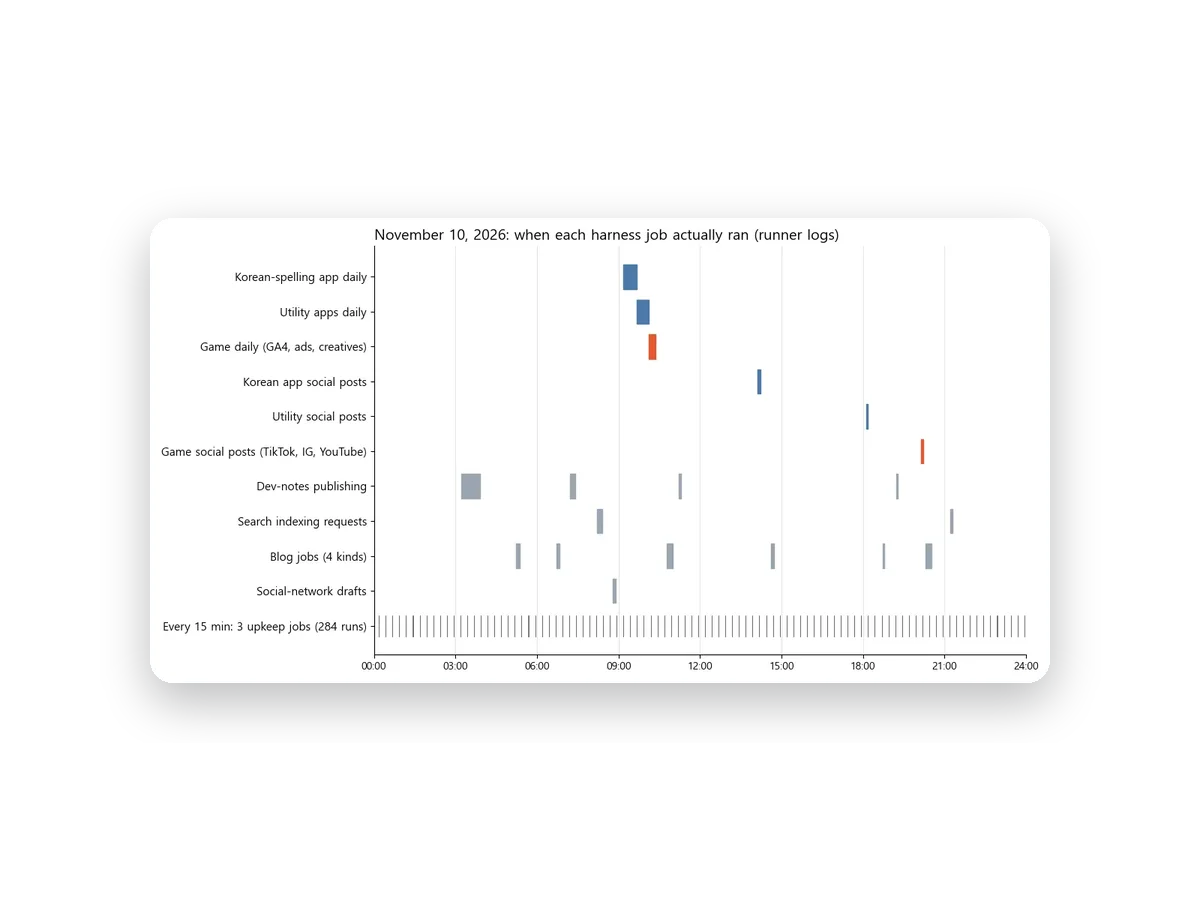
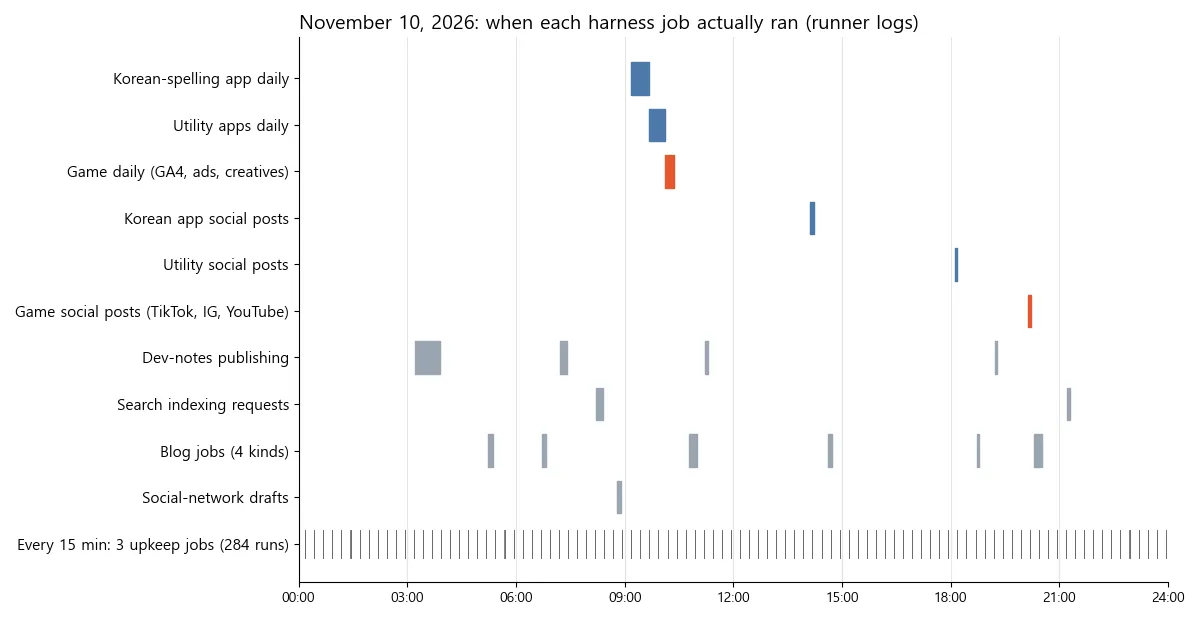
The chart below shows when SugarMount's own harness actually ran on November 10, 2026.
How to read it:
- From 09:11 the three apps' morning jobs ("dailies") run one after another, never at the same time.
- The game daily started at 10:07 and took 13.8 minutes. It checks GA4 numbers, ads, and promo video material.
- The game's social job ran at 20:07. It posts a video to TikTok, Instagram and YouTube.
- The ticks at the bottom are three upkeep jobs that run every 15 minutes: 284 runs that day.
Step 2: Know how it differs from a chat AI
| Question | Chat AI | Harness |
|---|---|---|
| How do you ask? | Open a window and type | Write the task into files ahead of time |
| When does it work? | While you sit at the window | At the times on its timetable, with nobody there |
| Where is the result? | On screen | In log and report files you open later |
| What must be running? | An open chat | A PC that is on, with you signed in to Windows |
"Signed in" (Windows calls it logged on) means your Windows account is in use on the PC. The kit schedules jobs to run only while you are signed in, so it never stores your password. A schedule set up inside a chat session stops when you close that session; with a harness, Windows itself keeps the time.
The harness calls Claude Code as claude -p. The -p flag answers one request without opening a chat window and then exits, which is called headless mode. You try it yourself in Part 4.
Step 3: Learn the kit's four parts
The kit you download in Part 6 has four moving parts. An office comparison helps:
| Part | Office comparison | In the kit | What it does |
|---|---|---|---|
| Task Scheduler | Timetable | registered by register-job.ps1 | The scheduler built into Windows. It wakes the runner, for example at 09:05 every day |
| Job card | One card per task | jobs folder | A job card (a job definition file in the jobs folder) says which instructions, which model, which tools are allowed, and the time limit |
| Prompt | Work order | prompts folder | What Claude should do. Report jobs use only numbers found in the files, and every job ends with a "verdict" line |
| Runner | The clerk who runs it | run-job.ps1 | Runs one job, blocks overlapping runs, enforces the time limit, and writes the work log (logs, reports, state folders) |
The kit was written in Korean. Its default prompts, the line the runner prints when a job ends, and the status table's column names are Korean. English prompts sit in prompts/en; to use one, change the job card's "prompt" to prompts/en/<job>.md. A .ps1 file is a PowerShell script: a file of saved commands. "Model" means which Claude model a job uses; the kit uses haiku for its test job and sonnet for the rest.
SugarMount's real harness has more parts that this series does not build:
| Only in the real harness | What it does |
|---|---|
| Dispatcher | Wakes every 15 minutes, runs the app dailies in order, and carries out approved requests |
| Approval inbox | A Notion table where anything the AI must not do alone (money, accounts, big changes) waits for a person |
| Guard hook | Checks each tool call just before Claude makes it and blocks dangerous commands |
| Watcher | Reads only state and log files, with no model, and reports failures and missed runs |
| Data collection server | Gathers the previous day's ad and GA4 numbers at 09:00 every day (runs in Docker) |
Step 4: Check what you need and what it costs
- PC: one Windows 11 PC. Claude Code's documented minimum is Windows 10 1809 or later, 4 GB of RAM or more, an x64 or ARM64 processor, and an internet connection. Part 2 shows how to check your version.
- Claude plan: Pro is $20 a month ($17 a month billed yearly), Max is $100 a month, Ultra is $200 a month (claude.com/pricing, checked Nov 11, 2026). The free plan does not include Claude Code.
- A PC that stays on: at job time the PC must be on and you must be signed in.
- Marketing accounts: GA4 (downloading a report needs the Viewer role on the property), Google Ads, and your TikTok, Instagram and YouTube channels.
- Docker Desktop: optional. The kit runs without it (Part 5).
It worked if
You can answer yes four times: the PC runs Windows 10 1809 or later; you can pay for a Claude plan; the PC can stay on at the morning job time; you can sign in to GA4 or Google Ads. Then go on to Part 2.
Step 5: Look at the series map
| Group | Parts | What you have at the end |
|---|---|---|
| Install | 2 to 5 | PowerShell open, Git and Claude Code installed, signed in, and a first unattended question answered. Docker is optional |
| Automate | 6 to 7 | The kit downloaded, a first job run by hand, then scheduled for the same time every day |
| Marketing | 8 to 10 | A morning GA4 report, ad budget suggestions, and a plan for TikTok, Reels and Shorts videos |
| Operate | 11 | A start-up order and a morning check routine taken from a 17-day record of real runs |
The kit never touches your ad account; it writes suggestions. It never uploads videos; it writes plans. A person makes the changes and does the posting.
When this setup doesn't fit
| If this is you | Why | What to do |
|---|---|---|
| Your PC is off most of the time, or nobody is signed in | Kit jobs run only while you are signed in. A missed run fires once after the PC is back on | Keep the PC on at job time, or schedule jobs after the time you usually switch it on |
| You want the AI to own the ad budget or posting outright | The kit only suggests and plans. Even the real harness sends money and account decisions to a person | Start with suggestions you read and apply yourself (Part 9) |
| You only have the free Claude plan | The free plan has no Claude Code | You need Pro or higher |
| Your Windows is 32-bit | Claude Code does not support 32-bit Windows | Use a 64-bit Windows PC |
| You can't download GA4 and ad numbers by hand each day | The kit reads only CSV files you download and drop in | Automatic collection is outside this series; run the report on the days you do download |
In the real harness
SugarMount's harness started on October 25, 2026. An older harness that ran in a Linux environment was stopped and rewritten for Windows from scratch, keeping the lessons but none of the code.
As of November 11, 14 jobs were registered in Task Scheduler; the dispatcher calls the rest in order. Each job names its model: opus for the app dailies, which involve the most judgment, sonnet for fixed screen work such as posting, and haiku for self-checks.
FAQ
Can I run a harness on the free Claude plan?
No. Claude Code needs a Pro, Max, Ultra, Team, Enterprise or Console account; the free claude.ai plan does not include it (official docs, Nov 11, 2026).
What happens to a scheduled job if my PC is off?
It does not run at that time. The kit schedules a missed run to fire once after the PC is back on and you are signed in. Part 7 walks through each setting.
Do I need any programming experience?
The series is written for people who are opening a command window for the first time. Part 2 starts with how to open PowerShell and paste a command.
As of Nov 12, 2026. Claude Code official docs (code.claude.com), claude.com/pricing (checked Nov 11, 2026), Microsoft Task Scheduler docs, SugarMount harness runner logs (Nov 10, 2026) and job list (Nov 11, 2026), and the kit used in this series.
This note is written from values SugarMount measured itself; an AI coding agent was used to draft it.