App campaign ad assets from gameplay recordings
Our Google Ads app campaign assets came out of the pipeline that already took our store screenshots, with one recording step, one JSON spec per language, and a width check for Korean headlines.
Ads and metrics for two puzzle games 3/4
A Google Ads app campaign doesn't take a finished ad. You hand it headlines, descriptions, images and videos, and Google assembles the ads itself, so you need the same scenes in several aspect ratios and every language you run. For our puzzle game Arrow Knots we didn't edit any of that by hand. We bolted screen recording onto the automation that already took our Play Store screenshots, and it produced 24 images and 6 videos.
Ad assets are never one-and-done. Every new hook or headline means another round, and here the second round needed no new recording, only an edited spec file.
Contents (7)
- Screen recording on top of the store-capture code
- One JSON spec, and only real gameplay
- Korean headlines count each character as two
- We uploaded videos through Google Ads, not the YouTube API
- v2 changed the spec, not the recording
- Seven steps from capture build to re-cut
- Silent videos and a button-shaped end card
Screen recording on top of the store-capture code
On the evening of October 8, 2026, the operator asked whether it was time to add campaigns or assets in Google Ads. The agent (Claude Code) advised against spending money yet and suggested preparing the assets first, since that part is free. The reply was to go ahead and prepare everything properly.
The agent borrowed our Galaxy S21 for 30 minutes and started with Block Turn, the other game in the same repository. By that evening the ad text, images, videos and a campaign runbook (the step-by-step document the operator follows) were in one commit. Arrow Knots then took the same scripts and changed only the colours and font.
It went that fast because the code for opening boards and making moves already existed. Both games have a capture build, a release-code build with ads and analytics off, that a script drives over adb (Android's command-line tool for controlling a device over USB) to take store screenshots. The new recording script makes exactly the same moves and simply turns on the phone's screen recorder (adb shell screenrecord) around them. The ad images weren't shot again at all: they are the store captures with a caption and background added.
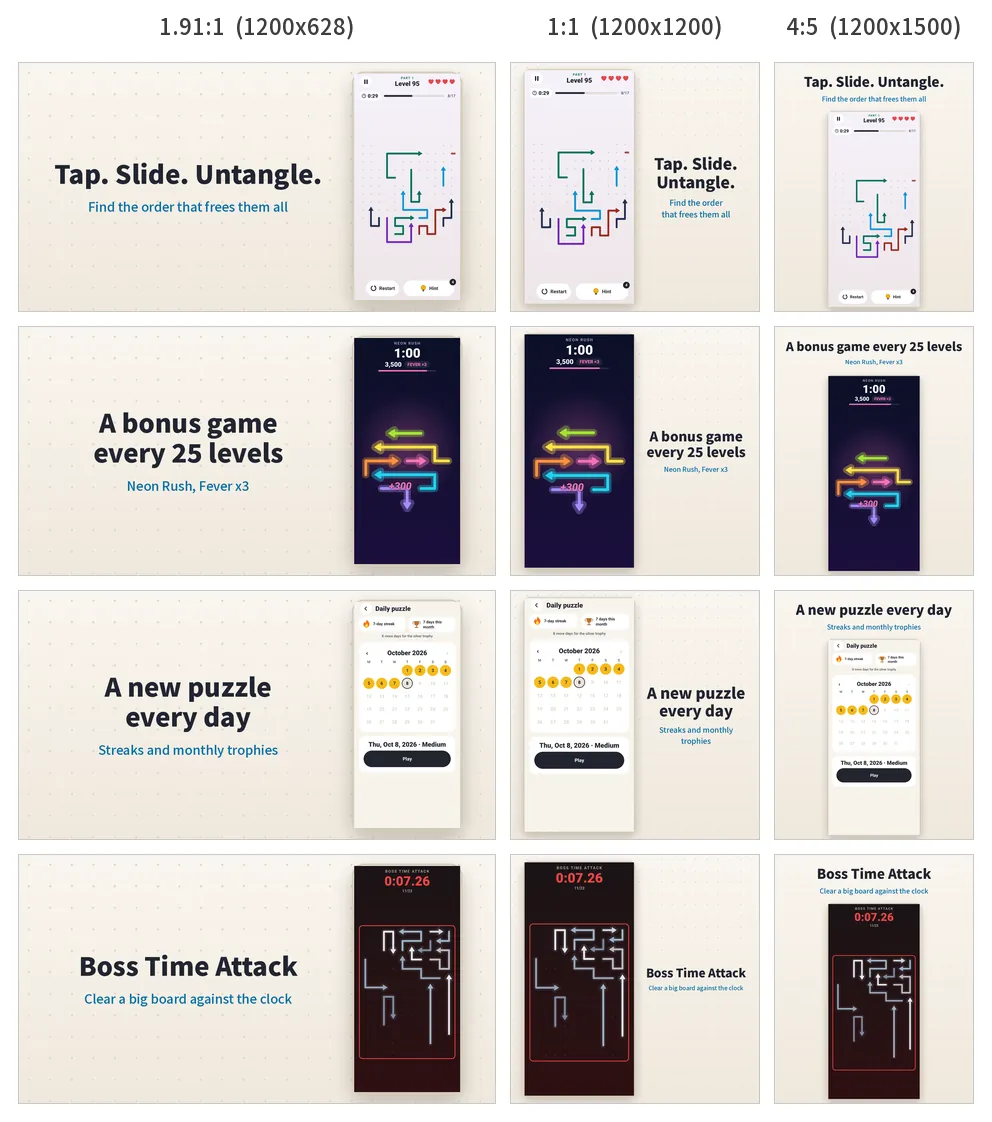
Four scenes, three ratios and two languages give 24 images. The videos come in portrait, landscape and square for each language. A portrait phone recording has to sit differently in each frame: the caption goes left in the wide image, right in the square one and on top in the tall one. One function in the compose script, layout, decides that for every format.
One JSON spec, and only real gameplay
The structure of each video lives in videos.json, not in code. Each scene names a raw recording, the start and end seconds to cut, and the title and subtitle to lay over it. The first Korean cut ran level 95 solved from the first move, then the Neon Rush bonus game that appears every 25 levels, then the big level 705 board, then an end card with the app name. Here is the first English scene:
{"src": "play", "start": 2.5, "end": 16.2, "title": "Tap. Slide. Untangle.", "sub": "Find the order\nthat frees them all"}The compose script reads that line, trims the raw recording play.mp4, draws the caption with Pillow (the Python imaging library) and lets ffmpeg overlay it on the footage.
The recorder's docstring says "Real play only". Google Ads' Misrepresentation policy bans designs that mimic system notifications and non-functional elements that look like buttons, and it flags ads that don't match the app. The repository goes a step further: no staged failures and no mocked screens, only moves the recording script actually made. Images follow the same rule, so they start from store captures.
We had done this the other way before. Our Korean spell-checker app's store images from October 1 used a separate compose script for each screen, plus more for tablet and feature graphics. Every new screen meant a new script. The game pipeline split the work into a spec file and one script.
Keep your ad-asset scripts in the same repository as your store-capture scripts, on the same recordings. If they live apart, the ads keep showing the old screens after the store listing moves on.
Korean headlines count each character as two
App campaign headlines are capped at 30 characters and descriptions at 90. Google Ads help says each double-width character, as in Korean, Japanese or Chinese, counts as two toward the limit.
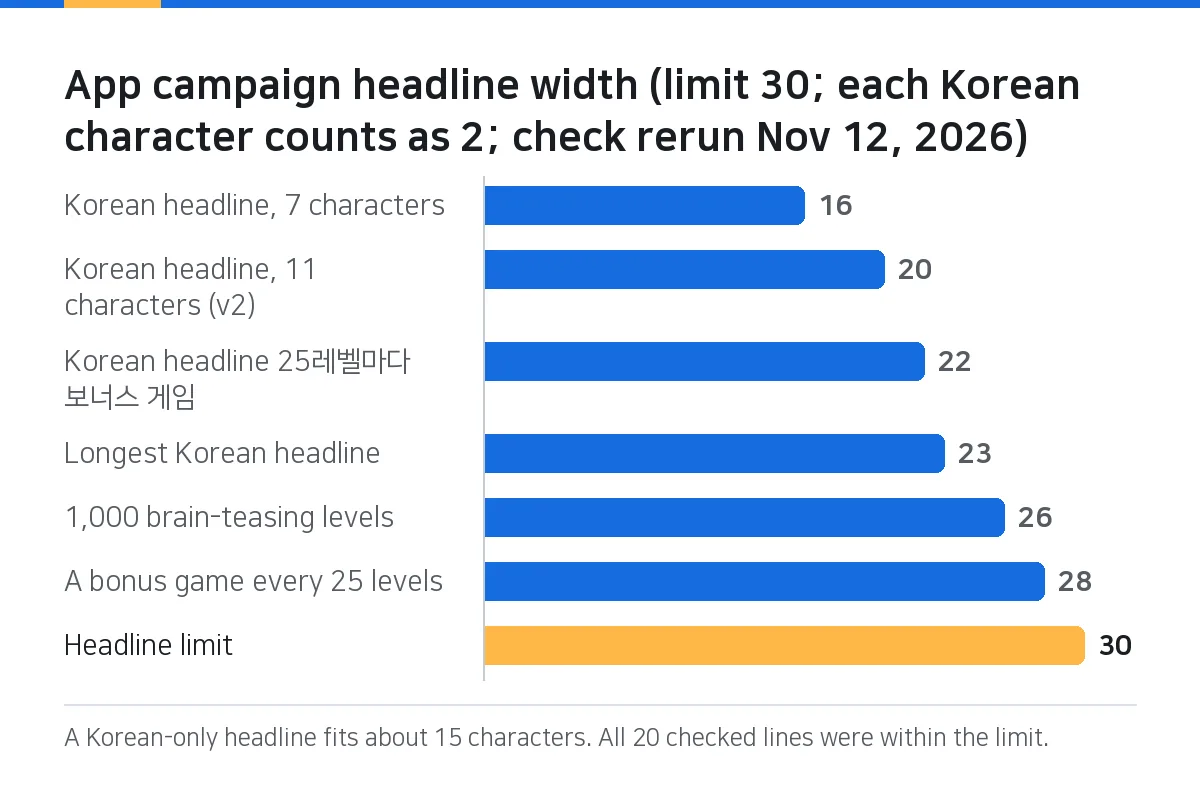
So a headline in Korean only fits about 15 characters. The v2 headline 남은 화살표가 우르르 ("the rest of the arrows tumble out") is 11 characters but 20 wide. Measure it with len() and a line can pass that Google Ads counts as over the limit.
The repository's copy-check script does the measuring, and the core is one function. It reads each character's East Asian width from Python's standard unicodedata module and counts wide (W) and fullwidth (F) characters as two:
import json, unicodedata

LIMITS = {"headlines": 30, "descriptions": 90}

def width(s):
    return sum(2 if unicodedata.east_asian_width(c) in "WF" else 1 for c in s)
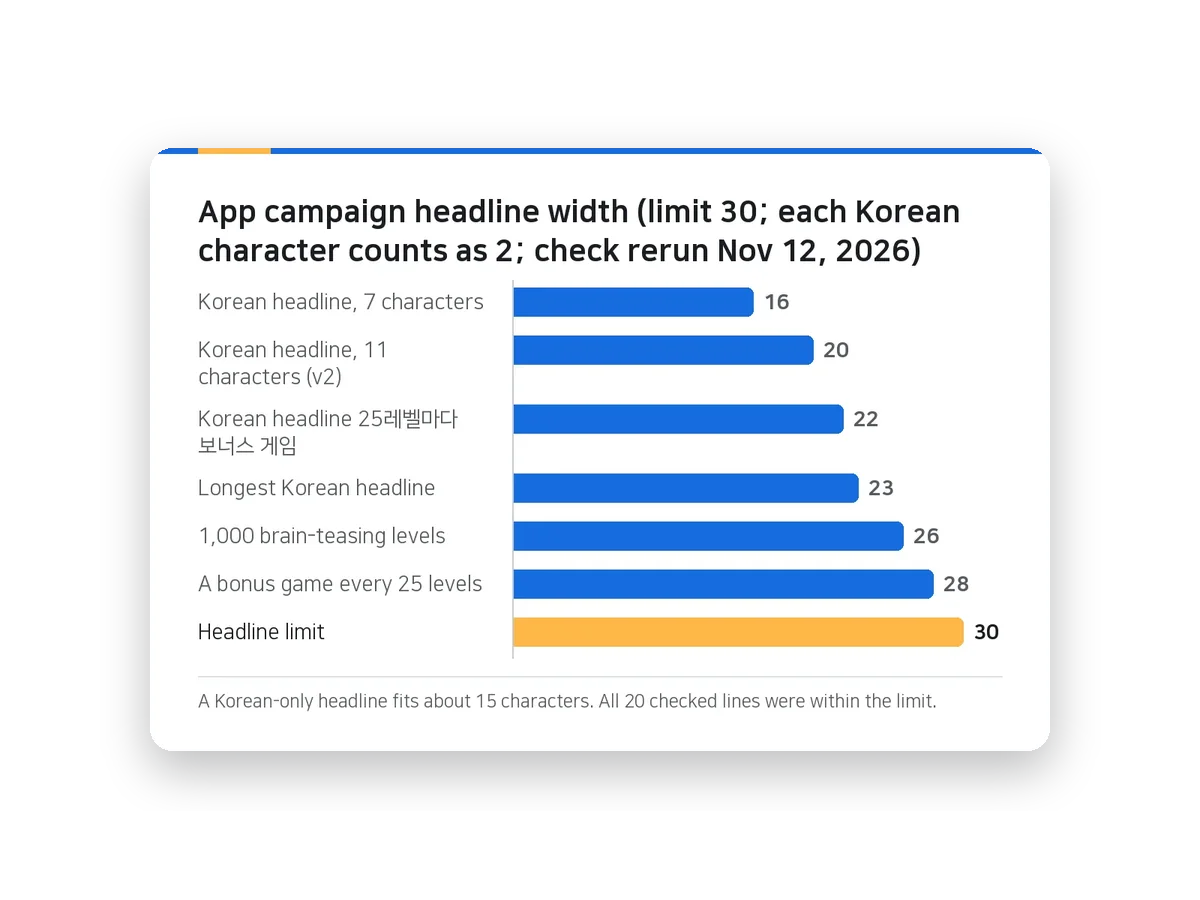
If any line is over, the script exits with code 1. Here is part of the output when we reran it on November 12, 2026:
OK  ko head  16/30 톡 누르면 스르륵
OK  ko head  22/30 25레벨마다 보너스 게임
...
OK  en head  28/30 A bonus game every 25 levels
...
OK  en head  26/30 1,000 brain-teasing levels
All 20 lines passed. The longest English headline used 28 of 30, the longest Korean one 23. Mixed digits, commas and Hangul are hard to count by eye, so the check runs every time the copy changes.
We uploaded videos through Google Ads, not the YouTube API
The agent set out to post the six Block Turn videos to YouTube as unlisted, so their links could go into the campaign, and turned on the YouTube API in a Google Cloud project and wrote an upload script. The login carrying upload permission was refused twice, first with a 400 error and then with a "This app is blocked" page; that story is in gcloud 'This app is blocked' for GA4: impersonate. Building our own OAuth client (a sign-in app registered under our name) and consent screen (the page that asks a user for permission) wasn't worth it for six videos, so the runbook was rewritten: upload the files in Google Ads while adding assets, and they go to the linked YouTube channel. The upload script stays in the repo for when we have our own OAuth client.
The agent had repeatedly said to create a new Google Ads account. There already was one, running ads for the spell-checker app, and the runbook switched to it. The same night the operator set a rule: anything that costs money or looks odd gets asked first (the agent wrote it down as "costs money or is hard to undo"). How that rule shapes daily budget work is in A daily Google Ads budget check that only suggests.
v2 changed the spec, not the recording
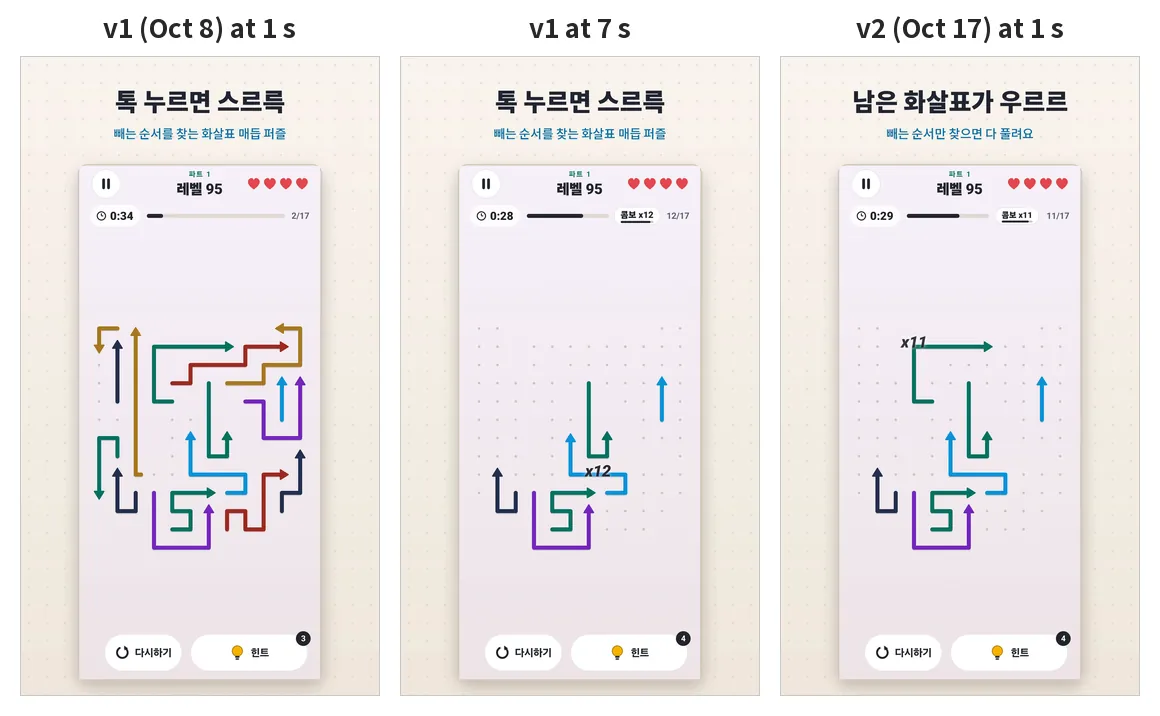
The October 11 marketing plan called for new Korean assets with a board emptying within the first two seconds. v1 solved level 95 from the first move, so that moment came around 7 s in.
The v2 script imports the v1 compose script and only writes a new scene spec. It cuts the same recording from 6.5 s to 12.8 s, where the board empties, puts that first, and swaps the order of the big board and Neon Rush. New Korean headlines went through the width check, and after the operator approved, some of them and the new video went into the campaign that night. All three v2 formats run 22.7 seconds.
Whether the faster hook works is still open. Our automated setup, where AI agents run marketing and operations jobs on a daily schedule, on November 6 logged the asset ratings Google Ads gives each asset for the week before. The v1 portrait video was rated "Best" and the v2 portrait video "Low". With 50 and 57 impressions, that says nothing either way. Spend and cost per install are in Google Ads for a puzzle game: CPI 30x break-even.
The day after v2, its first 11.8 seconds became a TikTok and Instagram Reels clip (the Reel went up on October 20), and on November 6 two Shorts made by that automated setup were added as video assets to both games' Korean campaigns. Planning those clips is covered in TikTok, Reels and Shorts plans with Claude Code.
Seven steps from capture build to re-cut
This assumes your app has a build that a script can drive.
Turn off ads and analytics in the capture build. Our capture and test builds send no analytics events, so device recordings never reach the GA4 reports.
Import the move-making code from your store-capture script and write one recording function per scene. Start with
adb shell screenrecord; stop it with SIGINT (the same interrupt Ctrl+C sends), or the mp4 may not be finished properly.Put a scene spec per language in JSON: raw clip name, start and end, title, subtitle, end-card text.
Decide the per-ratio layout in one function. Draw captions with Pillow and overlay and concatenate with ffmpeg. Build images from store captures in 1.91:1, 1:1 and 4:5 frames.
Run headlines and descriptions through a width checker that counts wide characters as two and fails when a line is over.
Upload videos as files in Google Ads when you add assets. The YouTube API route needs your own OAuth client.
For a new cut, keep the recordings and change only the cut points and order in the spec.
Silent videos and a button-shaped end card
These videos have no sound; the compose script adds a silent audio track. On November 1 the operator rejected our automatically made short-form videos partly for silent gameplay, and the ads still have the same gap.
The end card's "Play free now" is text inside a rounded rectangle in the button colour. The script's comment says it is not a fake store badge or install button, but it sits close to the policy's "non-functional elements that resemble buttons".
Raw recordings are not committed to git. v2 came from originals still in a cache folder; without them, it's back to the phone. A test phone also tends to be shared between sessions. On October 8, eight to ten minutes after the recording finished and the S21 was handed back, another session taking store captures on the same phone had a Block Turn screen pop up and lost one shot. We never found out which session opened it.
The next thing to check is the Shorts assets added on November 6: on November 13 their installs are due to be compared with the seven days before.
Sources: the game repository's git history and asset files; the v2 build and posting log (Oct 17 to 20, 2026); the Oct 8 work log; the Oct 11 marketing plan; a rerun of the copy check and ffmpeg measurements (Nov 12); Google Ads help on text limits and the Misrepresentation policy (checked Nov 12).
This note is written from values SugarMount measured itself; an AI coding agent was used to draft it.