Fitting a JPEG under a file size limit: quality binary search, a predicted long edge, and a final check against the original
Fitting a JPEG under a cap like 500 KB takes a search that encodes and counts real bytes. Here is ours: a quality binary search, a long-edge prediction and a final check against the original.
Three photo apps, the first 20 days 3/4
A 107 KB JPEG went into our photo compressor with a 500 KB limit and came out as a 150,250-byte file. That was a device test on a Galaxy S20 (Android 13) on October 4, 2026, running version 1.0.5 of Compress Image; a Galaxy S21 and an emulator showed the same 40% growth that day. The output was under the limit, so the search code reported success. The search works within quality 40 to 95, at most 20 encodes and 30 seconds per photo, and a 320 px long-edge floor; a keep-the-original rule shipped the same evening.
Sources: the search code and its 12 tests in the app repository (September 20, 2026), three device test reports and the fix (October 4, 2026), and the QA script that generates the test image. Numbers rechecked against the source on November 2, 2026.
Contents (9)
- A 107 KB JPEG became 150 KB under a 500 KB limit
- Each resolution level tries q95, then q40, then a binary search
- The next long edge comes from the square root of the byte ratio
- The search never saw the original's size, and a test locked that in
- The fix keeps the original's coded image with metadata stripped
- PNG originals and photos over the edge limit still get re-encoded
- From a byte-counting encoder to the check against the original
- No device numbers for 1.0.6 yet, and no encode timings
- FAQ
A 107 KB JPEG became 150 KB under a 500 KB limit
Three test reports used copies of the same test image (test_small.jpg) and got nearly the same result. The Galaxy S21 report lists the original at 107,093 bytes and the output at 150,170 bytes, 40% larger. On a Pixel 8 Pro emulator (API 35) a 107,100-byte copy became 150,162 bytes. The result screen did show a "larger than the original" label, but Save all wrote the larger file anyway.
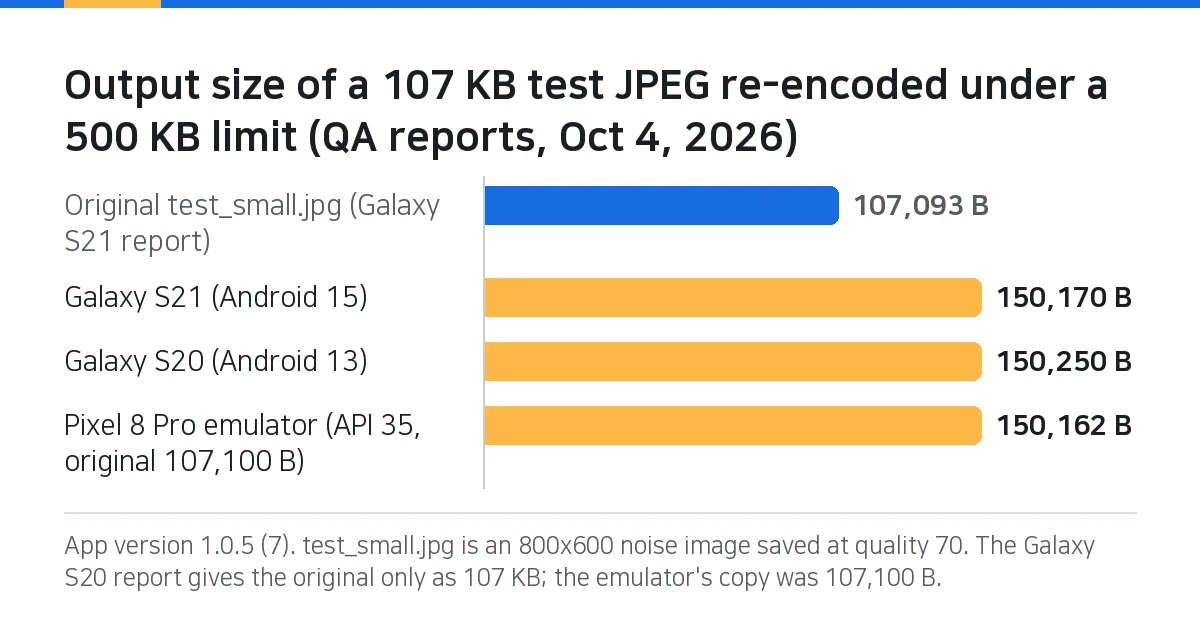
test_small.jpg is not a real photo. Our QA script makes it by saving an 800x600 noise image at JPEG quality 70. An ID photo that already met the size rule took the same path, so it could also come back larger than it went in, by an amount that depends on the photo. The user-side guide is Resize an ID photo for Korean application uploads. The reports rated the bug minor.
Each resolution level tries q95, then q40, then a binary search
TargetSizeSearch is a plain Kotlin class with no Android imports. It sees the encoder only as a function from (long edge, quality) to the real byte count, so the whole search runs in JVM unit tests. The default SearchBudget is quality 40 to 95, 20 encodes and 30 seconds per photo, and a 320 px minimum long edge. The 30-second check happens before each encode; an encode already running is not interrupted.
At one resolution level the search encodes at q95 first and stops if that fits. If not, it tries q40. When q40 is still too large, it gives up on the level and shrinks the long edge. When q40 fits and q95 does not, it binary-searches 40 to 94 and stops as soon as a fitting result is within 8% of the limit (92% or more of the target). The code comment puts the worst case at 2 + 6 = 8 encodes per level.
The tests use a fake encoder: bytes = 3 MB x (edge ratio)^2 x (0.15 + 0.85 x (q/95)^2). We ported the search logic to Python and ran it on that model for a 4000 px photo and a 500 KB target. These are not device numbers; the table only shows the order of steps.
| Encode | Long edge | Quality | Bytes | Decision |
|---|---|---|---|---|
| 1 | 4000 | 95 | 3,000,000 | too large |
| 2 | 4000 | 40 | 902,077 | too large; predicted scale 0.71 |
| 3 | 2829 | 95 | 1,500,607 | too large |
| 4 | 2829 | 40 | 451,221 | fits; search 40 to 94 |
| 5 to 7 | 2829 | 67, 53, 46 | 859,528 / 622,091 / 524,148 | all too large |
| 8 | 2829 | 43 | 486,413 | fits and is within 8%; stop |
The usual sample code that only lowers quality cannot fit this photo. At the full 4000 px, even q40 is 902,077 bytes, and the test comment does the same arithmetic ("q40 is ~0.3 * 3 MB = 900 KB").
The next long edge comes from the square root of the byte ratio
When q40 is too large, the next long edge is the current one times sqrt(limit / q40 bytes) x 0.95. If bytes grow roughly with pixel count, the long edge grows with the square root. The factor is clamped to 0.5 to 0.85: 0.85 is the normal step, and 0.5 stops a noisy estimate from throwing away most of the resolution in one jump. The edge never goes below 320 px, never asks for more than the source, and drops by at least 1 px even when rounding would keep it the same, so every level is smaller than the last.
val predicted = sqrt(targetBytes.toDouble() / floor.bytes.toDouble()) * 0.95
val factor = predicted.coerceIn(budget.maxDownscaleJump, budget.downscaleStep)
val next = max(budget.minLongEdgePx, (edge * factor).roundToInt())
edge = if (next < edge) next else edge - 1 // strictly decreasing
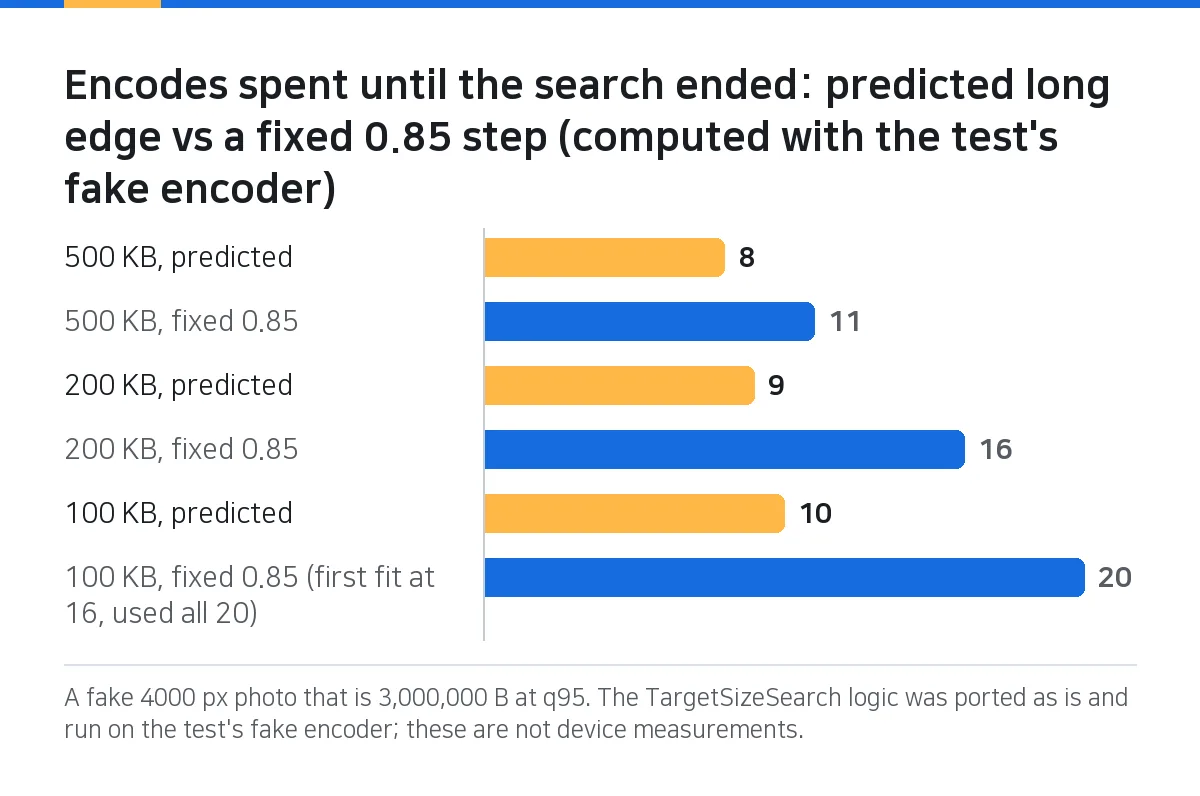
We also ran the same fake photo with a fixed 0.85 step. Counting encodes until the search ended, the 500 KB target took 8 with prediction and 11 without; 200 KB took 9 and 16; 100 KB took 10 and 20. At 100 KB the fixed step first fit on its 16th encode (92,806 bytes at 1283 px and q40), then spent the rest of the 20-encode budget looking for a higher quality and ended on that q40 result.
An impossible target still ends. With an encoder that returns 10,000,000 bytes for everything and a 50 KB target, the long edge goes 4000, 2000, 1000, 500, 320, two encodes per level, and the search fails at the resolution floor after 10 encodes. The failure carries the smallest size it saw. The code comment says this is so the screen can show how far off it was, but today the app shows only a fixed "could not be reached" message and the number stays in the error text.
On Android, the encoder (LevelEncoder) scales the bitmap once per level and re-encodes only the quality. Each candidate is written to a file and its length is counted, and the winning file is saved as is: the saver copies the exact bytes the user previewed.
The search never saw the original's size, and a test locked that in
The 107 KB test image finished on the first encode, because its q95 re-encode, about 150 KB, was under 500 KB. The only success condition in the search is "at or under the limit". The search receives the byte limit, the source long edge, the long-edge cap and an encoder, nothing about the original file, so it does not know how many bytes the original had, or even that it was a JPEG.
The tests had already written this down as correct. The first commit, written with an AI coding agent, includes a test named "input already under target passes with a single encode at max quality". Its fake encoder returns 100,000 bytes at q95, and the test expects one encode and 100,000 bytes. The fake encoder treats a q95 encode as the size of the original. The end-to-end test added with the fix notes that a q95 re-encode grows a q50 file ("re-encoding at q95 grows a q50 file"). All 12 search tests passed, and two weeks later the bug showed up on real phones.
Two of the reports pointed at TargetSizeSearch.kt as the place to fix. That file is still exactly as it was first written. The fix went into the app's worker, which calls the search. The rule there uses the original's format and size, which the engine reads from the file, together with the user's long-edge limit and compression mode from the app settings.
The fix keeps the original's coded image with metadata stripped
The Galaxy S20 report left the policy to a person: keep an already-small JPEG byte for byte, or drop or deselect outputs larger than the original. The operator decided that day that a saved result is never larger than its original, and the change shipped that evening (version 1.0.6, 410 unit tests, 0 failures).
Keeping the original byte for byte was rejected. The app removes metadata such as location by default, and an untouched original would keep its GPS tags. Instead, JpegMetadataStripper copies the coded image (quantization and Huffman tables, frame header, every scan) unchanged and drops EXIF, XMP and similar blocks. The decoded pixels match the original. Only the orientation is written back, as a minimal EXIF block, and colour data (the ICC profile and Adobe APP14) stays.
The rules for when that copy replaces the result sit in one place, KeepOriginalPolicy:
- Only still JPEG originals qualify, because the store listing promises JPEG output.
- If the user set a long-edge limit, the original must already be within it.
- The copy must be no larger than the original, the encoded result and, in target-size mode, the limit. For the 107 KB case that cap is 107,000 bytes. On a tie, the lossless original wins.
- If the search fails to reach the limit but the original already fits, the copy turns the failure into a success.
If you write a target-size search, compare its result with the original before saving. Tests built on a fake encoder will not catch this case.
PNG originals and photos over the edge limit still get re-encoded
The keep-the-original path applies only to JPEG originals. PNG, WebP and HEIC files can grow when they become JPEG (the 10 KB PNG became 36 to 37 KB), and the app still labels them "larger than the original"; the store listing says the same. When an original is larger than the user's long-edge limit, only the encoded result satisfies the request, so that result stays whatever its size.
The binary search assumes that higher quality never means fewer bytes. The random-encoder test (300 seeds) proves only that the search ends and stays within budget; we have not looked for real photos that break the assumption. A photo that is still over the limit at 320 px and q40 fails. For passport-style uploads with fixed pixel dimensions, the search does not crop to an aspect ratio, so crop first.
From a byte-counting encoder to the check against the original
- Wrap the encoder as a function from (long edge, quality) to real bytes: write the
Bitmap.compressoutput to a file and take its length. Keep Android imports out of the search class. - At each level, measure q95 and q40 first, then binary-search between them. Stop once a fitting result is within 8% of the limit.
- If q40 is still too large, set the next long edge with
sqrt(limit / q40 bytes) x 0.95, clamped to 0.5 to 0.85, with a 320 px floor, no upscaling and a strict decrease. - Stop after 20 encodes or 30 seconds, and return the smallest size seen when you fail.
- Reuse the scaled bitmap within a level, and save the winning candidate file as is instead of encoding again.
- After the search, compare with the original. If it is a JPEG within the edge limit and the size limit, use a metadata-stripped copy when that copy is no larger than the original, the result and the limit.
- Test with a random encoder, an injected clock (an encoder that takes 10 s per call times out after 3 encodes) and the no-upscale rule. Then, on a real phone, process one already-small JPEG with a 500 KB limit and compare output bytes with the original; to reproduce this bug, use an 800x600 noise image saved at quality 70.
No device numbers for 1.0.6 yet, and no encode timings
As of November 2, the repository has no device measurement of the 107 KB case on version 1.0.6. This fix has been checked only by unit tests (KeepOriginalPolicyTest, JpegMetadataStripperTest) and a Robolectric end-to-end test: a q50 JPEG with GPS tags does not grow and keeps the same pixels. The release-build, 1 MB, PNG and WebP rechecks that the Galaxy S20 report deferred have not been done either. We have not measured how much real photos (camera or messenger JPEGs that are already compressed) grow when re-encoded at q95, nor how many encodes, or how many seconds, a real photo takes. The 30-second cap comes from the product spec's suggestion, and neither cap has a device measurement behind it in the repository.
FAQ
What JPEG quality gets a photo under 500 KB?
There is no fixed value. Bytes at a given quality depend on resolution and content, so you have to encode and count. The fake 4000 px photo in this note fit at 2829 px and q43 (486,413 bytes), while at full size even q40 was 902,077 bytes.
Why does re-compressing a small JPEG make it bigger?
A re-encode's size is set by the new quality setting and the pixels, not by the old file's size. A 107,093-byte test JPEG saved at quality 70 became 150,170 bytes at q95 (Galaxy S21 report). Comparing with the original and keeping the smaller file prevents it.
Is 1 KB 1,000 or 1,024 bytes in a target-size search?
This app uses 1,000 bytes. A file fitted to 500 KB is at most 500,000 bytes, so it also passes a site that counts 500 KB as 512,000 bytes.
This note is written from values SugarMount measured itself; an AI coding agent was used to draft it.