gcloud 'This app is blocked' for GA4: impersonate
Adding the analytics scope to a gcloud login gets "This app is blocked". Leave the scopes alone and impersonate a service account; it reads GA4 with no key file.
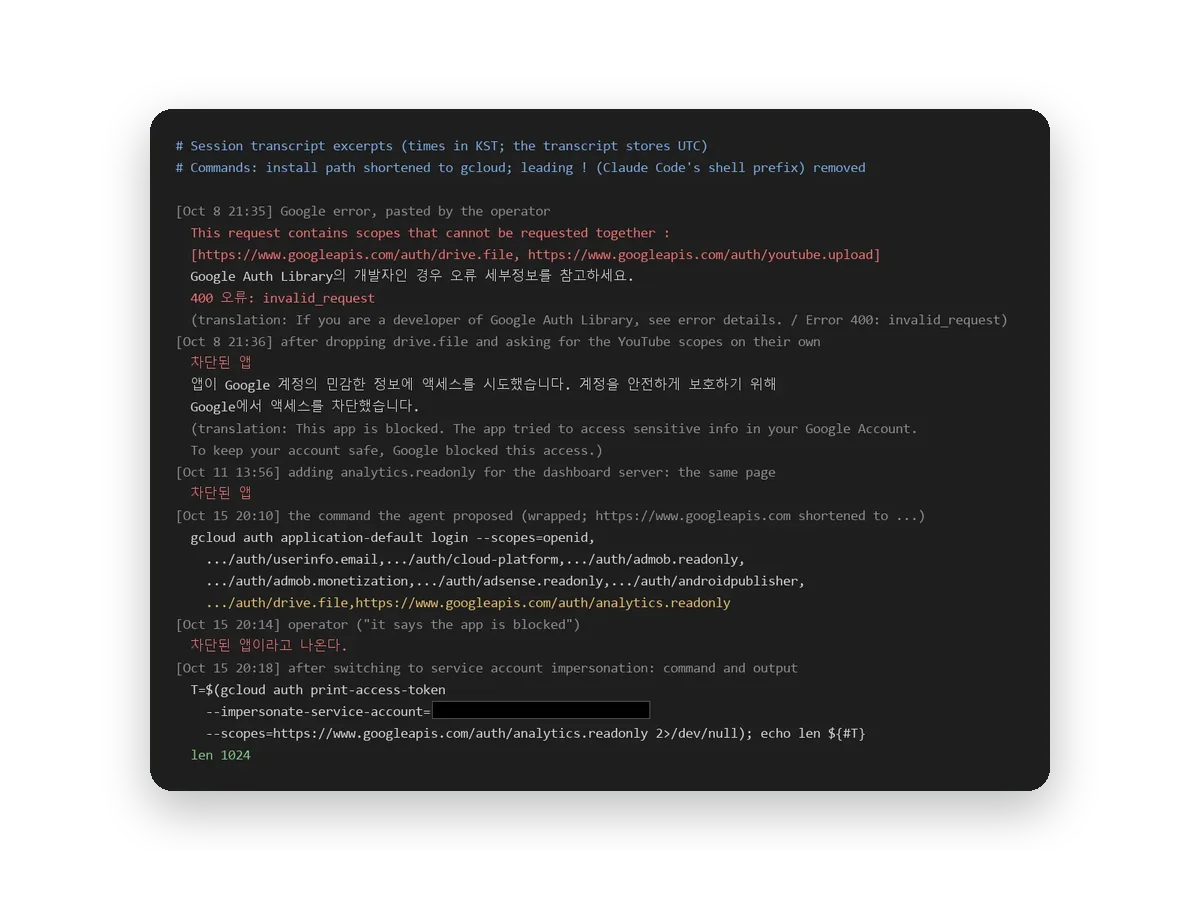
A script that reads Google Analytics 4 (GA4) needs an access token carrying the analytics scope. The usual move is to add that scope to gcloud auth application-default login, and then the browser shows Google's "This app is blocked" page (the operator's Korean screen read 차단된 앱). Changing the scope list changed nothing. SugarMount saw that page three times between October 8 and 15, 2026, asking for YouTube and analytics scopes, and each time the login command came from an AI coding agent.
On the 15th we switched to service account impersonation: your own account fetches a short-lived token on behalf of a service account. Less than five minutes after the block, the agent was listing GA4 properties, and no key file was ever created.
Contents (5)
Three runs into the same page
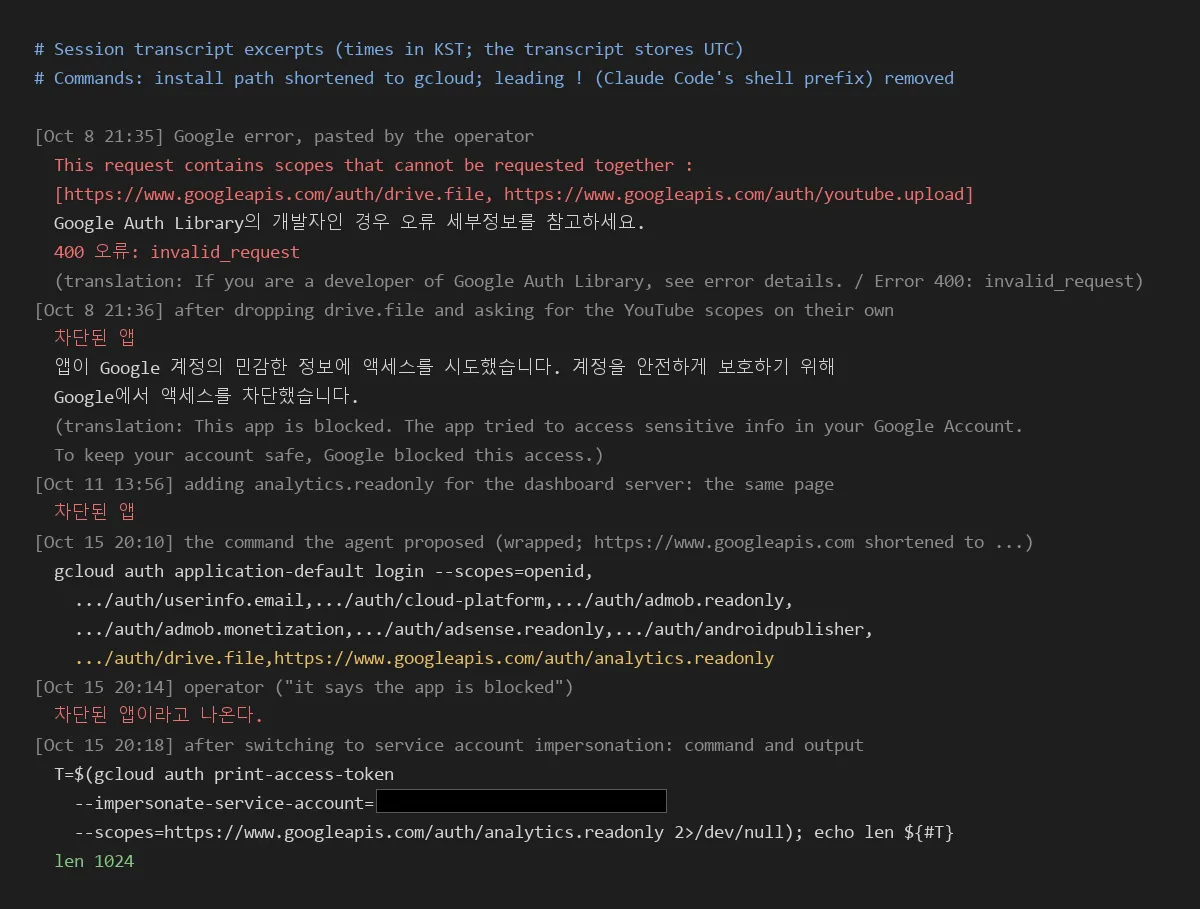
On the night of October 8 the agent wanted to upload ad videos to YouTube and proposed a login asking for drive.file and youtube.upload together. Google answered with a 400 saying those scopes cannot be requested together. Dropping drive.file and asking for the YouTube scopes on their own, from a separate gcloud config folder, produced "This app is blocked", and the agent gave up on the API upload and moved the videos to the Google Ads upload screen (App campaign ad assets from gameplay recordings). On the 11th the same page appeared while wiring GA4 into a personal dashboard server, and on the 15th while looking at uninstall counts for two games.
The block is on gcloud's own login app
On the 15th the starting point was a 403 with ACCESS_TOKEN_SCOPE_INSUFFICIENT. The diagnosis was right: the token from ADC (Application Default Credentials, the default credentials scripts borrow) had no analytics scope. The fix was wrong. gcloud auth application-default login opens the consent screen with the OAuth client built into gcloud. Changing the scope list did not help, and neither did a separate config folder. On the 11th, a desktop OAuth client we created ourselves asked for the same analytics.readonly and went through.
What the agent kept from October 8 was one parenthetical inside a game release status note: the gcloud client is blocked for YouTube scopes. On the 15th the session read that note and, 39 seconds later, proposed the same shape of login command with the analytics scope swapped in. When an agent hands you a gcloud login command and says one more scope will fix it, don't run it.
Getting an impersonated token without a key
In the Cloud project linked to GA4, enable the IAM Credentials API (the API that issues service account tokens) and the Analytics Data API, and create a service account. Do not create a key.
Give your own Google account the Service Account Token Creator role (roles/iam.serviceAccountTokenCreator) on that service account.
In GA4 Admin, under account access management, add the service account's address as a Viewer. Adding it at the account level covers every property.
Mint a token and send it in the Authorization header as a Bearer token to the GA4 Data API.
gcloud auth print-access-token --impersonate-service-account=<service account address> --scopes=https://www.googleapis.com/auth/analytics.readonly
Your login only uses the cloud-platform scope (general Google Cloud access) it already had, to call the IAM Credentials API; the analytics scope sits on the service account's token. gcloud's impersonation flag needs a gcloud user login, so on a Windows PC with only ADC we changed the tool to call the IAM Credentials API directly (October 22). On the 15th, Claude Code's auto-mode permission classifier (an automatic check that hands risky commands to a person) refused steps 1–2 (the role grant included), so the operator ran them by hand, and also did step 3 in the GA4 screen.
The other route is a desktop OAuth client you create yourself. Since October 11 our dashboard server has used one, limited to AdMob read, GA4 read and Gmail send. That route means keeping a client secret file, so on the 15th we picked impersonation, which leaves no secret to leak.
The fix was written down in one folder only
That evening the agent wrote a separate note in the game folder's project memory, just for GA4 access. Its first line is the working command, followed by Why and How to apply fields (why the rule exists, when to use it): putting analytics.readonly into ADC gives "This app is blocked", and the tool to use instead.
Claude Code memory lives per project folder, so the note only works there. Two days later, in a session for another app (a Korean document viewer), a subagent hit a GA4 Data API 403 and again left an ADC login command in its report; that session's misreading is in GA4 shows zero? Read a table report's total row first. On October 25 another project tried a spreadsheets scope the same way and hit "This app is blocked" a fourth time. We have not tried Gmail send, AdMob read or YouTube upload through impersonation.
If you run agents across several projects, put the working impersonation command, plus one line saying never to add scopes to a gcloud login, in the user-wide instructions every project reads (for Claude Code, ~/.claude/CLAUDE.md in your home folder). Claude Code loads that file at the start of every session, in every folder.
FAQ
Why does Google say "This request contains scopes that cannot be requested together"?
Some scope pairs are refused in a single login request. On October 8 the pair was drive.file and youtube.upload. Dropping drive.file and asking for the YouTube scopes alone made the 400 go away, but the YouTube scopes then hit "This app is blocked" through gcloud's default login.
Do I need a service account key file to read the GA4 Data API?
No. Give your account the Token Creator role on the service account, add the service account as a Viewer in GA4 account access management (the agent said doing this through the API would need a scope gcloud's login is blocked from, so the operator did it in the GA4 screen), and mint short-lived tokens with --impersonate-service-account. The service account in this note has read GA4 since October 15 with no key file.
Checked 2026-11-12. Claude Code session transcripts (Oct 8 to 25), project memory, and the git history of the dashboard server and game repositories.
This note is written from values SugarMount measured itself; an AI coding agent was used to draft it.
More AX notes
- Commits without a Co-Authored-By trailer: the agent made 26 of the 29 we could check
- Every branch passed its AI review, and the merged code still had 12 defects
- Install Claude Code on Windows: Git to first run
- Claude Code on WSL vs native Windows: what changed after the move
- Android 16 KB page size: add the linker flag before you upgrade the NDK (NDK 27 and 29 tinted our photos blue)
- Jetpack Compose splits Korean between syllables, but the stacked 'R/u/l/e' label came from how a Row measures