Claude Code on WSL vs native Windows: what changed after the move
Moving Claude Code from WSL to native Windows took one day for the repos and four more for session logs and Docker. The session logs need new folder names, a rewritten cwd and longer retention.
This is a checklist for anyone running Claude Code inside WSL (the Windows Subsystem for Linux) who wants to move to native Windows. We moved the repos and tools in one day, October 18, 2026, and verified them with an R8 release build and 1,500 monkey events. Session logs and Docker took until October 22.
In those four days the agent got five things wrong: session logs nearly disappeared, its advice for stopping WSL also stopped Docker, and plugins in daily use were removed. The eight steps below are ordered with those mistakes in mind.
Contents (10)
- The checklist, in eight steps
- Git settings for the copied repos
- Tool versions, and two workarounds we deleted
- Session logs live outside the project folder
- Eight missed root logs, and a shutdown that took Docker down
- Four things that kept waking Ubuntu
- Calling it done: an R8 build and 1,500 monkey events
- Step 3 fails on machines that can't create symlinks
- No build-time comparison yet; only the operator saw the /resume list
- FAQ
The checklist, in eight steps
We had used WSL because Claude Code used to be slow in the Windows terminal, with many features not working. On October 18 the operator asked whether Windows was usable now; the agent said yes and suggested trying one project for a day or two first. The operator said to move everything at once, and when approving the tool installs, told it to run a build as well. Keeping the projects in WSL and opening them from Windows through the WSL network path was ruled out because the agent called that path very slow (we never timed it).
If you follow this order, most of what went wrong for us gets caught early.
- Copy projects from the WSL home to the Windows home. Don't move them. Leave out
node_modules,build,.gradle,.dart_tool,.nextand.cxx. - Run
git status --porcelain | wc -lin every repo on both sides and make sure the counts match. - Set
core.filemode=false(submodules too), switch repos with symlinks tocore.symlinks=trueand check the links out again, rungit worktree repair, and fixsdk.dirin Android'slocal.properties. - Check tool versions and install what's missing per user, without admin rights.
- Rewrite the environment section of your Claude Code instruction file and delete workarounds that only WSL needed.
- Raise
cleanupPeriodDaysbefore you copy session logs. Then copy them under the new folder names, rewritecwdinside them, and look for logs in.claude/projectsunder the WSL root account's home too. Sessions that kept running in WSL after the move need one last sync. Finally, openclaude --resumein each project folder and check the old sessions are listed; run it from any other folder and the session is saved under a separate project folder. - Turn off whatever wakes Ubuntu, and if you run Docker Desktop, stop only Ubuntu with
wsl --terminate <distro>. You're done whenwsl -l -vshows Ubuntu as Stopped and docker-desktop as Running. If you change.wslconfig, applying it takes onewsl --shutdown, and Docker stops briefly with it (our containers were back within a minute). - Install an R8 release build on an emulator, run 1,500 monkey events, and check the crash buffer and that the process is still alive.
These are the commands we used for steps 1 and 3, gathered into one block, with repo names replaced by placeholders. Links inside a repo were found as the files git records with mode 120000.
# step 1 (inside WSL)
rsync -a --no-links --exclude=node_modules --exclude=build --exclude=.dart_tool \
  --exclude=.gradle --exclude=.next --exclude=.cxx <folders> <Windows home>/

# step 3 (Git Bash, per repo)
r=<repo>
git -C "$r" config core.filemode false
git -C "$r" submodule foreach --quiet 'git config core.filemode false'
export MSYS=winsymlinks:nativestrict
git -C "$r" config core.symlinks true
git -C "$r" ls-files -s | awk '$1=="120000"{ $1=$2=$3=""; sub(/^ +/,""); print }' > "$TMP/links.txt"
while IFS= read -r p; do rm -f "${r:?}/${p:?}"; done < "$TMP/links.txt"
tr '\n' '\0' < "$TMP/links.txt" | xargs -0 git -C "$r" checkout --
git -C <main repo> worktree repair <worktree paths...>
Git settings for the copied repos
From inside WSL, rsync -a --no-links copied 35 folders (16 of them worktrees of our game repo) and one bundle file to the Windows home, about 1.5 GB once build outputs were excluded. The WSL originals stayed where they were as a backup. That was the operator's rule, and we went back to those originals twice to recover session logs the first pass had missed.
Because of --no-links, rsync skipped every symlink with "skipping non-regular file". In the three repos that had links, we set core.symlinks=true, exported MSYS=winsymlinks:nativestrict in Git Bash, deleted the placeholder files and ran git checkout on them. In the utilities repo, CLAUDE.md came back as a real link to AGENTS.md. Every repo and submodule got core.filemode=false so permission-bit differences don't show up as changes. The game repo's 16 worktrees still pointed at Linux paths in their .git files; git worktree repair fixed the "gitdir incorrect" entries.
To check the copy, we compared the git status --porcelain line count of each repo against the WSL original: 23 lines in one repo, 0 in another, and so on. All matched except one repo, where a browser download marker, …pptx:Zone.Identifier, had been committed by mistake. Windows doesn't allow a colon in file names, so the file couldn't be created; git update-index --skip-worktree told git to ignore it.
The trees copied this way stayed mostly LF. The fresh work trees our harness later checked out for each repository came out CRLF because of core.autocrlf=true, and checks that count bytes broke four times in a month. That record is in Claude Code on Windows: CRLF broke four checks.
Tool versions, and two workarounds we deleted
The WSL-era instruction file listed node 20 and python 3.10. Windows already had node 22 and python 3.12, so the environment section we rewrote that morning used those (v22.18.0 and 3.12.3 as of November 2). The java on PATH was a Java 8 JRE with no javac, so JDK 21 went into the user folder from a zip and Gradle was pointed at it with org.gradle.java.home in ~/.gradle/gradle.properties. The winget install of the Google Cloud CLI stalled on a UAC prompt that was never approved, so we unpacked Google's zip into the user folder and added it to the user PATH. In Git Bash it has to be called as gcloud.cmd. jq, which WSL never had, and rg, which Windows lacked, came from winget with --scope user.
Some of our Android projects live on another Windows drive. Under WSL that drive was mounted over the 9p file system, Gradle's lock files broke there, and the instruction file told the agent to pass a separate --project-cache-dir or build from a copy on the Linux side. On native Windows the drive is used directly, so the new file drops that rule. A second line went too: "flutter on PATH is the Windows SDK, so call the Linux SDK by absolute path" no longer applies with only the Windows SDK left. Across the 5 sessions for projects on that drive since the move (81 jsonl files counting subagent logs), Timeout waiting to lock and Could not lock appear zero times, though few full builds ran there in that period.
Session logs live outside the project folder
With every project copied, claude --resume on Windows still showed none of the old sessions. Claude Code keeps session logs under ~/.claude/projects/, in a folder named after the working directory's absolute path. A project folder in the Linux home maps to -home-<user>-<project>, and the same folder in the Windows home maps to C--Users-<user>-<project>. On the night of October 18 we copied the 14 folders that had logs (about 3.1 GB) under their new names.
They still didn't show up as of October 21, because every line in a log carries a "cwd" field, and those still held Linux paths. When the agent tried to rewrite them in bulk, Claude Code's automatic permission check blocked it as tampering with session transcripts. We didn't work around the check. The agent wrote a script that changes only cwd, the operator ran it with a ! command, and 31 files were rewritten.
In each log, the script changes the cwd value from the Linux path to the Windows path and leaves the conversation text and the file's modification time alone. It only rewrites the top-level session files; subagent logs in subfolders are left as they are. Sessions opened outside the home (on another drive, for example) need their own line for that path. Below is the actual script with the second-drive handling and the user name taken out, and the Windows home detected automatically. If you run it with ! from Git Bash, pass the script path with forward slashes; the shell strips backslashes, which is why our first run couldn't find the file.
# Rewrite only cwd in copied session logs (.jsonl) to Windows paths. Keeps mtime.
import os, re, glob

LINUX_HOME = '/home/<user>'
WIN_HOME = os.path.expanduser('~')          # %USERPROFILE%
root = os.path.join(WIN_HOME, '.claude', 'projects')
pat = re.compile(r'"cwd":"' + re.escape(LINUX_HOME) + r'((?:/[^"]*)?)"')

def rep(m):
    # inside a JSON string, so backslashes are doubled
    path = (WIN_HOME + m.group(1).replace('/', '\\')).replace('\\', '\\\\')
    return '"cwd":"%s"' % path

n = 0
for f in glob.glob(os.path.join(root, '*', '*.jsonl')):
    with open(f, encoding='utf-8') as fh:
        s = fh.read()
    if '"cwd":"' + LINUX_HOME not in s:
        continue
    st = os.stat(f)
    with open(f, 'w', encoding='utf-8', newline='') as fh:
        fh.write(pat.sub(rep, s))
    os.utime(f, (st.st_atime, st.st_mtime))
    n += 1
print('rewritten', n)
That is when we noticed five logs from September 18 to 20 were gone. The agent had kept the original modification times when copying, and by default Claude Code deletes logs untouched for more than 30 days when it starts. We added "cleanupPeriodDays": 3650 to ~/.claude/settings.json and copied the five back from WSL.
Eight missed root logs, and a shutdown that took Docker down
On the night of October 22 the operator said the session logs didn't seem to have come across properly. The agent had already reported the job finished. A second look found it had missed all 8 logs under the WSL root account, and one session that kept running in WSL after the move was out of date. After those 9 were copied and their cwd rewritten, no log with a Linux path was left.
The agent was also wrong about stopping WSL. Six of its reports from October 18 to the afternoon of October 22 told the operator to ask for wsl --shutdown. On the night of October 22 the operator ran it, and Docker went down with it. Two more reports after that still carried the same line. --shutdown stops the whole WSL2 virtual machine, and Docker Desktop runs in a docker-desktop distro on that same VM. The command that stops only Ubuntu is wsl --terminate Ubuntu-22.04. When Ubuntu came back up afterwards, the likely cause was a find the agent had started inside Ubuntu earlier to search for session logs, still running.
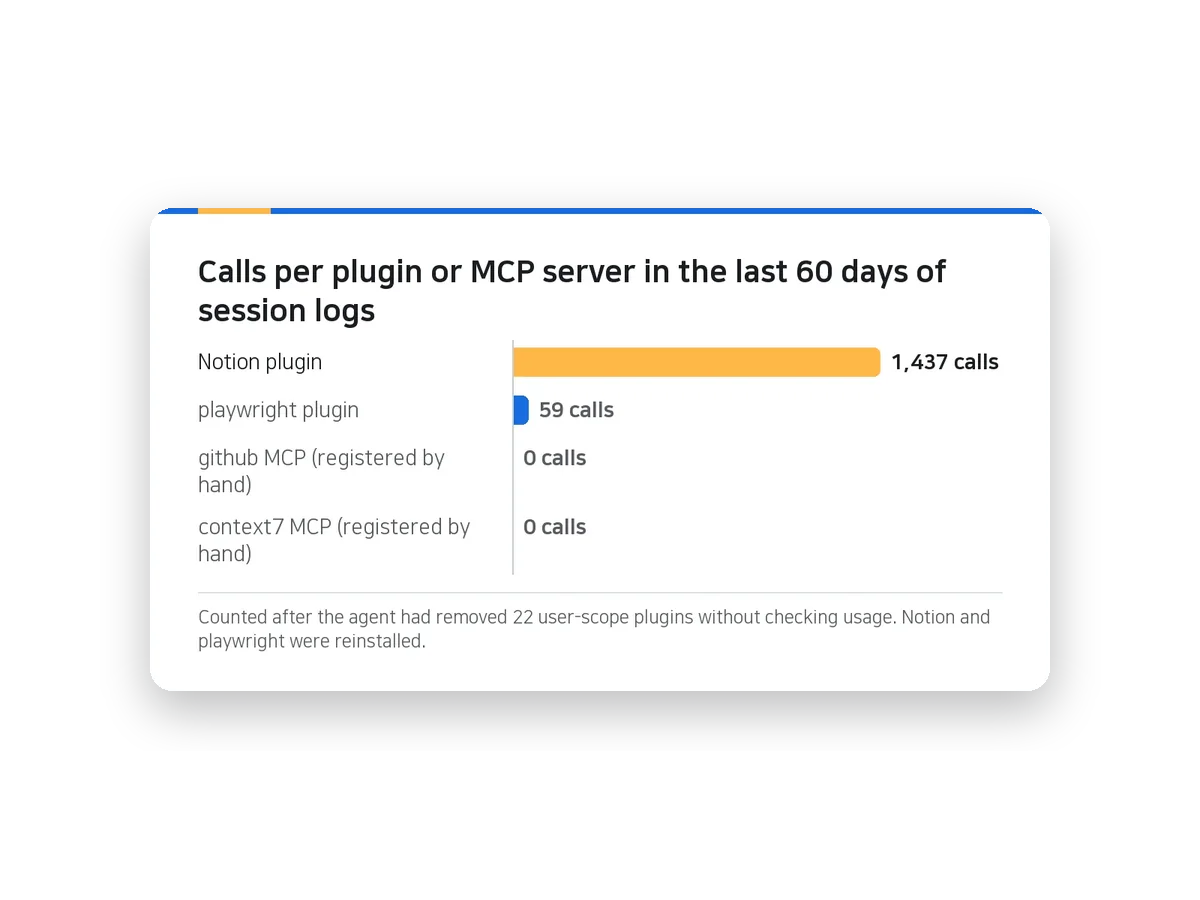
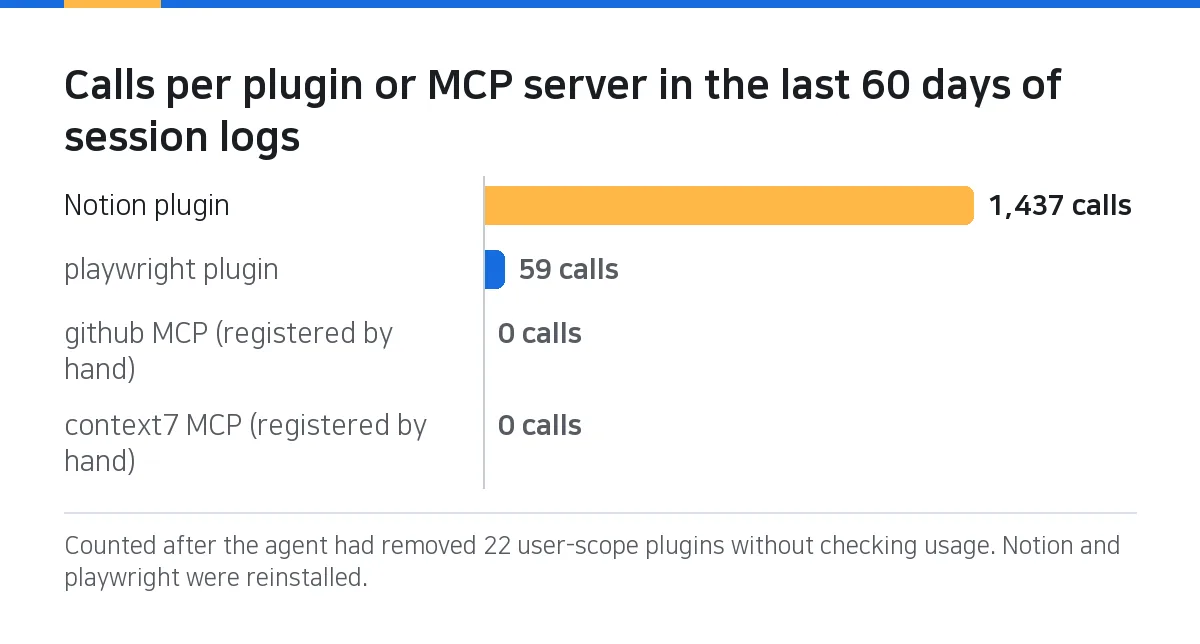
Asked to remove one plugin, the agent read the request as all installed plugins and removed 22 user-scope plugins without looking at how often they were used. When the operator asked why things in use were being removed, the agent counted MCP calls in the last 60 days of session logs. The separately registered github and context7 MCP servers had 0 calls; among the removed plugins, Notion had 1,437 and playwright 59. Both went back in. Count calls before you remove a plugin.
Four things that kept waking Ubuntu
Keeping WSL as a cold backup only works if Ubuntu stays off. A script in the Startup folder that launched a bot inside WSL, the Ubuntu WSL integration in Docker Desktop's settings, a network drive permanently mapped into Ubuntu, and the leftover find above all started it. The script and the Docker settings were moved to a backup folder or switched off rather than deleted, and the drive was unmapped with net use and /delete. Our personal dashboard server on Docker had already been moved to a Windows path and a Docker volume, so it keeps running with Ubuntu stopped. The Ubuntu distro stays registered and Stopped as a backup; we're not deleting it.
The WSL2 VM that Docker Desktop uses stays up, so we shrank it in .wslconfig to memory=3GB, processors=2, swap=1GB and autoMemoryReclaim=dropCache. Opening the Linux entry in File Explorer, or any WSL network path, starts Ubuntu again; --terminate it when that happens.
Calling it done: an R8 build and 1,500 monkey events
The R8 crash in our release gate note never showed up in a debug build, so we judged the environment move the same way: assembleRelease with --no-daemon for the image compressor app in our utilities repo. The first attempt lost its result when the session ended. The rerun, logging to a file, went through 337 tasks (298 executed, 39 from cache), including minifyReleaseWithR8, in 5 min 50 s. It was the first build on Windows, with no configuration cache yet.
adb -s emulator-5554 install -r app-release.apk
adb -s emulator-5554 logcat -c
adb -s emulator-5554 shell monkey -p <package> --throttle 200 --pct-syskeys 0 -v 1500
adb -s emulator-5554 shell pidof <package>
adb -s emulator-5554 logcat -d -b crash
On a Pixel 8 Pro API 35 emulator, monkey printed "Events injected: 1500" and "Monkey finished", pidof returned a process ID, and the crash buffer was empty. Two real phones were plugged in, but we didn't install on them, since that could overwrite the Play build. This run used install -r, which replaces an existing install, and we didn't check whether the app data was fresh. Defects that only show up on a fresh install are covered in the VIBRATE permission and fresh-install monkey test.
Step 3 fails on machines that can't create symlinks
On a machine that can't create native symlinks, step 3's core.symlinks=true re-checkout won't work as written (this one could). We didn't copy the Linux Flutter and Android SDKs and use the Windows ones instead.
No build-time comparison yet; only the operator saw the /resume list
We haven't timed the same build on native Windows and WSL under the same conditions. The agent never opened the /resume list itself; the last check was the operator saying on October 22 that it seemed to work. We also haven't checked whether the emulator lab's shell scripts were rerun on native Windows. The moved sessions still mention the old Linux paths in their conversation text, so on resume the agent may first try those paths. The agent's advice in its report was to tell it the new path once when resuming; we haven't looked for a better fix.
FAQ
Can Claude Code run on Windows without WSL?
On this machine it does, using PowerShell and Git Bash side by side, through an Android release build and emulator tests. To paste an image on Windows, use Alt+V instead of Ctrl+V.
Can I move Claude Code session history from WSL to Windows?
Yes, but copying the folder isn't enough. Rename the folders under ~/.claude/projects/ to match the Windows paths and rewrite the cwd values inside the logs; after that, the operator reported that /resume seemed to work. Raise cleanupPeriodDays first, or older logs can be deleted.
What is the difference between wsl --shutdown and wsl --terminate?
--shutdown stops the whole WSL2 VM, which also stops Docker Desktop running on it. --terminate <distro> stops just that distro.
Checked 2026-11-02. Three Claude Code session logs from the move, the memory file that records it, and the global instruction file before and after. Times are Korea Standard Time.
This note is written from values SugarMount measured itself; an AI coding agent was used to draft it.
More AX notes
- Every branch passed its AI review, and the merged code still had 12 defects
- Install Claude Code on Windows: Git to first run
- Commits without a Co-Authored-By trailer: the agent made 26 of the 29 we could check
- Three agent designs, three judges: the market judge alone would have picked the one that crashed on every KakaoTalk file
- Android 16 KB page size: add the linker flag before you upgrade the NDK (NDK 27 and 29 tinted our photos blue)
- The first LLM feature in a spell-check app: cost, model evaluation and daily caps for "Why is this wrong?"