Korean Christmas greeting card messages
A Korean Christmas greeting only needs one or two sentences that fit the person. You can send the words on their own, or use SugarCard to put them on a card and send it as an image or a snowfall video.
This guide is based on SugarCard 1.0.002, an Android app made by SugarMount. The app is in Korean. The example messages below were written for this page; the app has no built-in messages, so you type your own.
Contents (9)
Example messages by recipient
Each line is Korean first, then what it means. Adding a name or one thing from this year makes it feel less formal. If the message goes on a card, two short lines read best.
Parents and family
- 올 한 해도 늘 먼저 챙겨 주셔서 고마워요. 따뜻한 성탄절 보내세요.
- Thank you for always looking after us this year. Have a warm Christmas.
- 가족 모두 건강하게 한 해를 마무리할 수 있어서 감사한 성탄이에요.
- I'm grateful we're all ending the year in good health. Merry Christmas.
Friends
- 올해도 내 편 해 줘서 고마워. 즐거운 크리스마스 보내!
- Thanks for being on my side again this year. Have a fun Christmas! (casual)
- 바빠서 자주 못 봤지만 늘 생각했어. 연말에 꼭 얼굴 보자.
- We were too busy to meet, but I thought of you. Let's catch up before the year ends. (casual)
Colleagues and clients
- 한 해 동안 함께 일해 주셔서 감사합니다. 평안한 성탄절 보내시기 바랍니다.
- Thank you for working with us this year. Wishing you a peaceful Christmas. (formal)
- 성탄의 기쁨이 가정에 가득하시길 바랍니다. 내년에도 잘 부탁드립니다.
- May your home be full of Christmas joy. We look forward to next year. (formal)
Teachers and elders
- 선생님 덕분에 올 한 해 많이 배웠습니다. 행복한 성탄절 보내세요.
- I learned a lot this year thanks to you. Have a happy Christmas. (polite)
Partner, or one short line
- 올해 가장 좋은 선물은 너였어. 메리 크리스마스.
- You were the best gift this year. Merry Christmas.
Without an app, and the limits
- Text only — Edit an example above and send it. Fastest, but with no picture it blends into everyday chat.
- A gallery photo plus text — Send your own photo and the message. They arrive as two separate messages, and the words are not on the picture.
- A card image found online — Plenty to choose from, but someone may hold the rights, and you need an editing app to put text on it.
Send a Christmas card with SugarCard
- Pick Christmas — Tap the title at the top (for example 생생카드: 설날 ›) and choose 크리스마스 (Christmas). In November and December the app opens on Christmas.
- Pick a style — Tap one of 골드 (gold), 캐릭 (characters), 심플 (simple) or 전통 (classic), then swipe to choose a card. 전체 (all) shows all 29 Christmas cards in a two-column grid.
- Type the message — Type in the box at the bottom and the text appears on the card right away in a handwriting-style font. Text colour and position are set per card.
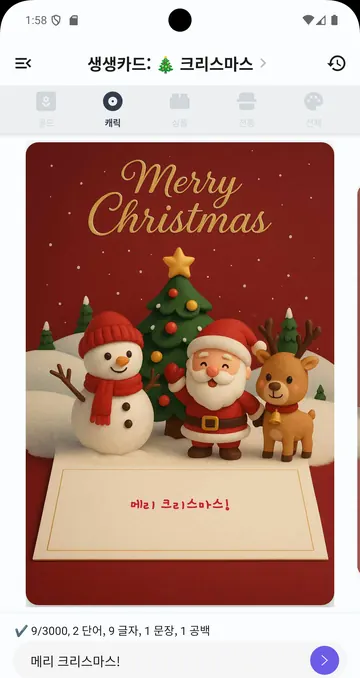
SugarCard 1.0.001 in Korean (captured February 2026). The ad banner and keyboard are cropped out. - Tap send, then pick a format — The send button next to the box asks you to choose 눈 내리는 영상 (snowfall video) or 이미지로 공유 (share as image). The video is made on the phone, with a progress bar.
- Pick the app — Your phone's share screen opens. Choose KakaoTalk, Messages or another app.
That last screen is Android's own share screen. The Android developer documentation describes it like this:
"The Android Sharesheet is primarily designed for sending content outside your app or directly to another user."
So the list of apps you can send to depends on what is installed on your phone. Source: Android Developers, Send data to other apps
Christmas card styles and the video
| Style | Cards |
|---|---|
| Gold (골드) | 9 |
| Characters (캐릭) | 9 |
| Simple (심플) | 5 |
| Classic (전통) | 6 |
The snowfall video is a 9-second MP4 (1024×1536, 30 frames per second) with snow falling over your finished card. One of 7 Christmas tunes bundled with the app is picked at random. The video option is only for Christmas cards; Lunar New Year and Chuseok cards are sent as images.
Comparison
| Method | Picture | Text on the picture | Motion and music | Best for |
|---|---|---|---|---|
| Text only | None | Not applicable | None | Quick greetings to many people |
| Gallery photo + text | Your photo | No (sent separately) | None | Family and close friends, with news |
| SugarCard image | 1 of 29 Christmas cards | Yes | None | A clean one-card greeting |
| SugarCard snowfall video | Same | Yes | Snow and music, 9 s | Parents or a partner, when you want a little more |
Verdict: For group or work greetings, text alone is the safe choice. For one person, a SugarCard image feels like a real card, and the snowfall video adds a moment when they open it. Cards made with SugarCard carry the app name, so for formal contacts send text only.
What it can't do
- The app name is stamped on. Images and videos get a small "SugarCard" and "생생카드: 인사말 카드" mark in the top-right corner. The current version has no way to turn it off.
- Promo text goes along. Sharing also passes a short Korean note saying the card was made with SugarCard, a Google Play link and hashtags. Some apps put this into the message, so check before you send and delete it if you don't want it.
- No font, size, colour or position changes. Each card has a fixed text spot and size, so one or two short lines fit better than a long message.
- No cards from your own photos. Only the card pictures bundled with the app.
- No choice of video music. One of 7 tunes is picked at random; make the video again to get a different one.
- The box clears after sharing. Your message is kept in the history (clock button, top right).
- No birthday or wedding cards. The occasions are Lunar New Year, Chuseok and Christmas.
FAQ
Is SugarCard free?
Yes. You can make and send cards without paying. The app shows ads.
Can I remove the app name from the card?
Not in the current version. It appears small in the top-right corner of both images and videos.
How long is the snowfall video?
9 seconds, with one Christmas tune, and it is made on your phone.
Is my message uploaded anywhere?
The card is made on your phone and goes only to the app you pick when sharing. See the SugarCard privacy policy for details.
Can I write the message in English?
Yes, the box takes any text you type. The app's menus are in Korean only.
Related guides
Get SugarCard
An Android app that puts your own greeting on Lunar New Year, Chuseok and Christmas cards and sends it to KakaoTalk or text messages. The card pictures are bundled with the app, no account is needed, and the app is in Korean.