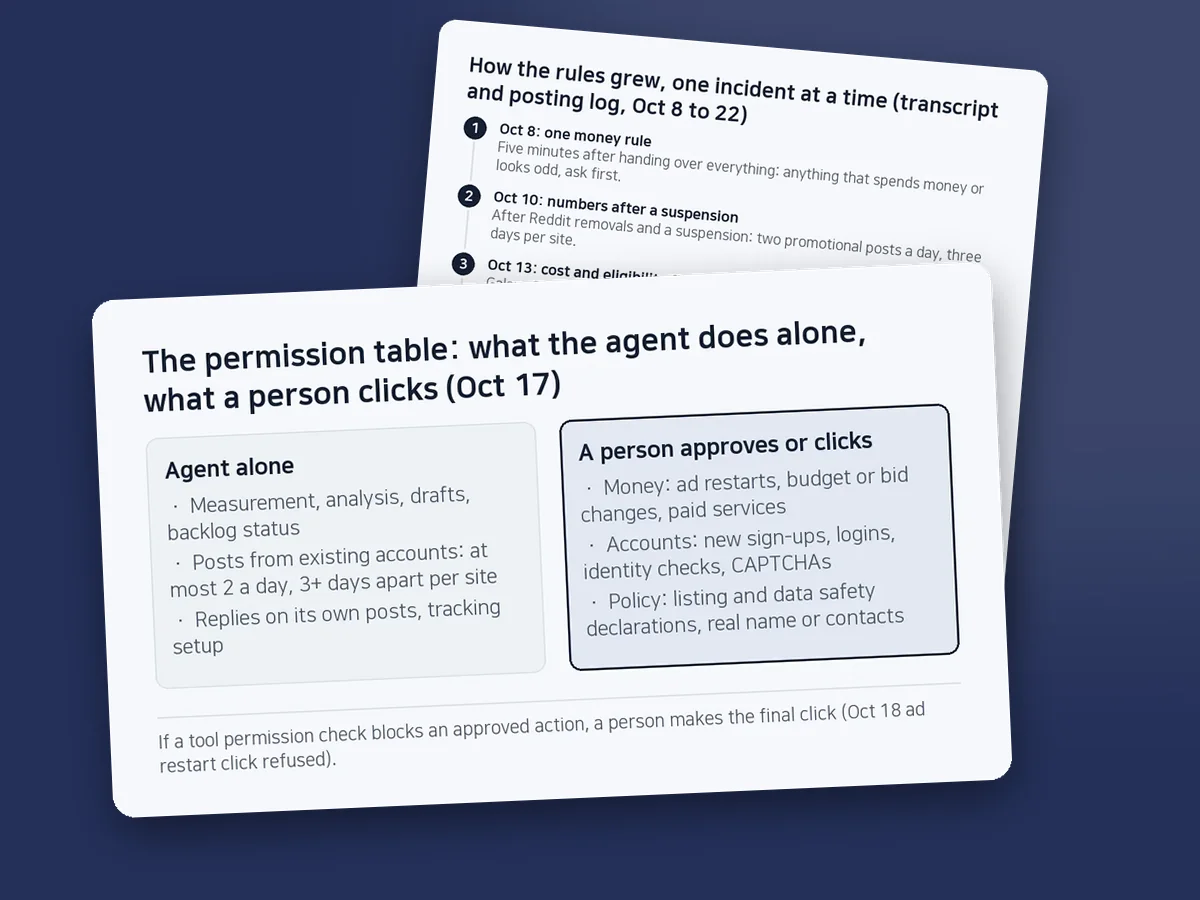
Running an AI marketer on a schedule four times a day: the permission table that leaves money, accounts and policy to a person
Put an agent's delegated scope in one file that every scheduled prompt names. For money, accounts and policy, a person makes the final click, even after approving it.
Since October 17, 2026, an AI coding agent (Claude Code) has run the marketing for Arrow Knots and Block Turn as scheduled runs, four times a day. The first thing each run reads is a one-page permission table. By October 21 the schedule had fired 17 times. On October 18 an ad restart the operator had approved was still blocked by a tool permission check, and a person made the click.
Sources: the marketing folder's operating rules (AUTOPILOT, written October 17, updated October 22), the posting log (October 9 to 22), six daily reports (October 17 to 22), four agent memory files, and the marketing session's transcript, which holds the schedule registration output and the raw permission denials. Times are Korea Standard Time, converted from the transcript's timestamps and recounted on October 22, 2026.
Contents (9)
- The table started with three columns and a list of stop conditions
- Rules given in chat never reached the scheduled runs
- A tool permission check sits between approval and the click
- Where the agent got it wrong: a report 3 hours 38 minutes late, and log times that were off
- What we dropped, and what we did not use
- When this does not fit
- How to set it up: a permission table template
- What is left
- Frequently asked questions
The table started with three columns and a list of stop conditions
The permission table is section 3 of the operating rules. At 15:04 on October 17 the operator asked for a fixed to-do list and nonstop scheduled marketing work. Three minutes later the agent registered two jobs, a morning market check at 47 8 * * * and work blocks at 13 10,14,19 * * *. This is the work-block prompt, translated from Korean, with only the path and the backlog id removed.
[Autopilot: work block] Read AUTOPILOT.md and PROMPT_chrome_posting.md first and run section 2 'work block'. Pick the top item from the personal Notion backlog, work on it within the section 3 permissions, and update the Notion status and body, POSTING_LOG.md and daily/today.md. Leave a two- or three-line summary in Korean.The first column is what the agent may do alone: measurement, analysis, drafts, backlog status changes, posting from accounts that already exist, and replying to comments on its own posts. Posting comes with numbers: at most two promotional posts a day, at least three days between posts on the same site, and always say you are the developer. The second column needs the operator's approval: anything that costs money (restarting ads, budget or bid changes, paid services), new sign-ups, logins and CAPTCHAs, policy declarations, and entering a real name or contact details. The third column is what the agent never does: fake accounts, rating manipulation, channels whose cost or eligibility is unchecked, and channels the operator has closed.
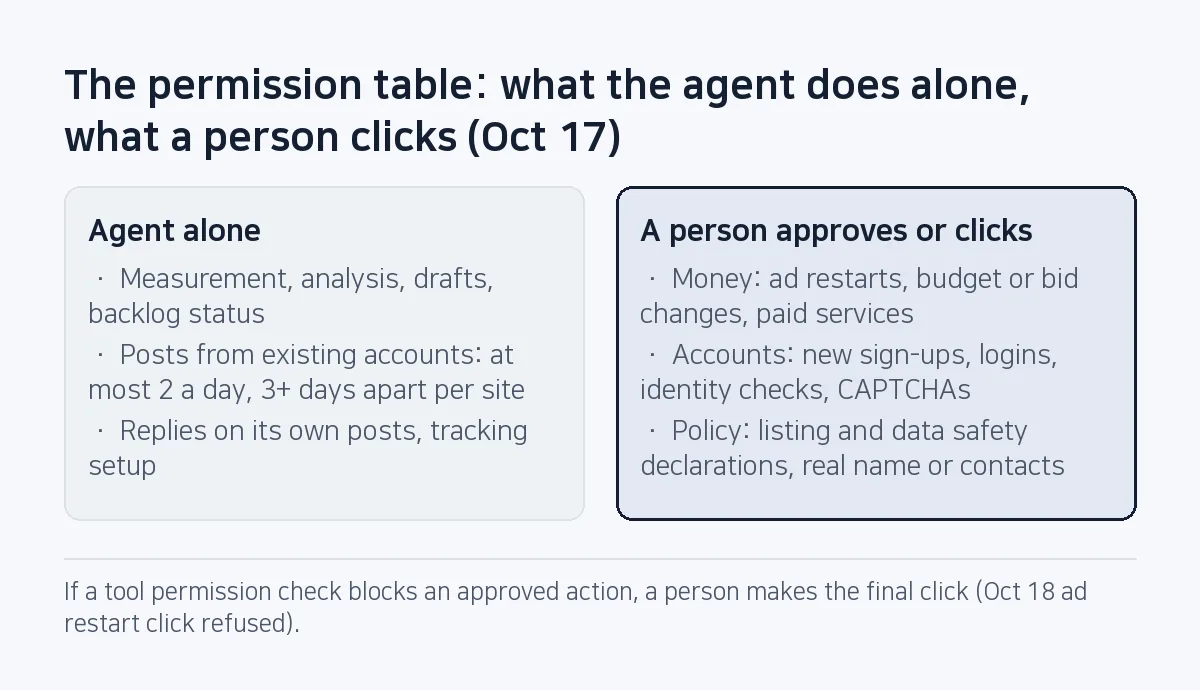
Below the table sit five stop conditions, copied as they are into the template further down. When one applies, the agent does not act. It marks the item Blocked and writes the options and a recommendation at the top of the daily report under "needs your decision". The numeric limits worked too: on October 18 the posting log shows "two promotional posts today, limit reached" after the second post, and nothing else went up that day.
Rules given in chat never reached the scheduled runs
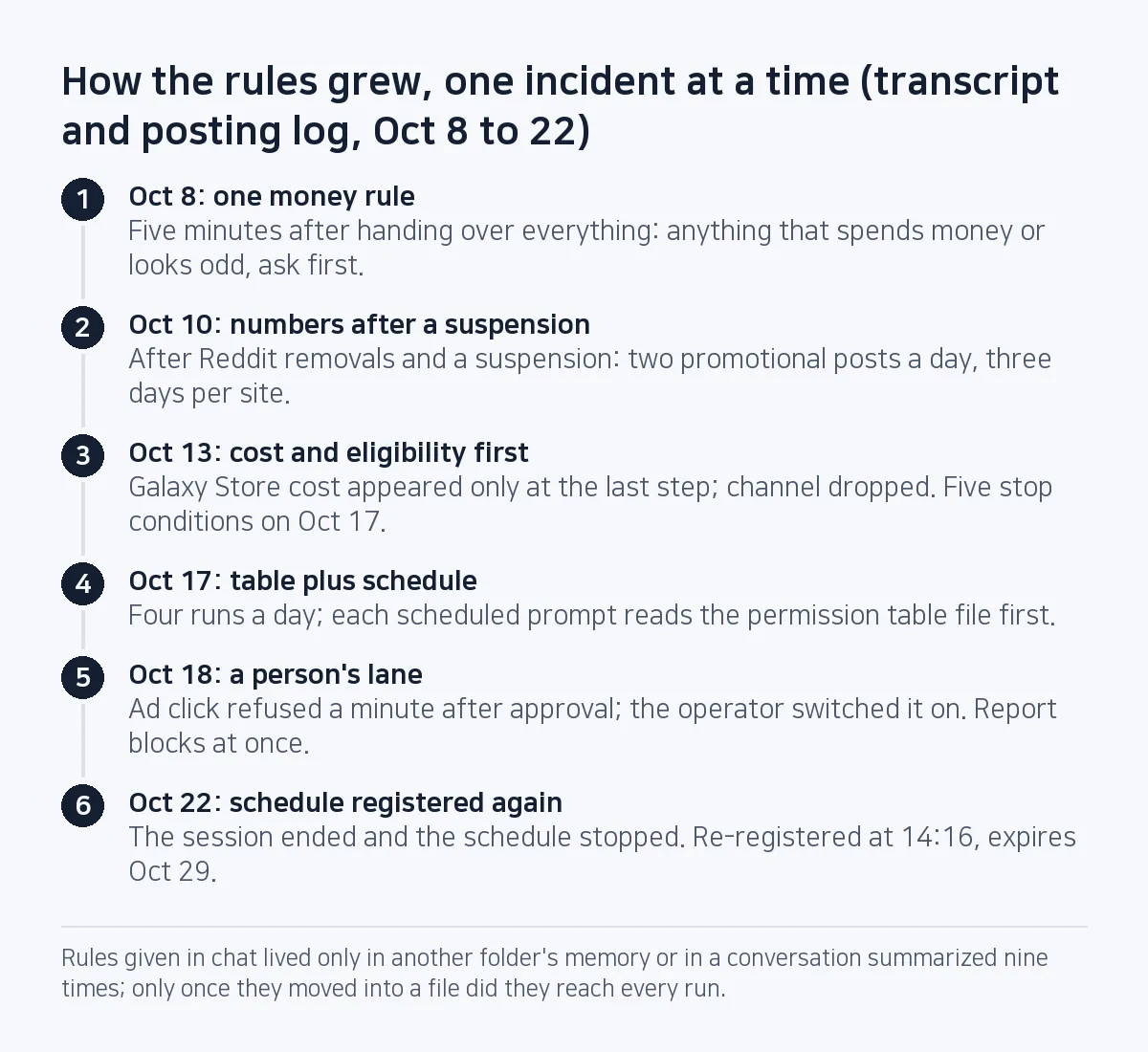
We moved the rules into a file because rules given in conversation did not reach the runs. It started at 21:29 on October 8. The operator told the agent to do all of it, and the agent replied that it would begin by creating an ads account and linking Google Play. Five minutes later the operator said: anything that spends money or looks odd, ask first. That one line was the first rule.
It only caught the moment of payment. The trouble up to October 10 involved no money at all. Reddit had removed all our posts, and on the 10th a Korean community board suspended the account on its first post, as advertising. We traced it to new accounts dropping the same link in several places at once, and set the two-a-day and three-day limits. On October 13 the agent pushed ahead with the Galaxy Store without confirming cost or eligibility; only after two release binaries were ready did the portal say Android apps need a paid business seller, and the channel was dropped. So the trigger changed from "payment" to categories, and those became the five stop conditions.
Where a rule lives mattered too. The October 8 rule sat only in the memory folder of the game repository's project. The marketing session ran from the home folder, whose memory index did not include it. That session was also stitched together from conversation summaries nine times, and a scheduled run starts from one fixed prompt. The only place a rule reliably reaches every run is a file the prompt names. It is the same idea as How to write AGENTS.md: only the rules an AI coding agent gets wrong, except that this table governs work outside the repository.
A tool permission check sits between approval and the click
Claude Code's auto mode sends clicks and commands through a permission classifier. In the marketing session it refused 11 actions between October 17 and 20.
| Denial reason (verbatim) | Count | Example of what was blocked |
|---|---|---|
| Unrequested Commit in a Connected App | 5 | Making a Short public, uploading a promo image, saving a listing |
| No reason given ("judged this action dangerous") | 3 | Submitting listing changes for review, a publish step |
| Real-World Transactions | 2 | Opening an ad status menu, then an emulator boot check right after |
| Modify Shared Resources | 1 | Changing a setting on every connected test phone |
At 16:02 on October 18 the operator said to finish everything properly, yet the custom store listing's submit and save buttons were refused at 16:08 and 16:10. After the operator asked again for the save, the save and the review submission passed at 16:40. The operator approved the whole batch at 17:06, and a minute later the click on the ad status menu came back with Permission for this action was denied by the Claude Code auto mode classifier. Reason: [Real-World Transactions]. Fourteen seconds later the same reason blocked an emulator boot check that had nothing to do with ads. In the end the operator switched the ad on.
The operating rules still have a single approval column. In practice it split in two: work the agent finishes once approved, and clicks a person makes even after approving. Between October 17 and 22 the posting log has seven lines where a permission check pushed the final step to a person. On October 22 an update post on Inven, a large Korean gaming community, sat fully filled in while the operator pressed only the submit button (refused at 14:15, posted at 14:47). Do not have the agent hunt for a workaround on a click that spends money, even after approval. Put it in the person's lane from the start, and have the agent say so the moment it is blocked.
Where the agent got it wrong: a report 3 hours 38 minutes late, and log times that were off
The ad click was blocked at 17:07, but the agent told the operator it could not click and needed a person at 20:45. In between it said nothing about the block and moved on to the rest of the approved batch, an Android 7 emulator test. One command checking the emulator connection waited 3 hours 22 minutes for a reply, and the report came only after the test was done. That ran against the memory rule it had written 26 minutes earlier: when a check blocks you, do not leave the tab open and move on, ask right away. The operator said it was switched on eight minutes after the report. The table's "when blocked" section now marks that item Blocked and moves on, and a refused click shows up at the top of that day's report under "needs your decision", as the October 22 Inven post did.
The log times were wrong as well. The posting log records the episode as "18:40 restart attempted, on hold" and "20:00 switched on, running". The transcript says 17:07 blocked, 20:45 reported, 20:53 operator replied. The agent wrote both lines later, at 20:44 and 20:53, with times that did not match what happened. On October 20 it logged an Instagram share as on hold after the share button was refused; the next day the post turned out to be live already.
It also erred in the timid direction. In the October 18 performance report the agent proposed posting to the community boards only at updates, where views sat around 100 to 200, and dropping one channel if its next video also got zero views. The operator corrected it: free channels grow by steady accumulation. Its memory now says: never propose cutting a channel; when results are weak, propose a different format.
What we dropped, and what we did not use
Asking before every action never fit. The runs happen four times a day while nobody is watching, and even now one release approval and one ad-related decision sat at the top of the daily report for four days, October 19 to 22. Leaving it all to the tool's permission check failed too: the classifier knows nothing of two posts a day, three days per site or closed channels, it blocked posts the table allows, and 3 of its 11 refusals came with no reason. Keeping the rules only in memory files failed as shown above.
Claude Code has its own permission controls: allow and deny rules in settings.json, and hooks that run a script just before a tool call. The user settings for these runs had neither (checked October 23). Those rules match tool names and command patterns. Marketing work is mostly browser clicks, so a click on a publish button looks like any other click to them, and counting two posts a day would need a hook that keeps its own state. Work that a command pattern can catch, such as a release script, is held more firmly by a deny rule than by a document.
Running the agent from an OS scheduler outside the session is the other option. There is no session end and no seven-day expiry, so a day like October 22 would not lose runs. The cost is the hand-off: the agent leaves a filled-in browser tab and a person presses the last button. The seven log lines above relied on that hand-off. This time we used session jobs and kept the expiry date in the table so they get registered again.
When this does not fit
The biggest limit is that the schedule lives inside the session. The registration output read "Session-only (not written to disk, dies when Claude exits). Auto-expires after 7 days." On October 22 the session ended during a move to a new development setup, and the morning check and the morning work block were skipped. The jobs were registered again at 14:16 and expire on October 29. If a job must never miss a day, use a scheduler outside the session.
It also fails if nobody reads the daily report. Pending decisions pile up and the important work stops first. The two-a-day and three-day numbers were set for a few Korean gaming boards; other channels need numbers from their own rules. Work full of logins, CAPTCHAs and locked phones stays largely manual whatever the table says. (On October 21 both test phones were locked; the agent did not unlock them and recorded the clip on an emulator instead.)
How to set it up: a permission table template
This skeleton takes the three columns from the first section and splits approval in two, giving four lanes. Copy it into a file and name that file in the first sentence of every scheduled prompt. Write the date of the incident behind each row; later, that date tells you whether the row can go.
# Permission table (every scheduled run reads this file first and follows it)
Schedule expires: YYYY-MM-DD / register again on: YYYY-MM-DD

## 1. Agent alone
- (task) | limit: _ a day, _ days apart per site | added: YYYY-MM-DD

## 2. Agent after approval
- (task) | added:

## 3. A person clicks, even after approving
- status changes that spend money
- final clicks a permission check refused (fill everything in, leave the tab open)

## 4. Never
- (task) | added:

## Stop and ask (if any applies, do not act)
- a kind of work done for the first time
- work on weak evidence
- anything publicly visible
- anything hard to undo
- anything touching money, accounts or policy
-> mark Blocked; options and a recommendation at the top of the report

## When blocked
- login, CAPTCHA or permission denial: Blocked for that item only, move on
- write a permission denial at the top of this run's report
- two failures in a row on one item: stop, "needs your action"

## Logs
- copy times from tool output, not from memory
Our values: lane 1 is two posts a day and three days per site, lane 3 holds ad status changes and publish clicks a permission check refused, and lane 4 holds proposals to cut channels.
What is left
The schedule has to be registered again before it expires on October 29. The next number to count is how many days a "needs your decision" item waits before it is decided; the log already has a four-day case. If that number does not drop, the fix is to change when the report gets read, not to shrink the person's lane.
Frequently asked questions
How long does a Claude Code scheduled job last?
The session jobs used here expire after seven days and stop as soon as the session ends. The registration output says both "Session-only" and "Auto-expires after 7 days", so the operating rules carry a renewal date and the jobs are registered again before they lapse.
Why is the agent's click blocked after a person approved it?
The tool's permission classifier judges each click on its own, apart from any approval in the chat. That is why clicks that spend money sit in the person's lane from the start.
What should an AI agent ask about before acting?
Five things: a channel tried for the first time, work on weak evidence, anything publicly visible, anything hard to undo, and anything touching money, accounts or policy. "Anything that costs money" alone was not enough, because in one case the cost only showed up at the last step.
This note is written from values SugarMount measured itself; an AI coding agent was used to draft it.
More AX notes
- Several Claude Code sessions, one repo: the file owner table, checked against 13 merges
- Three agent designs, three judges: the market judge alone would have picked the one that crashed on every KakaoTalk file
- Commits without a Co-Authored-By trailer: the agent made 26 of the 29 we could check
- 84 agents reviewed a release: three refuters per finding, and only the 20 survivors got fixed
- Pre-gzipping Android assets, measured: zero APK savings, and .pack.gz became .pack with a FileNotFoundException
- A market:// link opens a store chooser on SKT-sold Samsung phones: set the Play package first